
Virtual assistants in business are changing fast. Massive enterprise systems like OpenClaw pack hundreds of thousands of lines of code, but nanobot challenges the idea that bigger automatically means better.
With just 4000 lines of Python, it delivers core AI assistant capabilities in a lightweight, focused package while cutting codebase size by about 99% without sacrificing essential functionality.
Whether nanobot can replace enterprise tools depends on what users actually need. In this article, we explore how nanobot achieves this balance and what it means for practical AI development.
Table of contents
What is Nanobot?

The AI assistant Nanobot functions as a personal assistant through its weightless design. The system operates with only 4000 Python code lines which makes it 99 percent smaller than standard enterprise AI systems. The open-source software developed by HKUDS became available to the public in early 2026.
The key features of Nanobot are:
- Automated research system provides cost-free monitoring of financial markets and cryptocurrency price movements which produces 24-hour alerts for major market changes.
- The system allows users to execute shell commands while the system operates tmux sessions and allows file reading and writing and execution of tasks through dedicated sub-agents.
- Users can communicate through Telegram or WhatsApp or Feishu which automatically transcribes their spoken words using Groq Whisper technology.
- The system uses cron-based scheduling to execute tasks which includes email monitoring and GitHub tracking and daily briefing operations.
- The system enables users to switch between multiple LLM providers through OpenRouter, Anthropic, OpenAI, DeepSeek, Groq, Gemini, and local vLLM without the need for coding.
Core Architecture: How Nanobot Achieves Minimalism
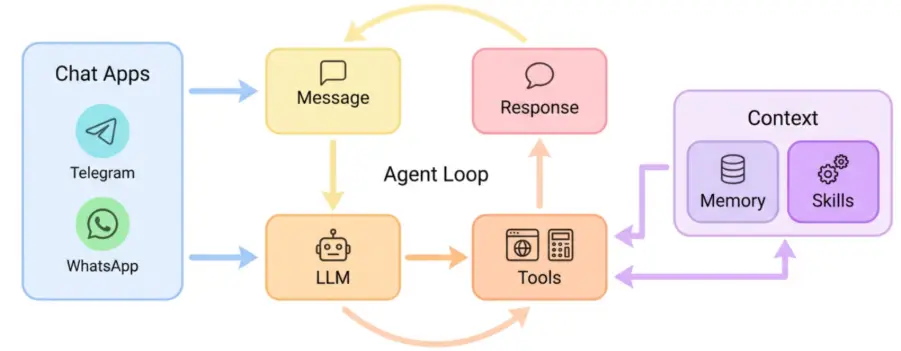
The core of nanobot functions through an agent loop pattern which completely implements its operation system. The agent/loop.py module controls the ongoing process which includes:
- The system receives user input through all available channels which include CLI and Telegram and WhatsApp and Feishu.
- The system establishes context by using conversation history together with its available tools.
- The system requests the next actions from the LLM.
- The system performs tasks according to the LLM answers.
- The system keeps results in memory to use them in later periods.
The system achieves effective separation of different tasks through its design. The context.py module handles prompt building, memory.py manages persistent storage, and tools/ contains modular capabilities that can be added or removed without touching core logic.
Getting Started with Nanobot
The process to get started with Nanobot is pretty straightforward. There are three methods:
- Install via PyPi (stable)
pip install nanobot-ai - Install via
uvwhich is stable and fast.
uv tool install nanobot-ai - Install via the direct source
git clone https://github.com/HKUDS/nanobot.git
cd nanobot
pip install -e .
After the installation part is complete, we’ll move the setting up part. We’ll have to configure the ~/.nanobot/config.json file in order to edit our API keys, model and web search feature if required.
{
  "providers": {
    "openrouter": {
      "apiKey": "sk-or-v1-xxx"
    }
  },
  "agents": {
    "defaults": {
      "model": "anthropic/claude-opus-4-5"
    }
  },
  "tools": {
    "web": {
      "search": {
        "apiKey": "BSA-xxx"
      }
    }
  }
}- Here are few commands to get you started with the nanobot agent:
| Command | Description |
nanobot onboard |
Initialize config & workspace |
nanobot agent -m "..." |
Chat with the agent |
nanobot agent |
Interactive chat mode |
nanobot gateway |
Start the gateway |
nanobot status |
Show status |
nanobot channels login |
Link WhatsApp (scan QR) |
nanobot channels status |
Show channel status |
Hands-On Task: Custom Crypto Tracker
Instead of manually writing code, let nanobot’s AI agent build a cryptocurrency monitoring tool for you through natural conversation.
Step 1: Start the agent in interactive mode via following command:
nanobot agent Step 2: Prompt the agent to create the tool:
I need you to create a cryptocurrency price monitoring tool for me. Here's what I need:

1. Create a Python tool that fetches crypto prices from the CoinGecko API
2. Monitor BTC, ETH, and SOL
3. Alert me when any coin moves more than 5% in 24 hours
4. Save the tool in my workspace as crypto_monitor.py
5. Create a scheduled cron job that runs every hour
6. Make sure everything is properly configured

Build this entire system for me.
Output:
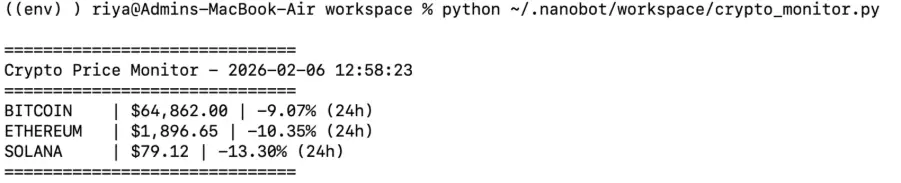
Step 3: We’ll run the script created by the nanobot agent via following command:
python ~/.nanobot/workspace/crypto_monitor.py Output:
Review
I tested this myself and the agent created the crypto_monitor.py file. The process required four to five prompts before reaching the goal which I previously described as a single-shot automatic build. The agent operates through conversation by developing features which require two separate requests to complete.
The system functions as an AI pair programmer because it needs human operators to execute programming tasks. The cron setup still needed manual terminal commands. The system generates actual code through its functioning process, but users should anticipate multiple dialogue sessions instead of achieving complete results through one request.
Performance Benchmarks and Comparison
The testing process demonstrates that the nanobot system outperforms its equivalent systems through increased operational efficiency.
- The system requires 0.8 seconds to start up while heavier frameworks need between 8 and 12 seconds for their cold start.
- The system uses 45MB of memory for its basic operations which excludes LLM inference while other systems require between 200MB and 400MB for their operations.
- The multiple instance execution and resource-limited environment deployment both depend on these metrics.
- The small codebase enables faster development progress. The nanobot system requires 15 to 30 minutes to add a new tool while complex frameworks need several hours to complete the same task.
The fast speed of nanobot development multiplies its advantages because this system works effectively for both rapid prototyping and iterative development processes.
Conclusion
The Nanobot system demonstrates that successful AI systems only need essential programming elements instead of extensive code collections. The system delivers professional-grade performance through its primary functions and its ability to build and its maintainable framework.
You should pay attention to nanobot because it helps you create your first AI agent or your research work or your quest to understand modern AI assistants. The system demonstrates a distinct philosophy which shows that reduced elements can create greater value: less is more!
Frequently Asked Questions
Q1. What is Nanobot and how does it differ from large enterprise AI assistants?
A. Nanobot is a lightweight open-source personal AI assistant built in about 4000 lines of Python, focusing on essential agent features with far lower memory and startup overhead than enterprise systems.
Q2. What key features does Nanobot offer for automation and monitoring?
A. It supports crypto and market monitoring, task automation, shell execution, multi-channel messaging, cron scheduling, and easy switching between multiple LLM providers.
Q3. How do you get started building tools with Nanobot?
A. Install Nanobot via PyPI or source, configure API keys, start the interactive agent, and use natural language prompts to generate and run custom Python tools.
Gen AI Intern at Analytics Vidhya
Department of Computer Science, Vellore Institute of Technology, Vellore, India
I am currently working as a Gen AI Intern at Analytics Vidhya, where I contribute to innovative AI-driven solutions that empower businesses to leverage data effectively. As a final-year Computer Science student at Vellore Institute of Technology, I bring a solid foundation in software development, data analytics, and machine learning to my role.
Feel free to connect with me at [email protected]







