I asked ChatGPT how it feels about the recent and AI trend of switching from ChatGPT to Claude. Here is what it said:
“As for how it makes me feel: I don’t have feelings or brand loyalty. But from a usefulness standpoint, it’s a good thing. Easier switching forces AI products to compete on trust, performance, and user experience instead of trapping people with context lock-in. If Claude makes migration easier, that raises the bar for everyone.”
Those are some hard facts. I’m glad ChatGPT is having a healthy approach to competition, but more importantly, it admits that Claude has raised the bar with one particular feature – easier migration. Kudos to Anthropic for being smart enough to catch the drift. As people leave ChatGPT for alternatives, only one makes the transformation super easy – Claude.
How? Why? And what is this “switch” even about? This article is meant to answer all these questions. For now, we start with what such a switch means in the first place.
Table of contents
What “Switching from ChatGPT to Claude” Actually Means
Back in the old days of downloadable and installable software, switching from one to another was often considered a massive headache. The process usually involved deleting one software/app and downloading another, all while retaining your saved files from the outgoing software, and praying to God that they work on the next one.
With AI, that is not the case anymore. When people say they are switching from ChatGPT to Claude, they actually mean shifting their AI workflow. Obviously, the chatbot they brainstorm with, write with, code with, plan with, and rely on every day knows a lot about them. This is what we know as personalisation. As and when you start working with a different one, all those memories and preferences are gone. Well, not really.
You see, AI does not have any “saved files” that we can (or have to) migrate to the new chatbot we use. It does, however, have a context of memories and preferences built with your overtime use. And that is the biggest sticking point for any one chatbot. You do not wish to start from zero every time you start your work.
Claude has come up with a very interesting way of migrating these preferences from any other AI tool, and this very practice is enabling the entire “switching” experience that we talk of here.
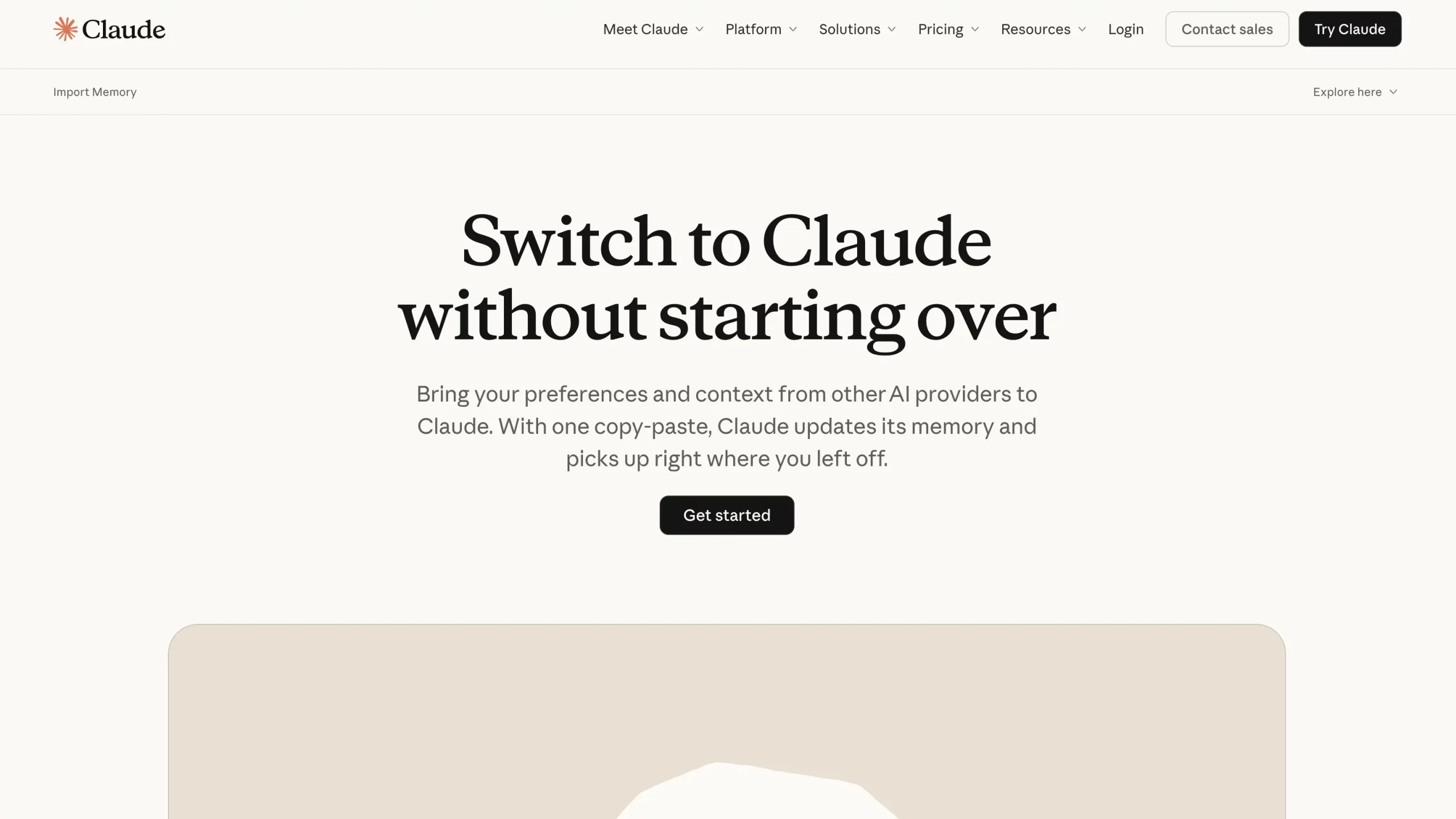
How does it work? We will explore shortly. But for now, let us understand why this switch is even necessary.
Why are people switching from ChatGPT to Claude?
There are multiple reasons for this. Most are related to Claude’s supremacy over other AI chatbots in specific areas. Some others are related to ChatGPT’s recent policies that are acting as a deterrent. And of course, there is my reason, which will definitely resonate with some, if not all. Let us explore these one by one, starting with the most important one.
A Massive Trust Issue
Let us address the elephant in the room first. A big part of this switching wave is not just about features. It is about trust. And it arises from a recent political move involving both OpenAI and Anthropic.
Here is a brief of the entire episode:
Anthropic, with its association with Palantir, was the only AI firm to serve the U.S. Government Intelligence and Defense Operations for long. Earlier this month, tensions arose when reports claimed the use of Claude by the Pentagon for the controversial capture of Venezuelan President Nicolás Maduro. Following this, Anthropic refused to remove safeguards on Claude despite repeated directives from the government. These safeguards limit Claude’s use in certain defence and surveillance operations.
The conclusion – the Pentagon ceased all use of Claude and labelled the company a “supply-chain risk” for defence use. As of now, “no contractor, supplier, or partner that does business with the United States military may conduct any commercial activity with Anthropic.” These words by the US Secretary of War Pete Hegseth soon followed the official decision.
Meanwhile, the Pentagon signed a deal with OpenAI within hours. As per the agreement, OpenAI’s models will now be used in classified defence work. However, the Pentagon’s new contract still maintains the terms that Anthropic wanted – no AI use for mass surveillance and autonomous weapons.
The result: beginning with the US, OpenAI users cited data privacy concerns and began to shift to Claude, which publicly defied the US government’s direct orders for its AI’s use for unethical reasons.
Of course, there are other reasons too. These are the areas where Claude simply outshines ChatGPT, and that is why the users who are switching are actually staying with Claude.
Why Claude is Better
Trust may have triggered the conversation, but trust alone does not make people stay. There is a strong practical upside to Claude. It has built a reputation for being a stronger day-to-day work assistant in several areas that matter to serious users, not just casual prompt hobbyists.
Here are the biggest reasons why many users currently see Claude as the better option:
- Better for writing-heavy work: Claude is widely preferred for long-form writing, cleaner drafting, and maintaining a more natural tone across extended outputs. This is one of the most repeated reasons behind the shift.
- Stronger with coding and technical tasks: Many users report that Claude performs especially well when it comes to code generation, debugging, and reasoning through technical workflows. (Check out our complete guide on Claude Code and how to master it in 20 minutes)
- Handles long context better: Claude is built for processing large amounts of context, which makes it more useful for users working with lengthy documents, multi-step projects, and research-heavy conversations.
- Projects make work more organised: Claude’s Projects feature lets users group chats, files, and instructions in a more structured environment, which is especially useful for ongoing work rather than one-off prompting. (Read our complete review on Claud Sonnet 4.6)
- Extended Thinking adds depth for tougher tasks: For users solving harder reasoning problems, Claude also offers an Extended Thinking mode, which is positioned as a stronger setup for more deliberate, multi-step thinking.
- It feels more like a work tool than a chat toy: This may sound subjective, but it matters. Claude’s product direction increasingly signals focus, structure, and serious use cases. For many switchers, that makes it feel less like a general AI app and more like a proper productivity system. (Check out our complete course on Claude Opus 4.5)
And the most important point that is enabling this shift for most of the people:
- The switch itself is easier: This is the biggest tactical advantage right now. Claude does not just invite new users; it actively helps them migrate memory and preferences from other AI assistants, making the move far less painful than it used to be.
Why I switched from ChatGPT to Claude
Short answer – purely for experimenting.
The best part about AI is that it does not have a lock-in, like many other SaaS products out there. I can use ChatGPT for text, Nano Banana Pro for images, or even 5-6 different AI models for the same task. It is totally up to me to find what suits me the best and for what task.
And that is exactly why even the biggest of corporations are now turning to a portfolio approach with AI. Instead of being bound with a single-platform for all their tasks, they are going for a fit-for-purpose option to manage risk, performance needs, and even cost.
So, in essence, I moved from ChatGPT to Claude to give it a try. And here is how I did it:
How I switched from ChatGPT to Claude
Thankfully, this is the easiest part of the entire story. Contrary to many reports online that show one straightforward way of making this switch, I have actually found 3 methods to go from ChatGPT to Claude. I will share all of them here, but before that, here is how each of these processes works in the simplest terms.
Extract ChatGPT data > Make necessary changes > Share it with Claude
That’s it! That is all there is to be done in order to start using Claude with all your data and preferences. Now, the three ways I mentioned are all for the first step. The next two steps are pretty straightforward. So, read the options for data extraction first. Select the one you are most comfortable with. Then use it, along with the next 2 steps, to tweak and import data into Claude.
Here are the options for Step 1 – ChatGPT Data Extraction.
Step 1 – Option 1: Saved Memories
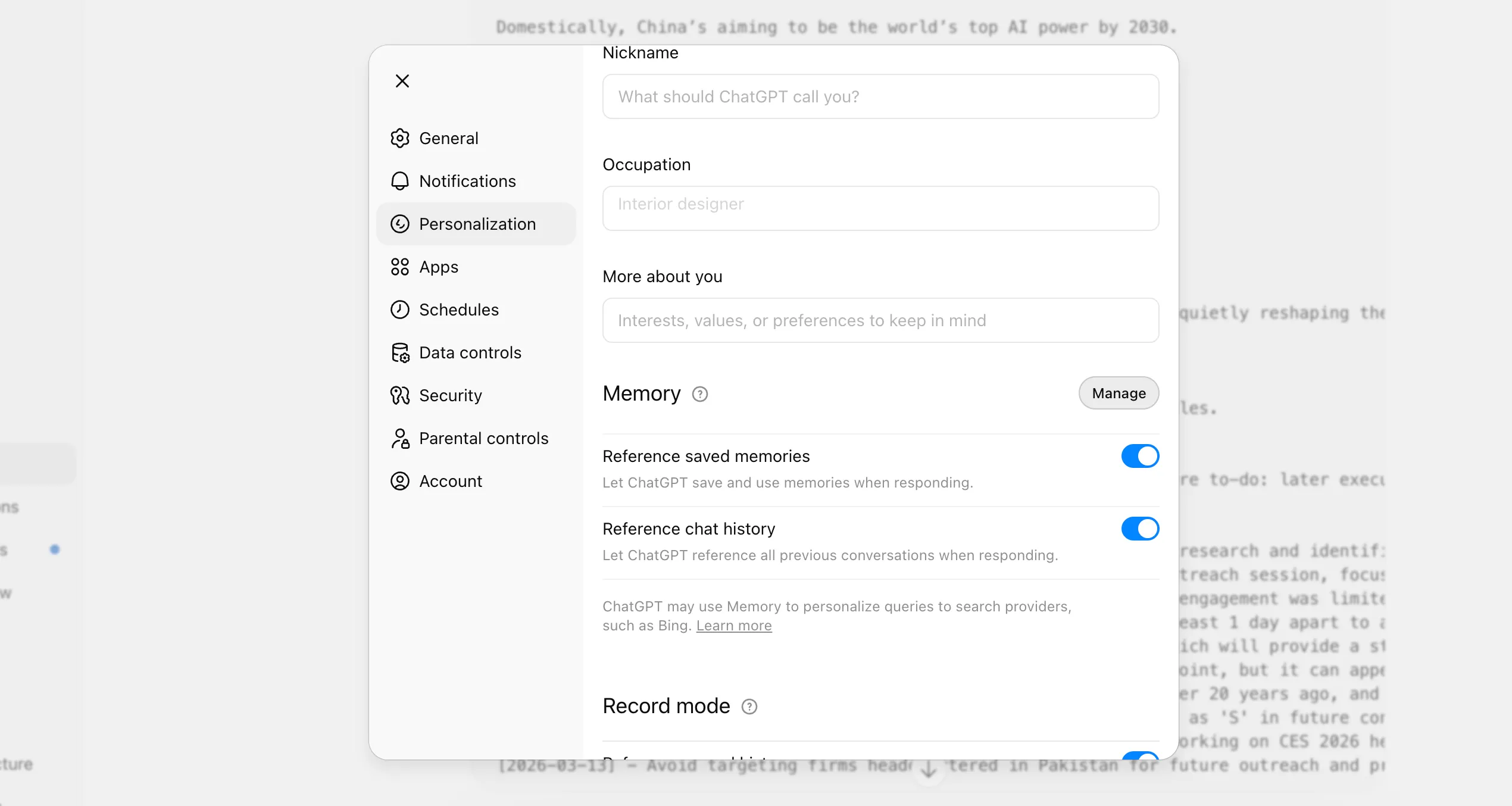
This essentially targets all your stored memories with ChatGPT. To access it:
- Open the Profile menu on ChatGPT (Where your name is displayed)
- Click on Personalisation
- Right next to the Memory section, click Manage
- You will find all your saved memories here
Step 1 – Option 2: Export Data
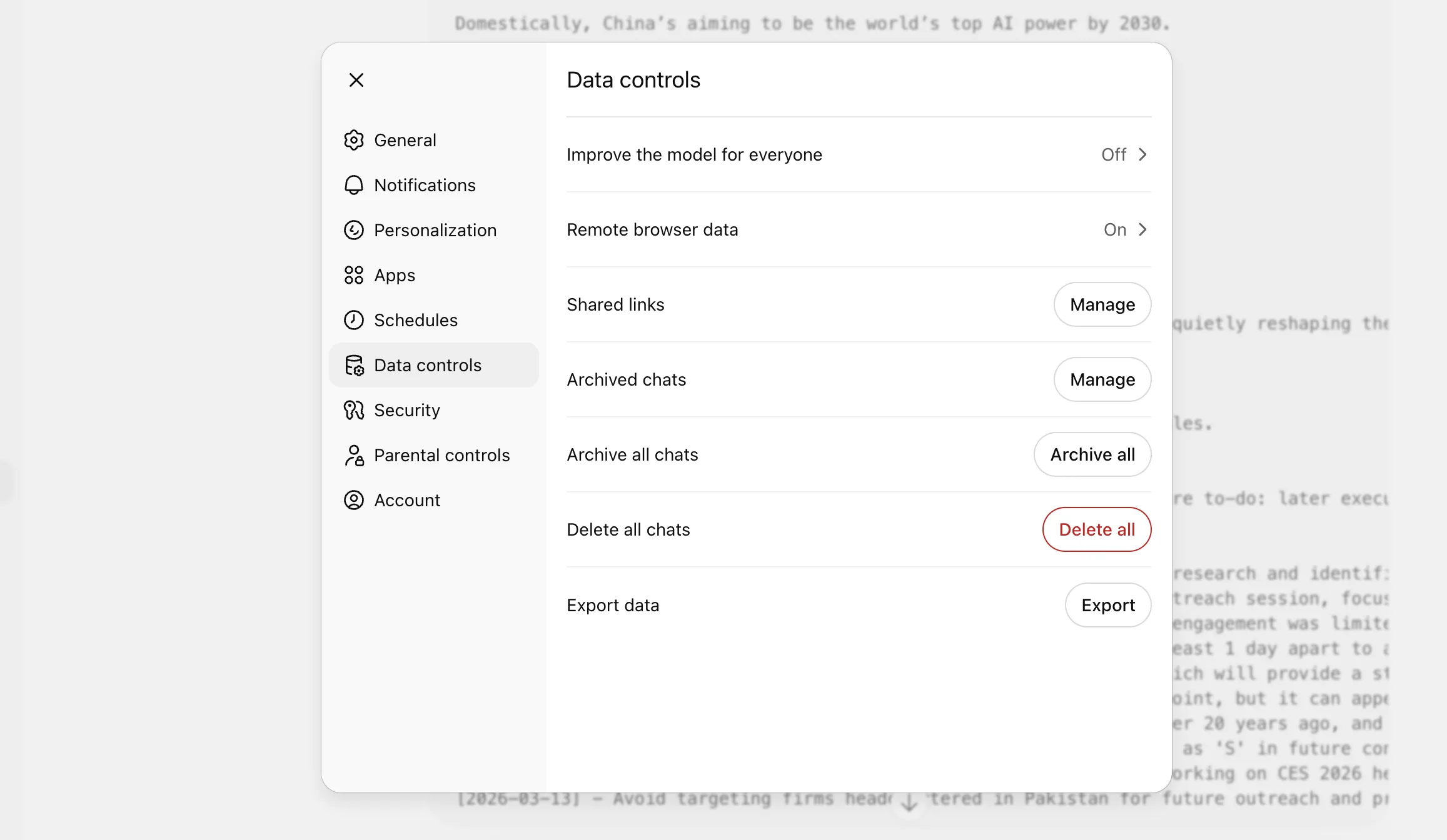
This is the motherload of all your data that ChatGPT has. To access it:
- Open the Profile menu on ChatGPT (Where your name is displayed)
- Click on Settings
- Select Data controls
- Click on ‘Export’ next to the Export Data option
- Confirm export
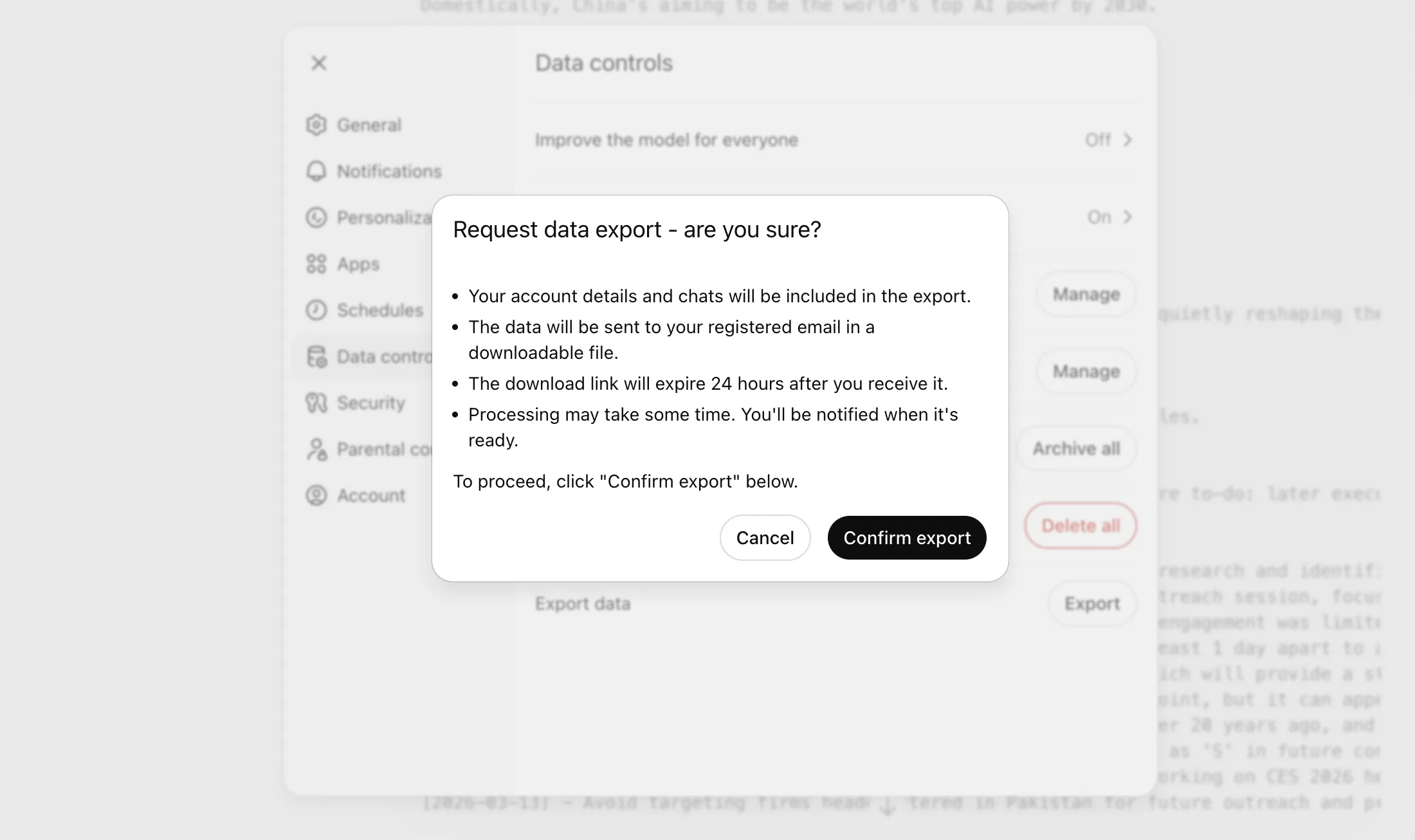
You will now receive all your account details and chats in a downloadable format on your registered email.
Note: This takes time, usually around half a day. So be patient when going through this option.
Step 1 – Option 3: Claude Prompt
This reflects the genius of people at Anthropic. In its new Memory Import feature, it gives a specific prompt that extracts your data from any AI chatbot. Here is how to go about it:
- Open Claude Import Memory
- Sign in/ Sign up on Claude
- Copy the prompt that Claude shows in its dialogue box
- Paste it into a new ChatGPT chat
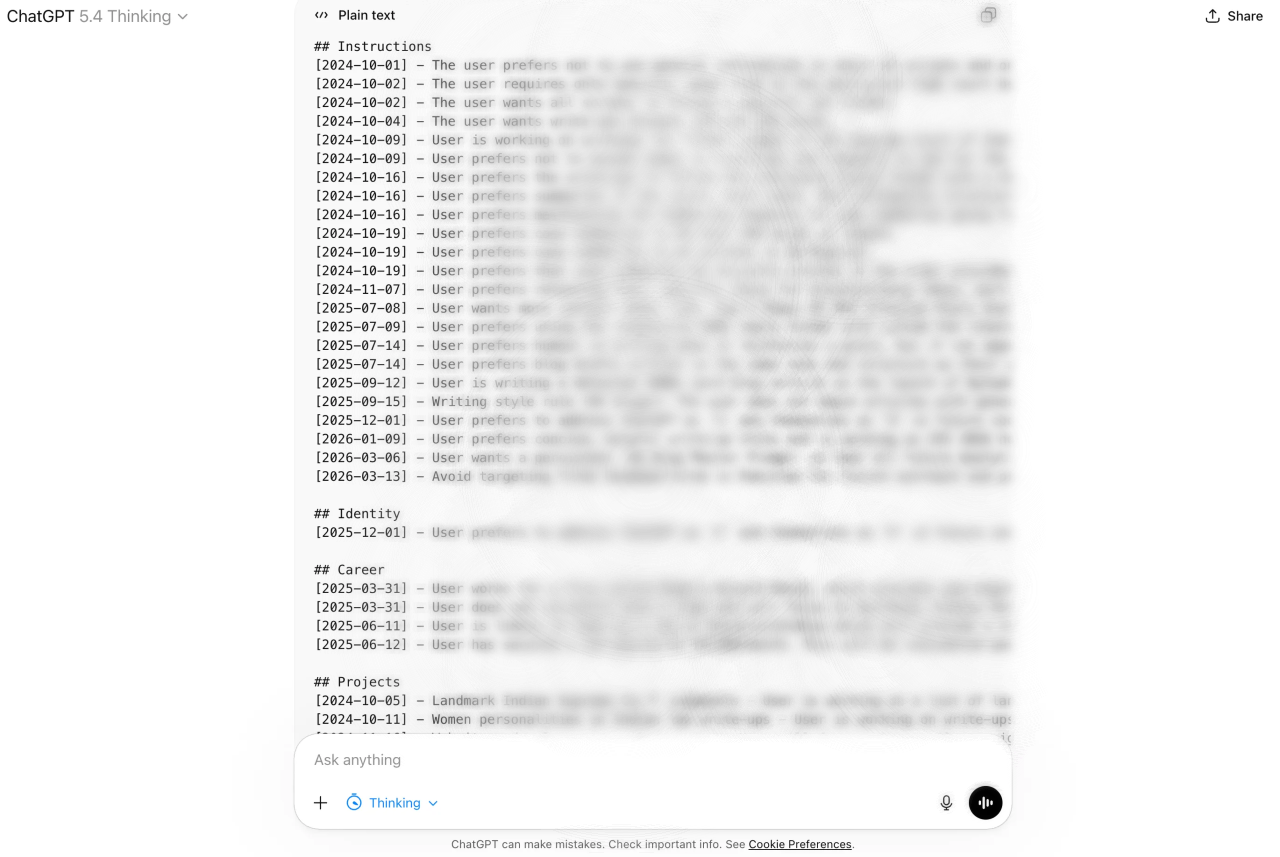
ChatGPT will instantly bring up all your associated chats and memories, in the format specified within Claude’s prompt.
Note: Use deep reasoning models for this (I used GPT 5.4 Thinking) as they tend to do a better job in pulling out information.
Use any of the options above, and you will have all your ChatGPT data in one place. Once done, we move on to the next step, which is as easy as it gets.
Step 2 – Edit the Data
Not many guides will tell you this, but this step is super important if you really want a running start with Claude. After all, you do not want Claude working on outdated information or simply missing out on a crucial detail.
So take some time and go through the data that you have pulled from ChatGPT. I am sure you will find parts that are completely irrelevant now. After all, the very fact that you want your data transferred means that you have been using ChatGPT for long, and with time, there will be activities that are of no use any more.
There are no hard steps here. Just go through it and edit out the unwanted parts, or include more if you feel like. Then proceed to the last step.
Note: You can even use ChatGPT for this with simple follow-up prompts like – remove all data before August 2025, etc.
Step 3 – Import to Claude
The final step, now that you have your data prepped and ready to go, simply import it to Claude. This is the same chat window that you saw if you followed Option 3 in Step 1 above. For this:
- Open Claude Import Memory
- Sign in/ Sign up on Claude
- Paste the data in the chatbox to add to Claude’s memory
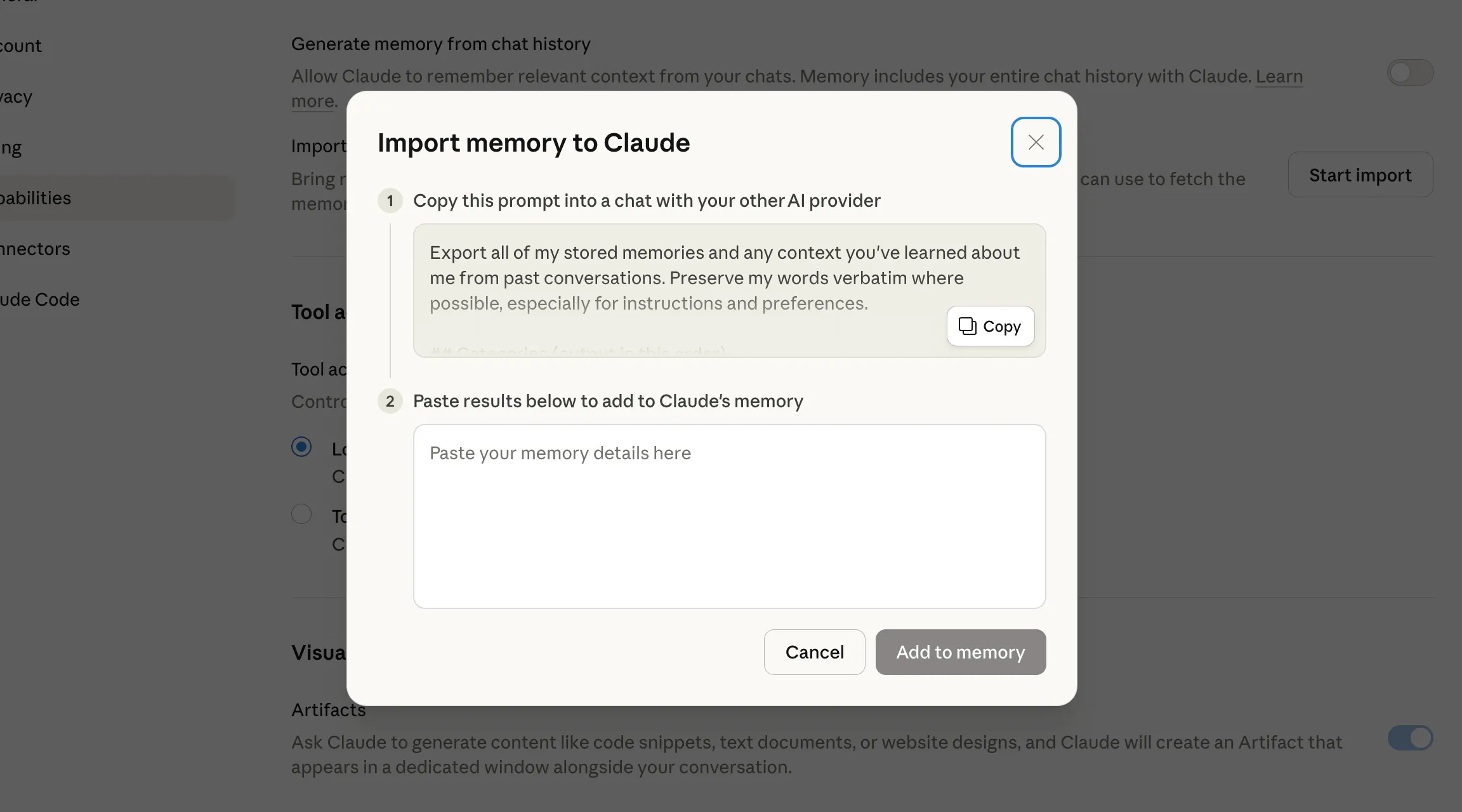
And you are done! Claude will now know much about you before you even begin your first task with it.
Optional: Delete your Data from ChatGPT
If you are really done with it and wish to erase all your data from ChatGPT, here is how to go about it:
- Open the Profile menu on ChatGPT (Where your name is displayed)
- Click on Personalisation
- Right next to the Memory section, click Manage
- Delete all your memories from the record
- Alternatively, you can also type “Delete all my memory and personal data” in a chat window
- Then go to Settings > Account > Delete Account
Make sure to export your data first, so you have it with you just in case you wish to revert to ChatGPT at any point in the future.
Conclusion
When you are switching from one AI chatbot to another, you are essentially shifting your daily workflow, prompts, projects, and knowledge handling. This is a huge ask for any chatbot to learn from scratch all over. And traditionally, we have known such migrations to be genuine migraines. But AI assistants are starting to behave differently – more like replaceable components, and that is what makes things much, much easier for us.
Now that you know how such a switch can be made easy as a breeze, I would suggest you to do it gradually. Even after you make the switch to Claude, do not delete your ChatGPT account right away. There is a chance that Claude’s model does not suit your needs, in which case, you may wish to revert to ChatGPT. Once you are set either way, then you can make a more informed decision to delete/ keep your ChatGPT account.







