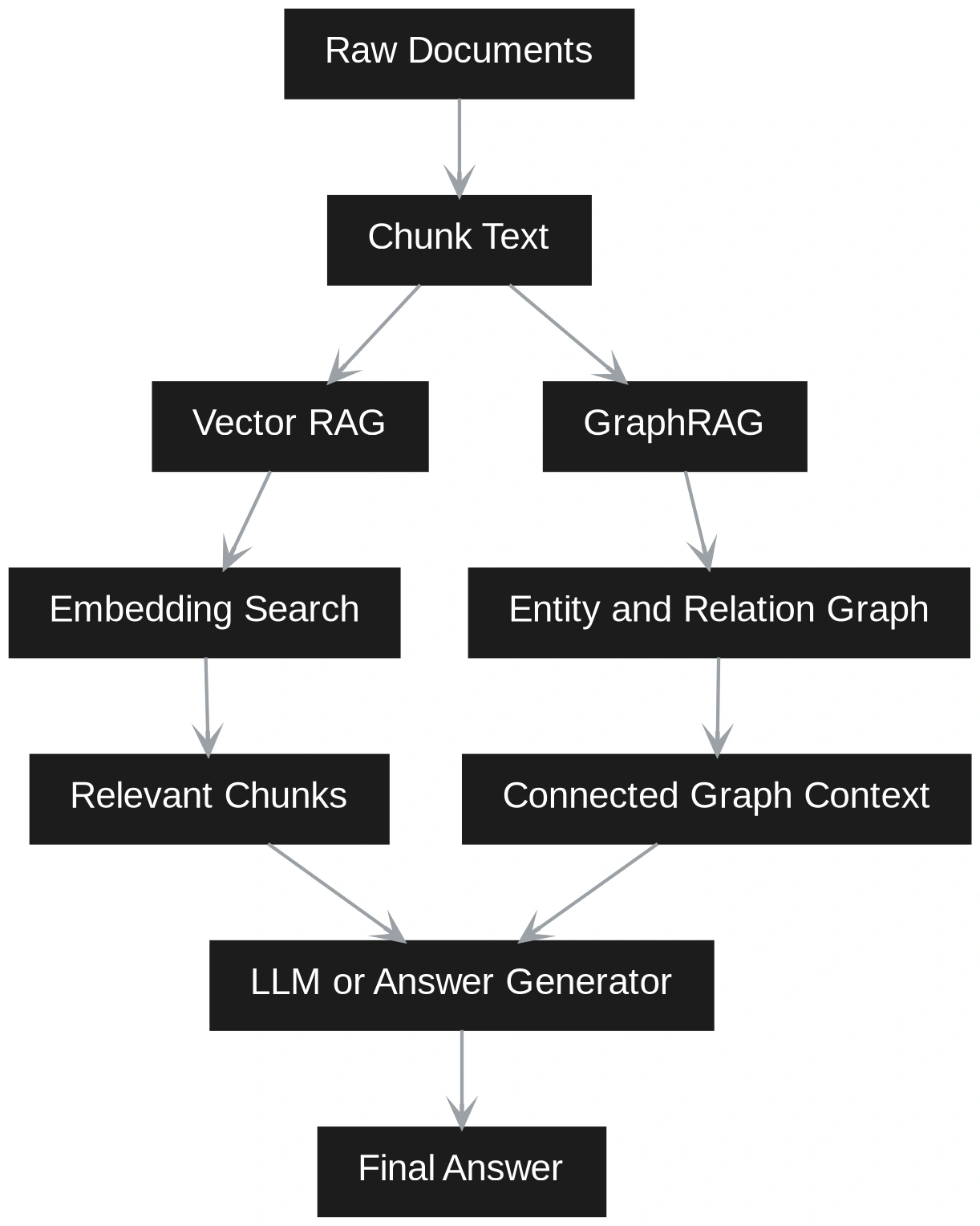
GraphRAG and Vector RAG address different retrieval needs. Vector RAG splits documents into chunks, embeds them, retrieves semantically similar passages, and sends them to an LLM. It is simple, fast to build, and works best when answers sit within one or two relevant chunks.
GraphRAG adds structure by extracting entities, relationships, and communities, making it stronger for multi-hop reasoning, explainability, and corpus-wide synthesis across connected ideas. In this article, a practical comparison of GraphRAG and Vector RAG, we’ll break down where each approach fits best.
Table of contents
Definitions and Architecture
Vector RAG works by splitting documents into small text chunks. Each chunk is converted into an embedding and stored in a vector database. When a user asks a question, the question is also converted into an embedding. The system then finds the most similar chunks and sends them to the LLM to generate an answer.
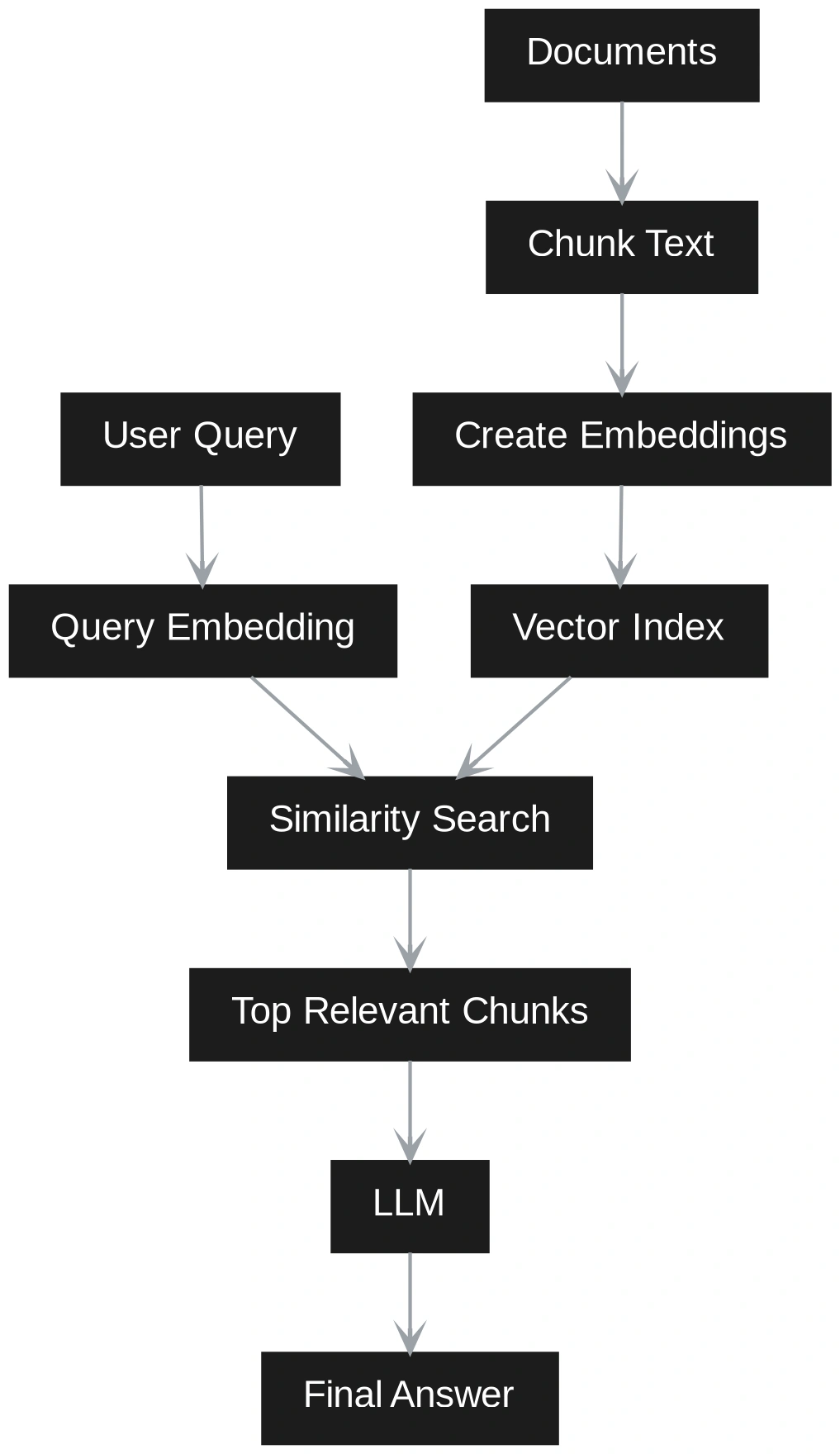
Vector RAG is simple, fast, and easy to update. It works well for direct factual questions. But it stores meaning mostly through embeddings and text, not through explicit entities or relationships. Because of this, it can struggle with questions that need connections across multiple chunks.
GraphRAG adds more structure. It extracts entities, relationships, claims, and communities from the documents. It then builds a graph that shows how different pieces of information are connected.
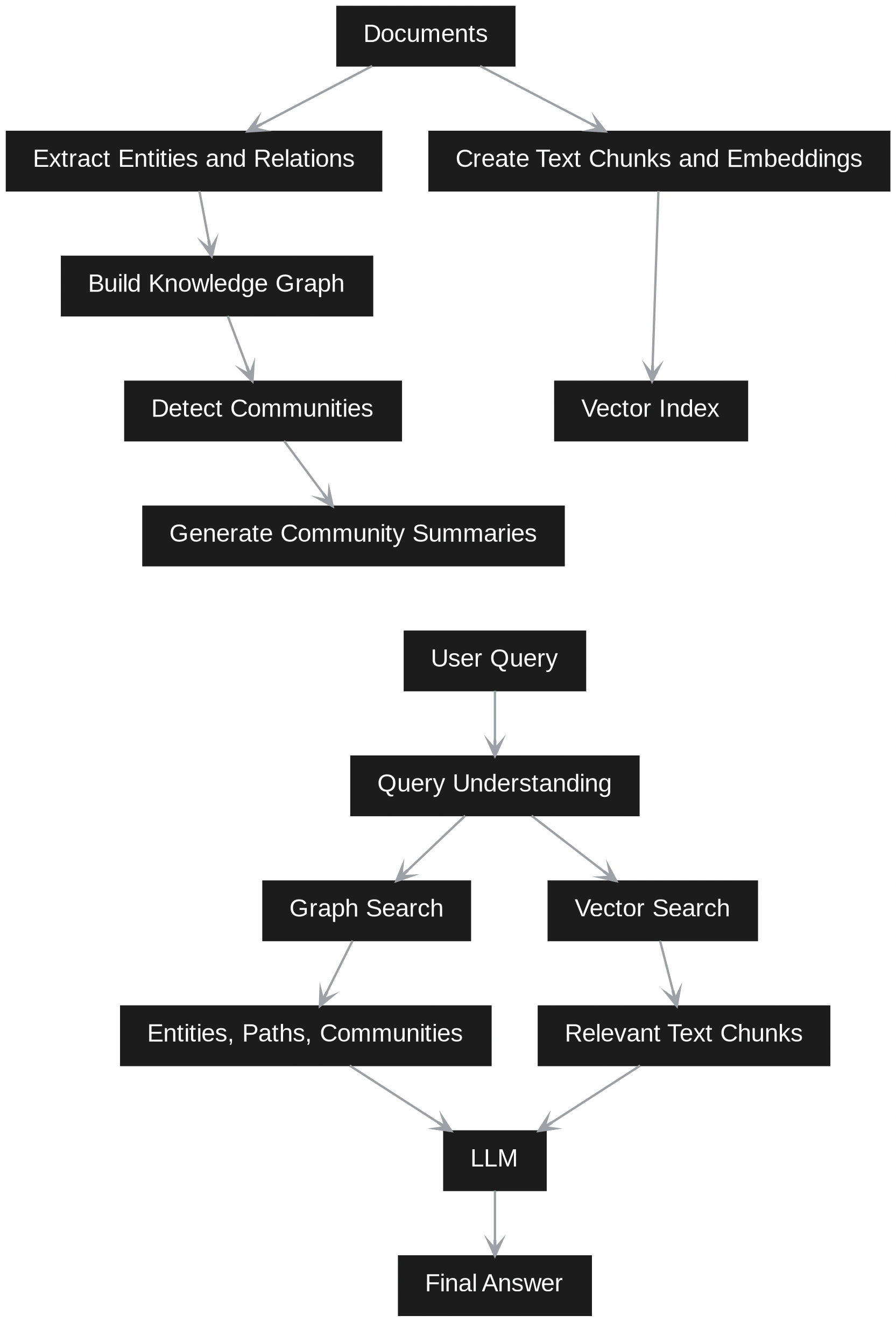
This makes GraphRAG better for relationship-based questions, multi-step reasoning, and broad understanding across a large set of documents. The tradeoff is that it takes more effort and cost to build because it needs graph construction, community detection, and summarization.
In practice, many systems use both. Vector search quickly finds relevant text, while graph retrieval adds connected context and better reasoning.
How Retrieval Works at Query Time
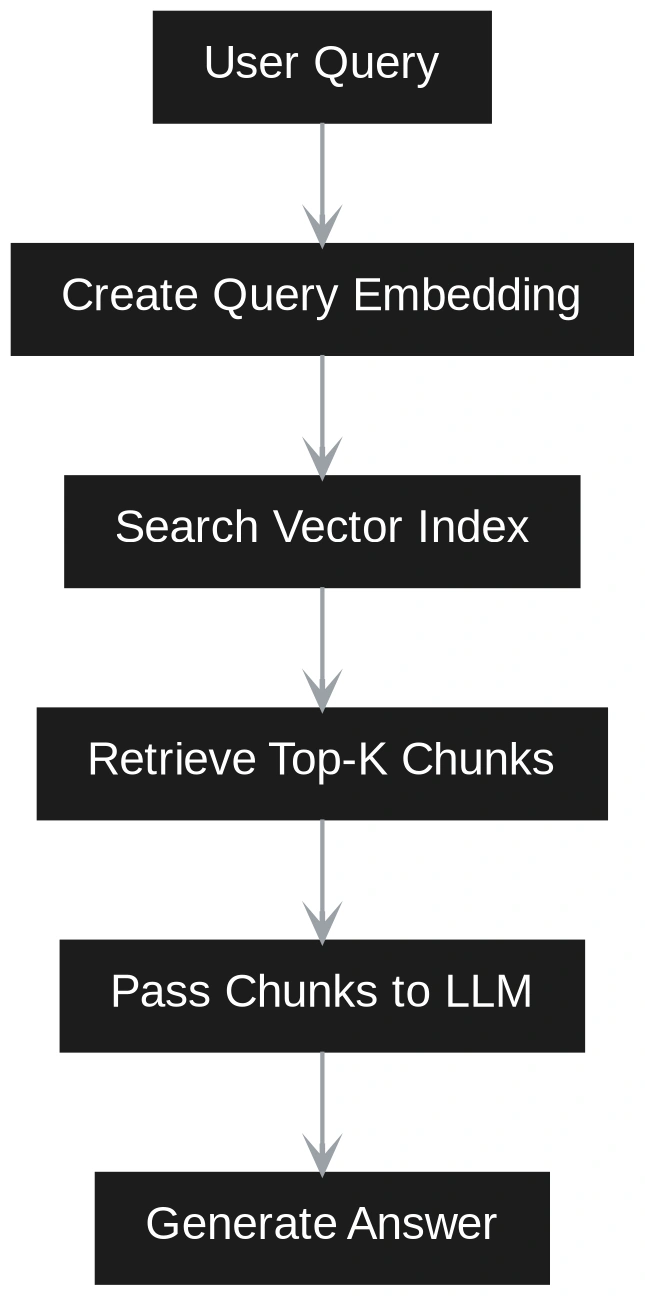
The biggest difference between Vector RAG and GraphRAG becomes clear at query time. In Vector RAG, the query is treated as a semantic search problem. The user question is converted into an embedding. The system compares this query embedding with stored chunk embeddings. It retrieves the closest chunks and sends them to the LLM. The LLM then answers using only those chunks as context. This works well when the answer is directly available in a small set of similar passages.
GraphRAG handles the query differently. It first tries to understand whether the question is local or global. A local question is about a specific entity, event, customer, product, or document. A global question asks for themes, patterns, risks, summaries, or relationships across the corpus.
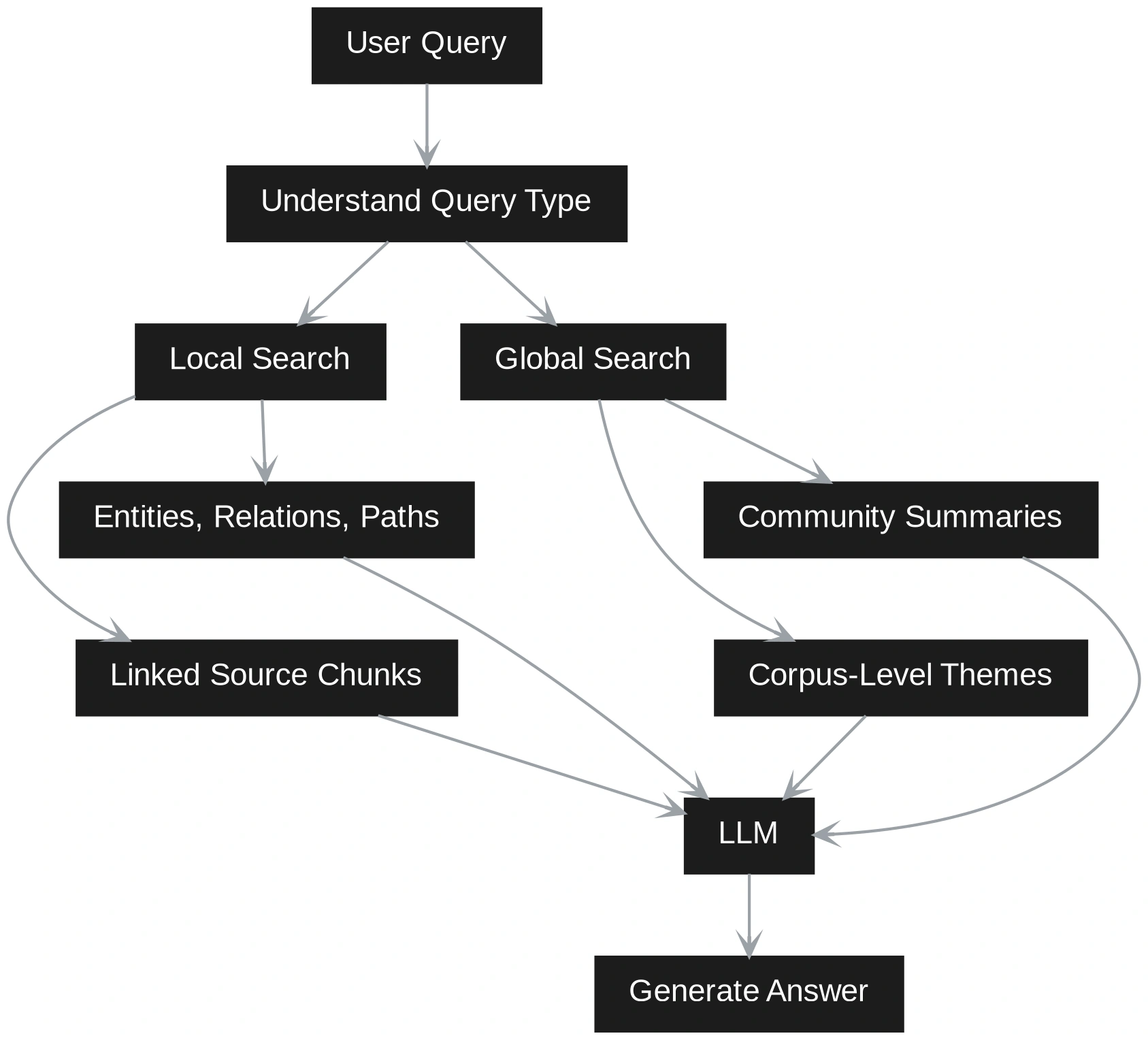
This means Vector RAG retrieves by similarity, while GraphRAG retrieves by structure and meaning together. Vector RAG is faster and easier when the question is narrow. GraphRAG is stronger when the answer depends on connections across many documents. A hybrid system can use both paths. It can first retrieve relevant chunks through vector search, then expand the context using graph relationships. This gives the LLM both textual evidence and structured grounding.
Hands-on: Build Vector RAG and GraphRAG from Start to End
In this hands-on section, we will build both Vector RAG and GraphRAG on the same small corpus. The goal is simple. We want to show how Vector RAG retrieves similar text chunks, while GraphRAG retrieves entities, relationships, and connected context. We will use Python, SentenceTransformers for embeddings, FAISS for vector search, and NetworkX for graph storage and traversal. SentenceTransformers supports encoding text into embeddings, FAISS is built for efficient vector similarity search, and NetworkX stores graphs as nodes and edges with attributes.
First, install the required libraries.
pip install sentence-transformers faiss-cpu networkx pandas numpyNow create a small demo corpus. This corpus is intentionally small so the difference is easy to show.
docs = [
    {
        "id": "doc1",
        "text": "NourishCo is facing rising logistics costs in its North region. The operations team believes the issue is linked to poor demand forecasting.",
    },
    {
        "id": "doc2",
        "text": "The North region uses Vendor A for cold chain delivery. Vendor A has repeated delivery delays during high-demand weeks.",
    },
    {
        "id": "doc3",
        "text": "The analytics team proposed a machine learning forecasting model to reduce stockouts and improve supply planning.",
    },
    {
        "id": "doc4",
        "text": "The finance team is concerned that Vendor A delays are increasing working capital pressure because inventory buffers are rising.",
    },
    {
        "id": "doc5",
        "text": "The leadership team wants an AI roadmap that connects demand forecasting, logistics optimization, and vendor performance monitoring.",
    },
]
Now define a simple chunking function. In this demo, each document is already short, so we will treat each document as one chunk.
chunks = []

for doc in docs:
    chunks.append({
        "chunk_id": doc["id"],
        "text": doc["text"],
    })

print(chunks)
Now build the Vector RAG index.
from sentence_transformers import SentenceTransformer
import faiss
import numpy as np

model = SentenceTransformer("all-MiniLM-L6-v2")

texts = [chunk["text"] for chunk in chunks]
embeddings = model.encode(texts, convert_to_numpy=True)

dimension = embeddings.shape[1]
index = faiss.IndexFlatL2(dimension)
index.add(embeddings)

print("Vector index created with", index.ntotal, "chunks")
Now create a Vector RAG retrieval function.
def vector_rag_search(query, top_k=3):
    query_embedding = model.encode([query], convert_to_numpy=True)

    distances, indices = index.search(query_embedding, top_k)

    results = []

    for idx in indices[0]:
        results.append(chunks[idx])

    return results


# Test the Vector RAG pipeline
query = "Why are logistics costs rising in the North region?"

vector_results = vector_rag_search(query)

for result in vector_results:
    print(result["chunk_id"], ":", result["text"])
This retrieves chunks that are semantically close to the question. It should return documents about North region, logistics costs, Vendor A, and delays. This is useful when the answer is present in one or two similar chunks.
Now let us build the GraphRAG version. In a production system, entities and relationships are usually extracted with an LLM or an information extraction model. For this hands-on demo, we will manually define them so the flow is easy to understand and explain.
import networkx as nx

G = nx.Graph()

entities = [
    "NourishCo",
    "North Region",
    "Logistics Costs",
    "Demand Forecasting",
    "Vendor A",
    "Delivery Delays",
    "Analytics Team",
    "ML Forecasting Model",
    "Stockouts",
    "Supply Planning",
    "Finance Team",
    "Working Capital Pressure",
    "Inventory Buffers",
    "Leadership Team",
    "AI Roadmap",
    "Logistics Optimization",
    "Vendor Performance Monitoring",
]

G.add_nodes_from(entities)

relationships = [
    ("NourishCo", "North Region", "operates in"),
    ("North Region", "Logistics Costs", "has issue"),
    ("Logistics Costs", "Demand Forecasting", "linked to"),
    ("North Region", "Vendor A", "uses"),
    ("Vendor A", "Delivery Delays", "causes"),
    ("Delivery Delays", "Logistics Costs", "increases"),
    ("Analytics Team", "ML Forecasting Model", "proposed"),
    ("ML Forecasting Model", "Demand Forecasting", "improves"),
    ("ML Forecasting Model", "Stockouts", "reduces"),
    ("ML Forecasting Model", "Supply Planning", "improves"),
    ("Finance Team", "Working Capital Pressure", "concerned about"),
    ("Vendor A", "Working Capital Pressure", "contributes to"),
    ("Inventory Buffers", "Working Capital Pressure", "increase"),
    ("Delivery Delays", "Inventory Buffers", "increase"),
    ("Leadership Team", "AI Roadmap", "wants"),
    ("AI Roadmap", "Demand Forecasting", "includes"),
    ("AI Roadmap", "Logistics Optimization", "includes"),
    ("AI Roadmap", "Vendor Performance Monitoring", "includes"),
]

for source, target, relation in relationships:
    G.add_edge(source, target, relation=relation)

print(
    "Graph created with",
    G.number_of_nodes(),
    "nodes and",
    G.number_of_edges(),
    "edges",
)
Now create a function to inspect graph neighbors.
def get_graph_context(entity, depth=1):
    if entity not in G:
        return []

    context = []
    visited = set([entity])
    frontier = [entity]

    for _ in range(depth):
        next_frontier = []

        for node in frontier:
            for neighbor in G.neighbors(node):
                edge_data = G.get_edge_data(node, neighbor)
                relation = edge_data["relation"]

                context.append({
                    "source": node,
                    "relation": relation,
                    "target": neighbor,
                })

                if neighbor not in visited:
                    visited.add(neighbor)
                    next_frontier.append(neighbor)

        frontier = next_frontier

    return context


# Test the graph retrieval
graph_results = get_graph_context("Vendor A", depth=2)

for item in graph_results:
    print(item["source"], "--", item["relation"], "--", item["target"])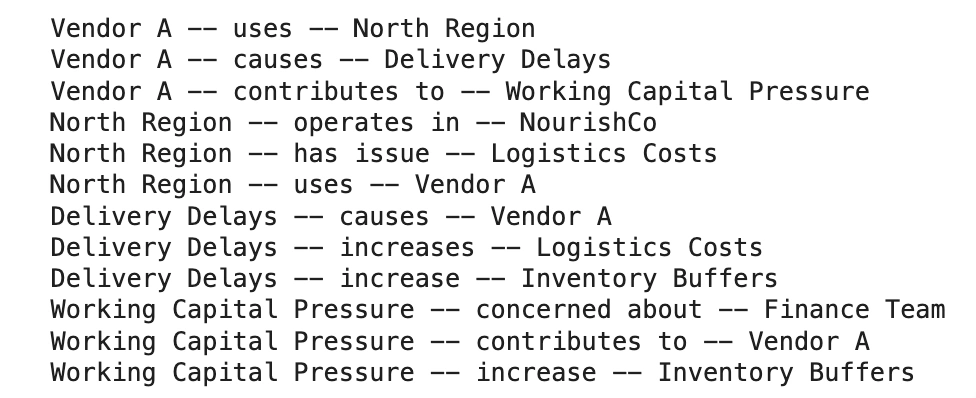
This gives connected context. It does not just retrieve similar chunks. It shows how Vendor A connects to delivery delays, logistics costs, inventory buffers, and working capital pressure.
Now we create a simple GraphRAG query function. For the demo, we will map query keywords to entities.
def detect_entity(query):
    query_lower = query.lower()

    entity_map = {
        "vendor": "Vendor A",
        "logistics": "Logistics Costs",
        "north": "North Region",
        "forecasting": "Demand Forecasting",
        "working capital": "Working Capital Pressure",
        "financial pressure": "Working Capital Pressure",
        "roadmap": "AI Roadmap",
    }

    for keyword, entity in entity_map.items():
        if keyword in query_lower:
            return entity

    return None


def graph_rag_search(query, depth=2):
    entity = detect_entity(query)

    if not entity:
        return []

    return get_graph_context(entity, depth=depth)


# Test GraphRAG
query = "How is Vendor A connected to financial pressure?"

graph_context = graph_rag_search(query)

for item in graph_context:
    print(item["source"], "--", item["relation"], "--", item["target"])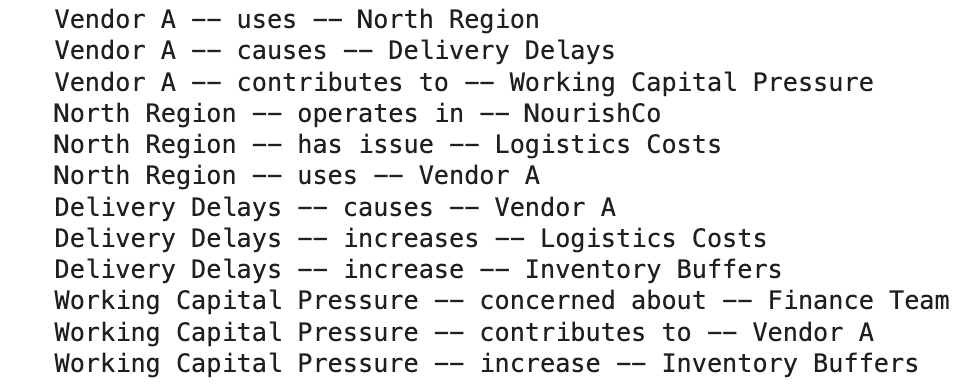
Now compare both methods on the same query.
query = "How is Vendor A connected to financial pressure?"

print("VECTOR RAG RESULTS")

vector_results = vector_rag_search(query)

for result in vector_results:
    print("-", result["text"])
print("\nGRAPHRAG RESULTS")

graph_context = graph_rag_search(query)

for item in graph_context:
    print("-", item["source"], item["relation"], item["target"])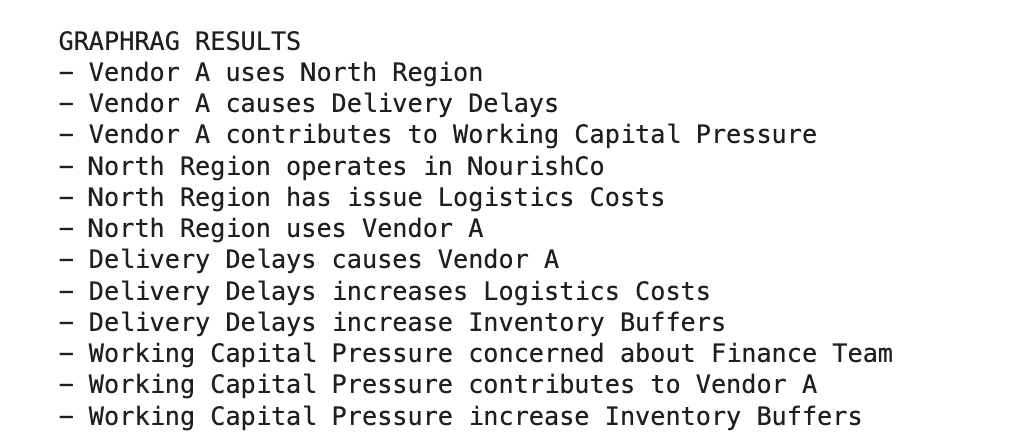
The Vector RAG output will return the most similar text chunks. It may find the finance document and the Vendor A document. GraphRAG will show the relationship chain more clearly. It can show that Vendor A causes delivery delays, delivery delays increase inventory buffers, and inventory buffers increase working capital pressure.
Now add a simple answer generator. This version does not require an LLM API. It creates a readable answer from the retrieved context.
def generate_vector_answer(query, retrieved_chunks):
    context = " ".join([chunk["text"] for chunk in retrieved_chunks])

    answer = f"""
Question: {query}

Vector RAG Answer:

Based on the retrieved chunks, {context}
"""

    return answer


def generate_graph_answer(query, graph_context):
    facts = []

    for item in graph_context:
        facts.append(
            f"{item['source']} {item['relation']} {item['target']}"
        )

    joined_facts = ". ".join(facts)

    answer = f"""
Question: {query}

GraphRAG Answer:

Based on the graph relationships, {joined_facts}.
"""

    return answer


# Run both answer generators
query = "How is Vendor A connected to financial pressure?"

vector_context = vector_rag_search(query)
graph_context = graph_rag_search(query)

print(generate_vector_answer(query, vector_context))
print(generate_graph_answer(query, graph_context))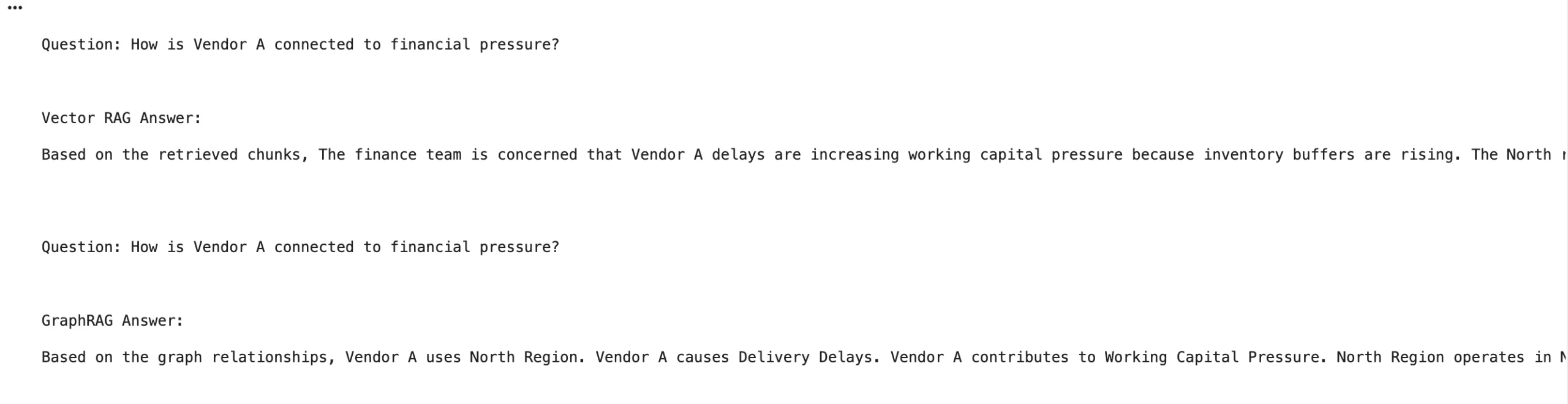
For a more realistic demo, you can connect this retrieval output to an LLM. The LLM prompt can be kept simple.
def build_llm_prompt(query, vector_context, graph_context):
    vector_text = "\n".join([chunk["text"] for chunk in vector_context])

    graph_text = "\n".join([
        f"{item['source']} -- {item['relation']} -- {item['target']}"
        for item in graph_context
    ])

    prompt = f"""
You are a business analyst.

Answer the question using only the provided context.

Question:
{query}

Vector Context:
{vector_text}

Graph Context:
{graph_text}

Final Answer:
"""

    return prompt


prompt = build_llm_prompt(query, vector_context, graph_context)

print(prompt)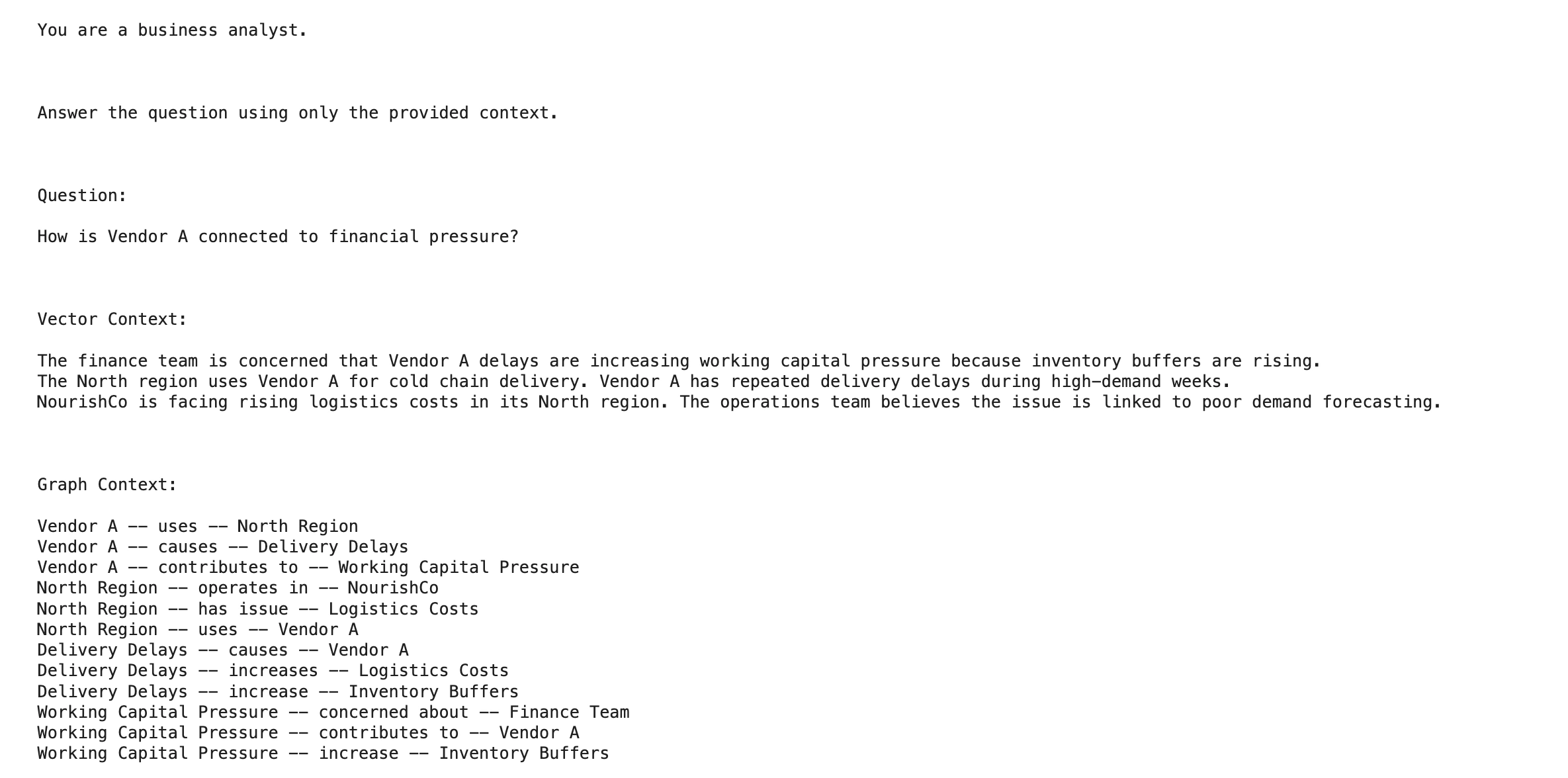
When to Use Vector RAG, GraphRAG, or Hybrid RAG
Use Vector RAG when the answer is likely present in one or a few text chunks. It is simple, fast, and works well for direct lookup questions.
Common use cases include:
- FAQs
- Policy documents
- Product manuals
- Support articles
- Document search
- Basic knowledge assistants
A typical Vector RAG question looks like:
“What does the refund policy say?”
Use GraphRAG when the answer depends on relationships across the corpus. It is better at connecting entities, events, risks, teams, vendors, and business processes.
Common use cases include:
- Root-cause analysis
- Compliance review
- Investigations
- Risk analysis
- Vendor analysis
- Strategic synthesis
- Knowledge discovery
A typical GraphRAG question looks like:
“How is Vendor A connected to financial pressure in the North region?”
Use Hybrid RAG when the system needs both fast retrieval and deeper reasoning. Vector search can quickly find relevant text, while graph retrieval adds connected context.
This is often the best production setup because real users ask mixed questions. Some questions are simple lookups. Others need multi-hop reasoning. Some need both.
A simple routing rule:
Direct factual question → Vector RAG
Relationship-heavy question → GraphRAG
Mixed or strategic question → Hybrid RAG
The practical rule is simple: start with Vector RAG. Add GraphRAG when similarity search misses important connections. Use Hybrid RAG when the application needs both speed and structure.
Performance, Cost, and Maintenance Trade-offs
| Dimension | Vector RAG | GraphRAG |
| Indexing process | Documents are chunked, embedded, and stored in a vector index. | Documents are processed to extract entities, relationships, claims, communities, and summaries. |
| Indexing cost | Lower cost because the pipeline is simple. | Higher cost because graph construction and summarization add extra steps. |
| Update effort | Easier to update. New documents can be chunked and embedded incrementally. | Harder to update. New content may require entity extraction, relationship updates, and graph refresh. |
| Retrieval speed | Usually faster because it uses similarity search. | Can be slower because it may involve graph traversal, entity expansion, and summary retrieval. |
| Best use case | Direct factual questions and semantic lookup. | Relationship-heavy questions, multi-hop reasoning, and corpus-wide synthesis. |
| Explainability | Explains answers mainly through retrieved chunks. | Explains answers through chunks, entities, relationships, paths, and summaries. |
| Maintenance complexity | Easier to maintain in fast-changing knowledge bases. | Needs more quality checks because wrong entities or relationships can affect answers. |
| Practical trade-off | Best when speed, simplicity, and cost matter most. | Best when structure, explainability, and deeper reasoning matter more. |
Limitations and Failure Modes
It’s all good until things come to a standstill. Here’s how it can happen:
- Where Vector RAG can fail
- Vector RAG can struggle when the right answer is not contained in one clear chunk.
- It may retrieve text that sounds semantically similar but does not fully answer the question.
- This is common when the query requires reasoning across multiple documents.
- Since Vector RAG does not explicitly understand entities, paths, or dependencies, it can miss hidden relationships between concepts.
- Where GraphRAG can fail
- GraphRAG can fail when the underlying graph is weak or incomplete.
- If entity extraction is inaccurate, those errors get carried forward into the graph.
- If important relationships are missing, the system may produce an incomplete or misleading answer.
- GraphRAG also requires more preprocessing than Vector RAG.
- For simple lookup tasks, the added cost and complexity may not always be worth it.
- The freshness challenge
- Vector RAG is usually easier to update when source documents change.
- GraphRAG may require graph updates, refreshed summaries, and relationship validation.
- This makes maintenance more complex over time.
- Choosing the right approach
- Evaluate both systems on real user questions.
- Start with Vector RAG as the baseline.
- Add GraphRAG only when the baseline fails on relationship-heavy or corpus-wide questions.
- Use Hybrid RAG when the same application needs both direct lookup and deeper reasoning.
Conclusion
Vector RAG and GraphRAG are both useful, but they solve different problems. Vector RAG is the best first step. It is fast, simple, and strong for direct questions. GraphRAG is useful when answers depend on entities, relationships, paths, and themes across many documents. It adds structure, but it also adds cost and maintenance effort. In real projects, the best approach is often hybrid. Use Vector RAG for quick evidence. Use GraphRAG for connected reasoning. The goal is not to build the most complex system. The goal is to retrieve the right context and generate reliable answers.
Frequently Asked Questions
Q1. What is the main difference between Vector RAG and GraphRAG?
A. Vector RAG relies on semantic similarity; it chunks text, converts it to embeddings, and retrieves paragraphs that sound most like the user’s query. GraphRAG relies on structure; it extracts entities (like people, places, or companies) and the relationships between them to build a knowledge graph, retrieving information based on how concepts are explicitly connected.
Q2. When should I choose Vector RAG over GraphRAG?
A. Vector RAG is the best choice for direct, factual questions where the answer is likely contained within a single paragraph or document (e.g., “What is the company’s remote work policy?”). It is faster to build, cheaper to run, and much easier to update than GraphRAG.
Q3. When is GraphRAG a better choice?
A. GraphRAG excels at “multi-hop reasoning” and global questions that require connecting information across many different documents. For example, answering “How did the supply chain delay in Asia impact Q3 revenue in Europe?” requires understanding the relationship between the delay, the region, and the financial outcome, which a knowledge graph handles much better than a simple vector search.
Hi, I am Janvi, a passionate data science enthusiast currently working at Analytics Vidhya. My journey into the world of data began with a deep curiosity about how we can extract meaningful insights from complex datasets.