You type a question into ChatGPT or Claude. For a split second, nothing happens. Then the answer starts flowing, word by word. That brief pause and the steady stream that follows are two very different jobs happening on a GPU. Understanding them is the key to building AI apps that feel instant, serve thousands of users, and stay affordable to run. This process is called LLM inference. In this article, we’ll break down how it works, where it slows down, how engines like vLLM speed it up, and then build a hands-on lab to measure it on your own machine.
Table of contents
- What is LLM Inference?
- How Does LLM Inference Work?
- How Do LLMs Remember Previous Tokens?
- Why is LLM Inference Slow?
- Key Metrics Used to Measure Inference Performance
- How Can We Optimize LLM Inference?
- What Hardware is Needed for LLM Inference?
- Popular LLM Inference Engines
- Hands-On: Build an LLM Inference Performance Lab
- What Does a Production LLM Inference Architecture Look Like?
- Best Practices for Production Inference
- Conclusion
- Frequently Asked Questions
What is LLM Inference?
LLM inference is the process of using a trained language model to generate outputs from new inputs without updating its model weights.
During training, a model learns patterns from data by adjusting billions of parameters. During inference, those parameters remain fixed while the model predicts the next token based on the input and previously generated tokens.
For example, consider the prompt:
Explain how a neural network learns.
The model processes this text and generates a response one token at a time. Each new token becomes part of the context for predicting the next one. It computes a probability distribution:

The decoding strategy selects a token, and the process continues until the response is complete.
Unlike model training, inference does not require backpropagation or gradient updates during ordinary generation. Its primary challenges are response speed, GPU memory, throughput, and operating cost.
How Does LLM Inference Work?
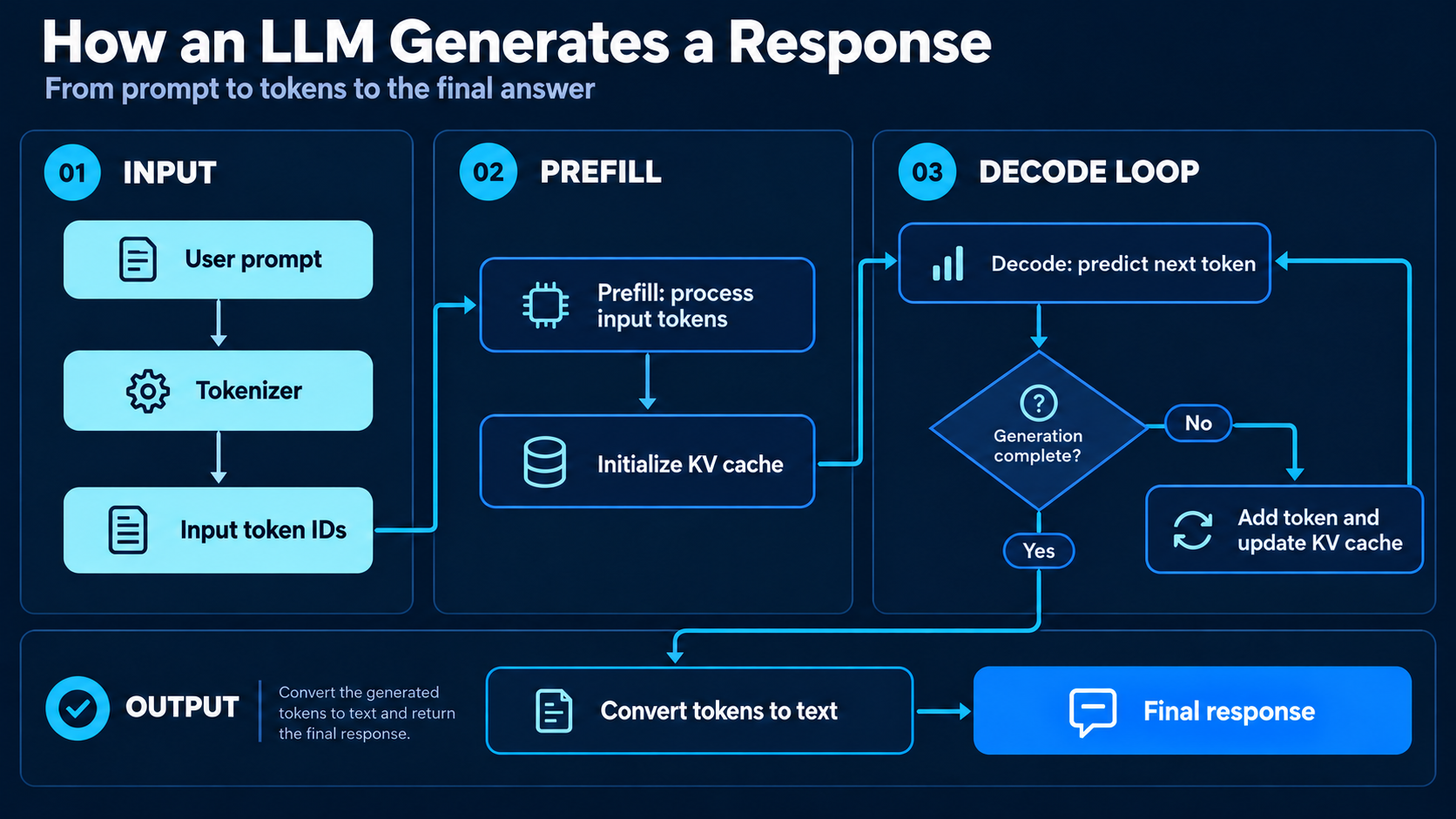
An inference request passes through several stages before a user receives the final response.
LLM inference pipeline
Let’s understand the main stages.
1. Tokenization
The input text is converted into numerical token IDs.
For example, the sentence “Machine learning is powerful” might be divided into words or subwords. The exact segmentation depends on the tokenizer.
These token IDs are converted into embeddings that the transformer can process.
Also Read: What is Tokenization? Here’s All You Need To Know
2. Prefill
During prefill, the model processes the input prompt through its transformer layers.
For example, if the prompt contains 2,000 tokens, the model can process many of their positions in parallel while respecting causal attention.
This stage also initializes the Key-Value cache, which stores intermediate attention representations required for future token generation.
Prefill often performs large matrix operations and can be compute-intensive.
3. Decoding
After prefill, the model starts generating output tokens.
Unlike prefill, decoding is sequential across generated positions. The model must select one token before it knows the full context for predicting the next.
At every decoding step, the model uses the previously computed KV cache instead of recalculating keys and values for the entire sequence.
This saves computation, but it also creates additional memory requirements.
Prefill vs. decode
| Feature | Prefill | Decode |
|---|---|---|
| Purpose | Process the input prompt | Generate output tokens |
| Processing | Parallel across prompt positions | Sequential across output positions |
| Common bottleneck | Compute | Memory bandwidth |
| Important metric | Prefill time, TTFT | Time per output token |
| Most relevant for | Long documents and RAG | Chatbots and code generation |
Prefill and decode behave differently on GPU hardware. This is why modern inference engines increasingly optimize these stages separately.
How Do LLMs Remember Previous Tokens?
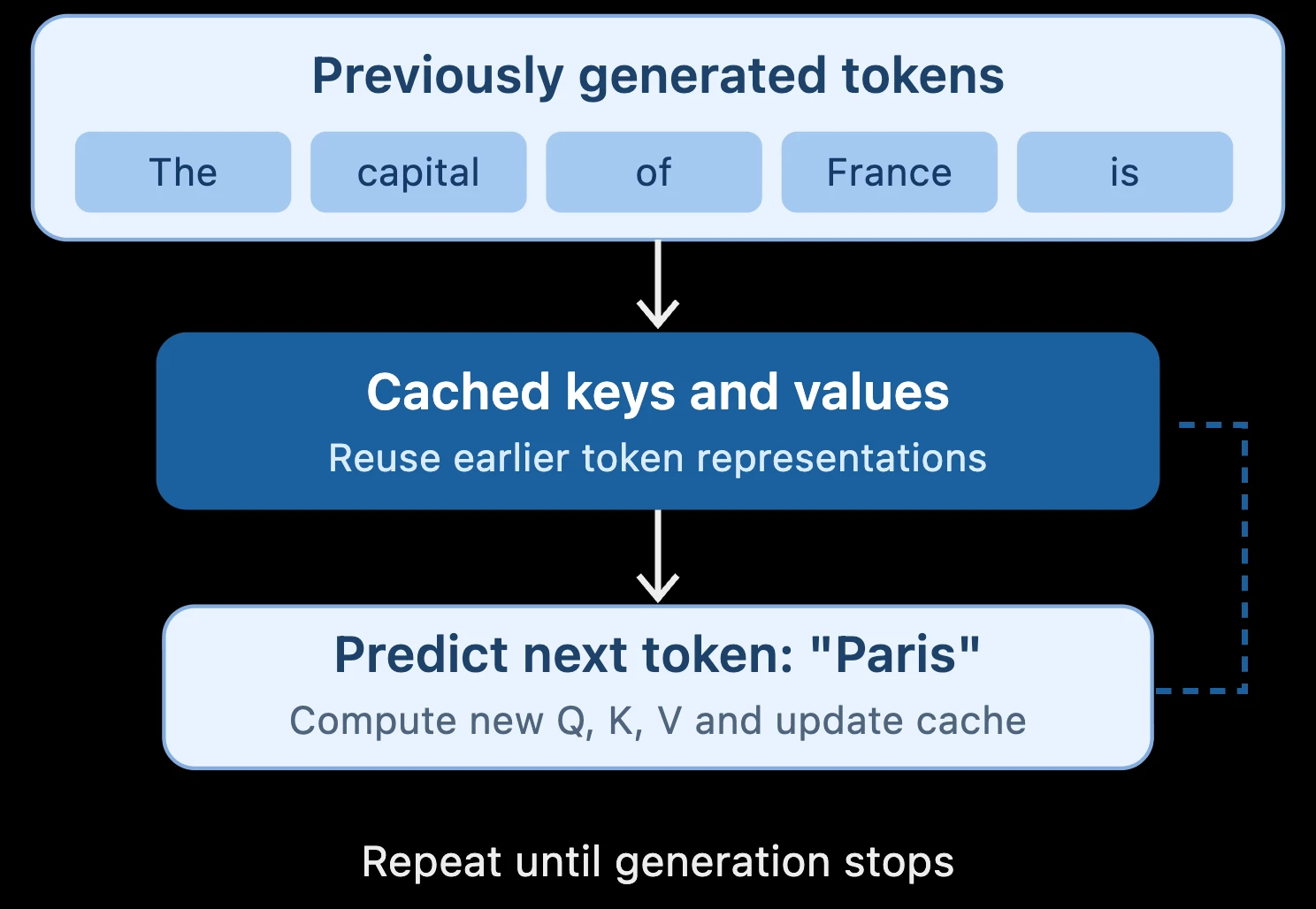
Imagine a model generating the sentence:
“The capital of France is Paris.”
Without caching, the model would need to repeatedly calculate representations of earlier tokens every time it generated a new token.
That would waste considerable computation.
The KV cache solves this by storing previously computed attention keys and values.
In transformer attention, each token is represented using three projections:
- Query (Q): What information is being requested?
- Key (K): What information is available?
- Value (V): What information should be retrieved?
Attention is calculated using:

During decoding, the model reuses cached keys and values from earlier tokens. It calculates new attention information only for the new token, while using the existing cache to access previous context.
KV-cache reuse during decoding
The limitation is memory consumption.
As context length increases, the KV cache grows. Serving multiple users simultaneously increases this memory requirement further.
This makes KV-cache management one of the most important parts of efficient LLM serving.
Why is LLM Inference Slow?
A model’s response time is not determined only by the number of parameters it contains.
Inference performance depends on GPU computation, memory bandwidth, available VRAM, context length, and how efficiently requests are scheduled.
Compute bottlenecks
During prefill, GPUs perform large matrix multiplications. The performance of this stage often depends on available computation capacity and efficient kernels.
Memory bottlenecks
During decoding, the system repeatedly accesses model weights and KV-cache contents. For small batches, moving this data through GPU memory can take more time than performing the mathematical operations themselves.
This is why a GPU with more compute capacity does not always deliver proportionally faster token generation.
Long context windows
Longer prompts require more attention processing and can generate much larger KV caches. This is particularly important for RAG applications, document analysis systems, and coding assistants that regularly operate on thousands of input tokens.
Concurrent requests
A single-user workload differs significantly from serving hundreds of users. The inference engine must schedule requests, manage caches, allocate memory, and prevent some requests from delaying others excessively.
Optimizing this process is one of the main reasons specialized inference engines exist.
Key Metrics Used to Measure Inference Performance
Before optimizing inference, we need to measure it.
| Metric | Meaning |
|---|---|
| TTFT | Time to First Token |
| TPOT | Time per Output Token |
| ITL | Inter-Token Latency |
| Throughput | Total tokens or requests processed per second |
| End-to-end latency | Total time to complete a request |
| GPU utilization | How effectively accelerator resources are used |
| Cost per token | Cost of serving model input or output |
- Time to First Token (TTFT) measures how long a user waits before the first output token arrives. It includes queuing, prefill, and initial decoding.
- Time per Output Token (TPOT) measures the average interval between generated output tokens after the first token.
- Throughput measures how much work a serving system handles over time. A model serving many users can achieve high aggregate throughput even if individual users receive tokens more slowly.
Production benchmarks should also measure p95 and p99 latency. These reveal slow requests that may be hidden by average measurements.
How Can We Optimize LLM Inference?
Different optimizations solve different bottlenecks. Some reduce memory usage, others improve computation or GPU utilization.
1. Quantization
Quantization represents model weights or activations using lower numerical precision.
For an 8-billion-parameter model, the approximate raw weight storage is:
| Precision | Storage |
|---|---|
| FP32 | 32 GB |
| FP16 / BF16 | 16 GB |
| INT8 | 8 GB |
| 4-bit | 4 GB |
These figures exclude metadata, cache memory, and runtime overhead.
Reducing precision can make large models fit into smaller hardware configurations. It can also reduce memory-bandwidth requirements.
However, lower precision may affect accuracy, and actual speed improvements depend on the hardware and implementation.
2. FlashAttention
Standard attention calculations can involve substantial movement of intermediate tensors between GPU memory and on-chip storage.
FlashAttention improves efficiency by processing attention computations in blocks and reducing expensive memory reads and writes.
Rather than materializing the complete attention matrix in high-bandwidth memory, it uses tiling and carefully managed intermediate computations.
This makes attention more memory-efficient, especially for longer sequences. The original FlashAttention research introduced this IO-aware approach while preserving exact attention results within floating-point numerical differences.
3. Continuous batching
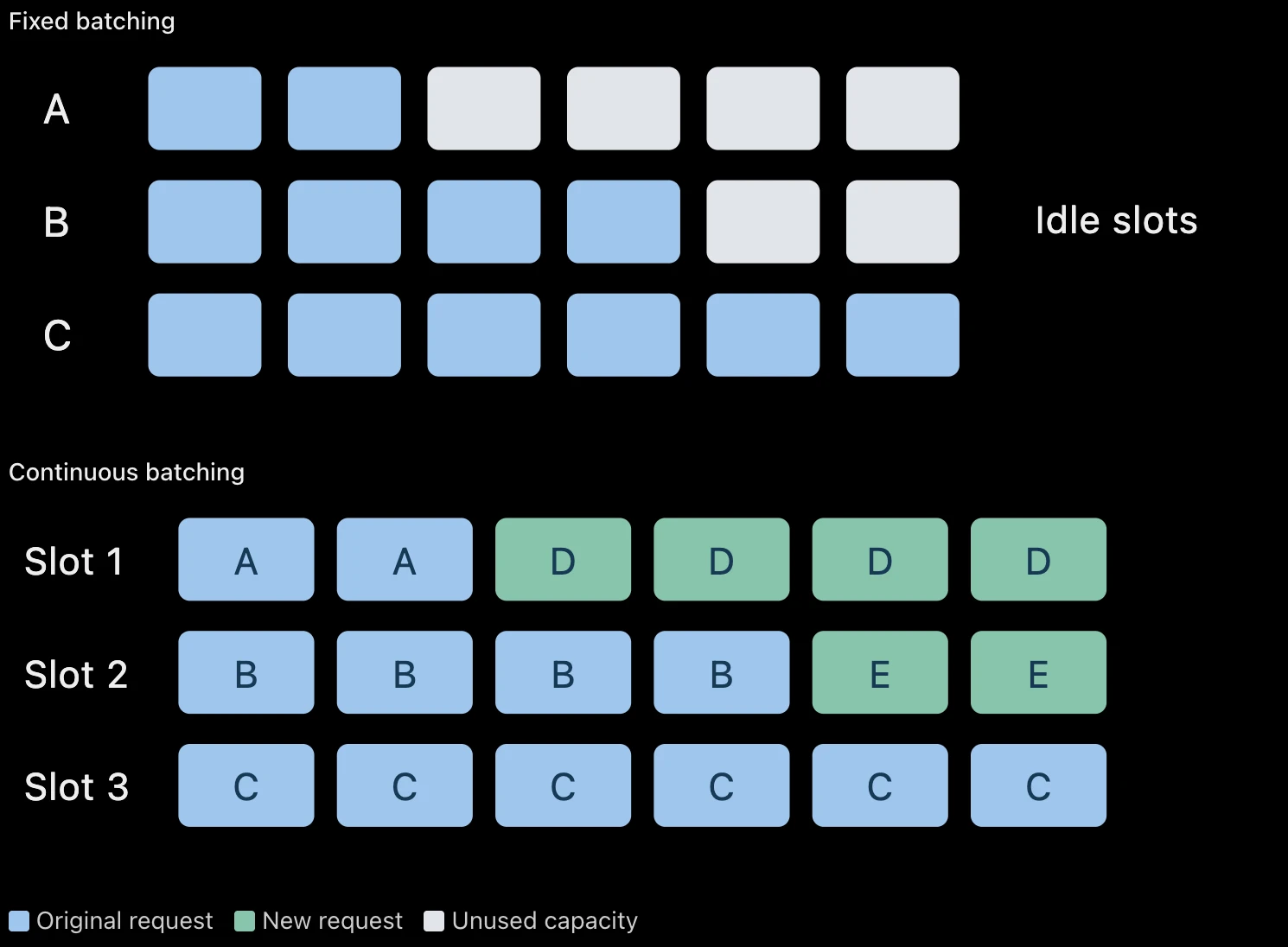
Traditional fixed batching groups requests together and processes them as a batch. The problem is that requests generate different numbers of tokens. Some finish early while others continue running.
Continuous batching allows new requests to join execution when capacity becomes available.
Fixed vs. continuous batching
Continuous batching helps the GPU stay busy and can improve total serving throughput.
Also Read: LLM Batching Explained: Static vs Dynamic vs Continuous Batching
4. PagedAttention
The KV cache can become inefficient when memory is reserved in large contiguous regions.
PagedAttention divides the cache into smaller blocks and manages them through a mapping system. This reduces memory fragmentation and allows cache capacity to be used more efficiently.
This technique is closely associated with vLLM and helps the engine handle large numbers of simultaneous requests.
5. Tensor parallelism
Some models are too large to fit comfortably on one GPU.
Tensor parallelism distributes parts of the model’s tensor computations across multiple GPUs.
For example, a large linear layer can be partitioned so multiple GPUs calculate portions of the result.
Tensor parallelism
Tensor parallelism allows larger models to run across multiple accelerators, but it introduces communication overhead.
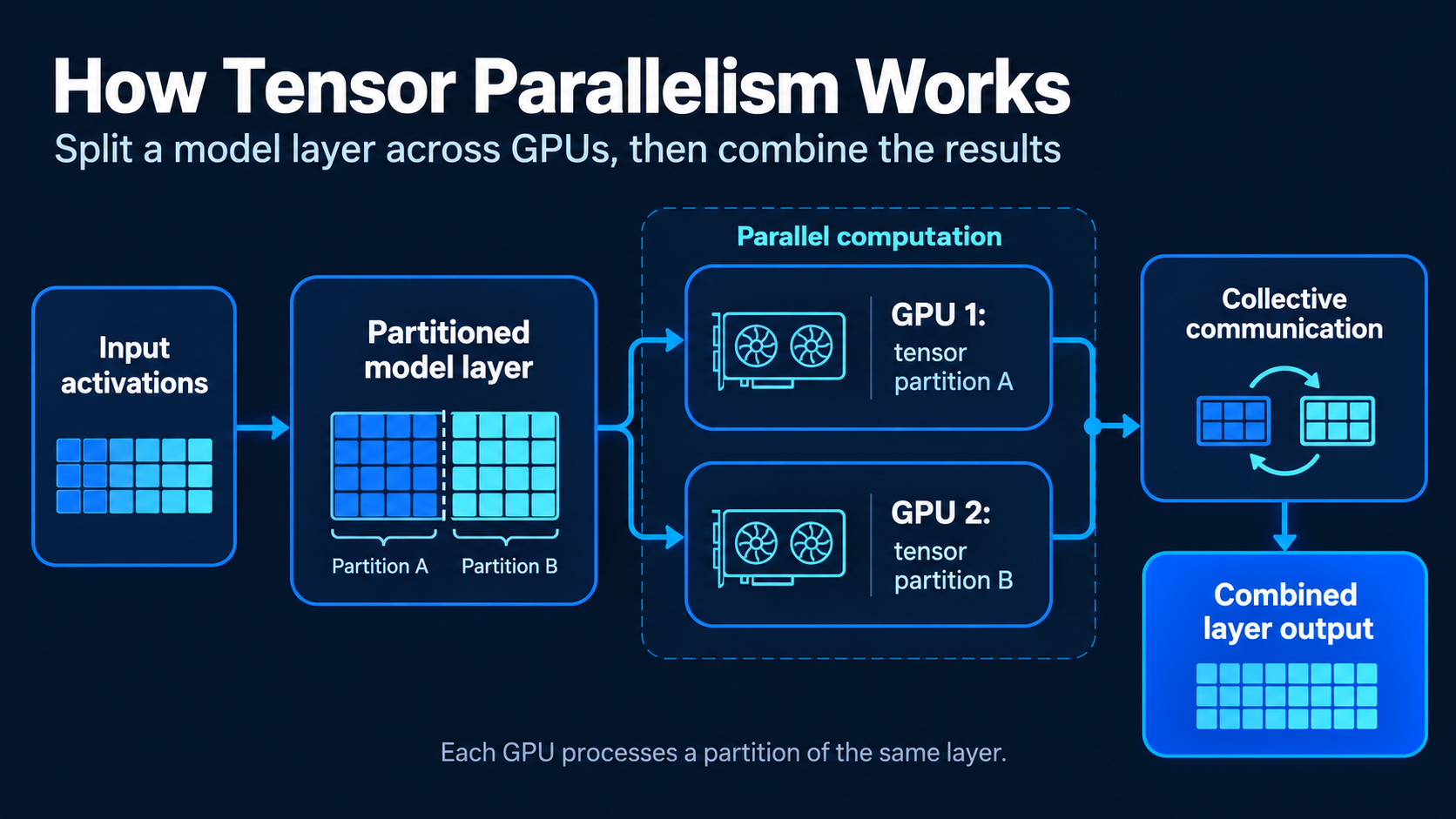
High-speed interconnects become important because GPUs may need to exchange intermediate results at multiple points during inference.
6. Speculative decoding
Ordinary decoding generates tokens one after another. Speculative decoding uses a faster draft mechanism to propose multiple tokens, then verifies them using the target model.
When proposals are accepted, generation can advance more efficiently. This can reduce latency, but the improvement depends on acceptance rate and verification overhead. These techniques, along with chunked prefill and prefix caching, are supported in modern engines such as vLLM.
What Hardware is Needed for LLM Inference?
Inference performance depends on both hardware and software.
A GPU’s computing power matters, but so do memory capacity and memory bandwidth.
VRAM capacity determines how much model data and KV-cache memory can remain on the accelerator.Memory bandwidth affects how quickly the GPU can access model weights and cached attention states.Compute performance influences how quickly operations such as matrix multiplication execute.GPU interconnect bandwidth matters when large models are split across multiple accelerators.This explains why model-serving architecture must consider more than a GPU’s advertised compute specifications.
A workload involving one user and a short prompt may perform well on modest hardware. A high-concurrency, long-context application may require multiple accelerators and specialized inference software.
Popular LLM Inference Engines
Several frameworks help developers deploy and optimize language models.
| Framework | Primary use |
|---|---|
| Ollama | Local inference and experimentation |
| llama.cpp | Lightweight and edge deployment |
| vLLM | High-throughput production serving |
| TensorRT-LLM | NVIDIA GPU-optimized inference |
| SGLang | Advanced model serving and scheduling |
Ollama is convenient for local experimentation. vLLM is designed for efficient serving, with features such as continuous batching, PagedAttention, prefix caching, and optimized execution kernels.
The best runtime depends on the model, hardware, expected concurrency, and application latency requirements.
Hands-On: Build an LLM Inference Performance Lab
In this experiment, we will benchmark a locally running LLM and investigate three questions:
- What happens to prefill time when the prompt becomes longer?
- How quickly does the model generate output tokens?
- What happens when multiple requests are submitted concurrently?
We will use Ollama for the main experiment because it is straightforward to run on a personal computer.
We will also see how the same benchmark can be extended to vLLM on a compatible GPU server.
Step 1: Install Ollama and download a model
Install Ollama from the official website.
Then run:
ollama pull llama3.2:1bThis downloads a small model suitable for introductory experiments.
Test it:
ollama run llama3.2:1bThe model should now be accessible through Ollama’s local API.
Step 2: Create a Python project
Create a folder and install the dependencies.
mkdir llm-inference-lab
cd llm-inference-lab

python -m venv .venv
Activate the environment and run:
pip install requests pandas matplotlibStep 3: Send an inference request
Create benchmark.py:
import requests

API_URL = "http://localhost:11434/api/generate"
MODEL = "llama3.2:1b"


def generate(prompt):
    response = requests.post(
        API_URL,
        json={
            "model": MODEL,
            "prompt": prompt,
            "stream": False,
            "options": {
                "temperature": 0,
                "num_predict": 128,
            },
        },
        timeout=300,
    )

    response.raise_for_status()
    return response.json()
We send a prompt and receive the generated response along with inference measurements.
Test the function:
result = generate( "Explain the KV cache in simple terms.")print(result["response"])Step 4: Measure prefill and generation speed
Ollama exposes fields such as prompt_eval_count, prompt_eval_duration, eval_count, and eval_duration. Durations are reported in nanoseconds.
Add this function:
def print_metrics(result):
    input_tokens = result["prompt_eval_count"]
    output_tokens = result["eval_count"]

    prefill = result["prompt_eval_duration"] / 1e9
    decode = result["eval_duration"] / 1e9

    prefill_speed = (
        input_tokens / prefill if prefill > 0 else 0
    )

    decode_speed = (
        output_tokens / decode if decode > 0 else 0
    )

    print(f"Input tokens: {input_tokens}")
    print(f"Output tokens: {output_tokens}")
    print(f"Prefill speed: {prefill_speed:.2f} tok/s")
    print(f"Generation speed: {decode_speed:.2f} tok/s")
Run:
print_metrics(result)These values reveal how quickly your hardware processes input tokens and generates output tokens.
They are approximate phase-specific rates, not exact measurements of TTFT or inter-token latency.
Step 5: Benchmark different prompt lengths
Now we will test short, medium, and long prompts.
import pandas as pd

base_text = (
    "Transformers use attention to understand "
    "relationships between tokens. "
)

prompts = {
    "Short": base_text * 10,
    "Medium": base_text * 60,
    "Long": base_text * 150,
}

results = []

for name, prompt in prompts.items():
    response = generate(prompt)

    results.append({
        "prompt": name,
        "input_tokens": response["prompt_eval_count"],
        "prefill_seconds": (
            response["prompt_eval_duration"] / 1e9
        ),
        "decode_seconds": (
            response["eval_duration"] / 1e9
        ),
        "total_seconds": (
            response["total_duration"] / 1e9
        ),
    })

df = pd.DataFrame(results)

print(df)
This experiment compares how input prompt length affects inference time.
2. Create the graph
import matplotlib.pyplot as plt

plt.bar(
    df["prompt"],
    df["prefill_seconds"],
)

plt.xlabel("Prompt size")
plt.ylabel("Prefill duration (seconds)")
plt.title("Impact of prompt length on prefill")

plt.show()
In general, a longer prompt requires more processing. However, cache reuse, runtime scheduling, and hardware behavior may influence the measured duration.
For reliable results, warm up the model, repeat the experiment, and compare median times.
Step 6: Measure Time to First Token
The previous experiment used a non-streaming request. To measure TTFT, we need to receive tokens as the model generates them.
Create stream_benchmark.py:
import json
import time
import requests

API_URL = "http://localhost:11434/api/generate"

payload = {
    "model": "llama3.2:1b",
    "prompt": "Explain speculative decoding.",
    "stream": True,
}

start = time.perf_counter()
first_token_time = None

with requests.post(
    API_URL,
    json=payload,
    stream=True,
    timeout=300,
) as response:
    response.raise_for_status()

    for line in response.iter_lines():
        if not line:
            continue

        chunk = json.loads(line)

        if chunk.get("response") and first_token_time is None:
            first_token_time = time.perf_counter()

end = time.perf_counter()

if first_token_time is not None:
    print(
        f"TTFT: {first_token_time - start:.3f} seconds"
    )

print(f"Total time: {end - start:.3f} seconds")
This measures client-observed time until the first nonempty output chunk arrives.
It includes network and HTTP overhead and may differ slightly from server-side token-level TTFT.
Step 7: Test concurrent requests
Real applications rarely serve only one user.
We can simulate multiple users using Python’s thread pool.
from concurrent.futures import ThreadPoolExecutor
import time

questions = [
    "What is quantization?",
    "What is FlashAttention?",
    "Explain tensor parallelism.",
    "What is continuous batching?",
]

start = time.perf_counter()

with ThreadPoolExecutor(max_workers=4) as executor:
    responses = list(executor.map(generate, questions))

elapsed = time.perf_counter() - start

total_tokens = sum(
    response["eval_count"]
    for response in responses
)

print(f"Total time: {elapsed:.2f} seconds")

print(
    f"Aggregate throughput: "
    f"{total_tokens / elapsed:.2f} tokens/sec"
)
This gives an approximate client-observed aggregate output throughput.
Repeat the test with different concurrency levels. Observe whether total throughput increases and how response times change. Actual concurrency will depend on model size, memory capacity, and Ollama’s scheduling configuration.
Step 8: Compare with vLLM
For an advanced experiment, deploy the same model using vLLM on a compatible GPU environment.
Follow the vLLM installation documentation and start an OpenAI-compatible inference server. Ensure the selected model is supported and use the same model weights or quantization configuration for a fair comparison.
Then benchmark the following workload combinations:
| Experiment | Prompt length | Output length | Concurrency |
|---|---|---|---|
| A | 256 tokens | 128 tokens | 1 |
| B | 2,048 tokens | 128 tokens | 1 |
| C | 256 tokens | 128 tokens | 8 |
| D | 2,048 tokens | 128 tokens | 8 |
| E | 2,048 tokens | 512 tokens | 16 |
Measure TTFT, average token generation speed, completed requests per second, p95 latency, and GPU memory usage.
Do not assume vLLM will always outperform Ollama. Its serving advantages are often more relevant under concurrent workloads, while exact results depend on the engine version, model, hardware, and configuration.
By the end of these experiments, you will have measured the effects of prompt length and concurrency rather than relying on theoretical performance claims.
What Does a Production LLM Inference Architecture Look Like?
Local inference is relatively simple. Production deployments require additional components to manage traffic, hardware resources, and reliability.
Workflow 5: Production LLM inference architecture
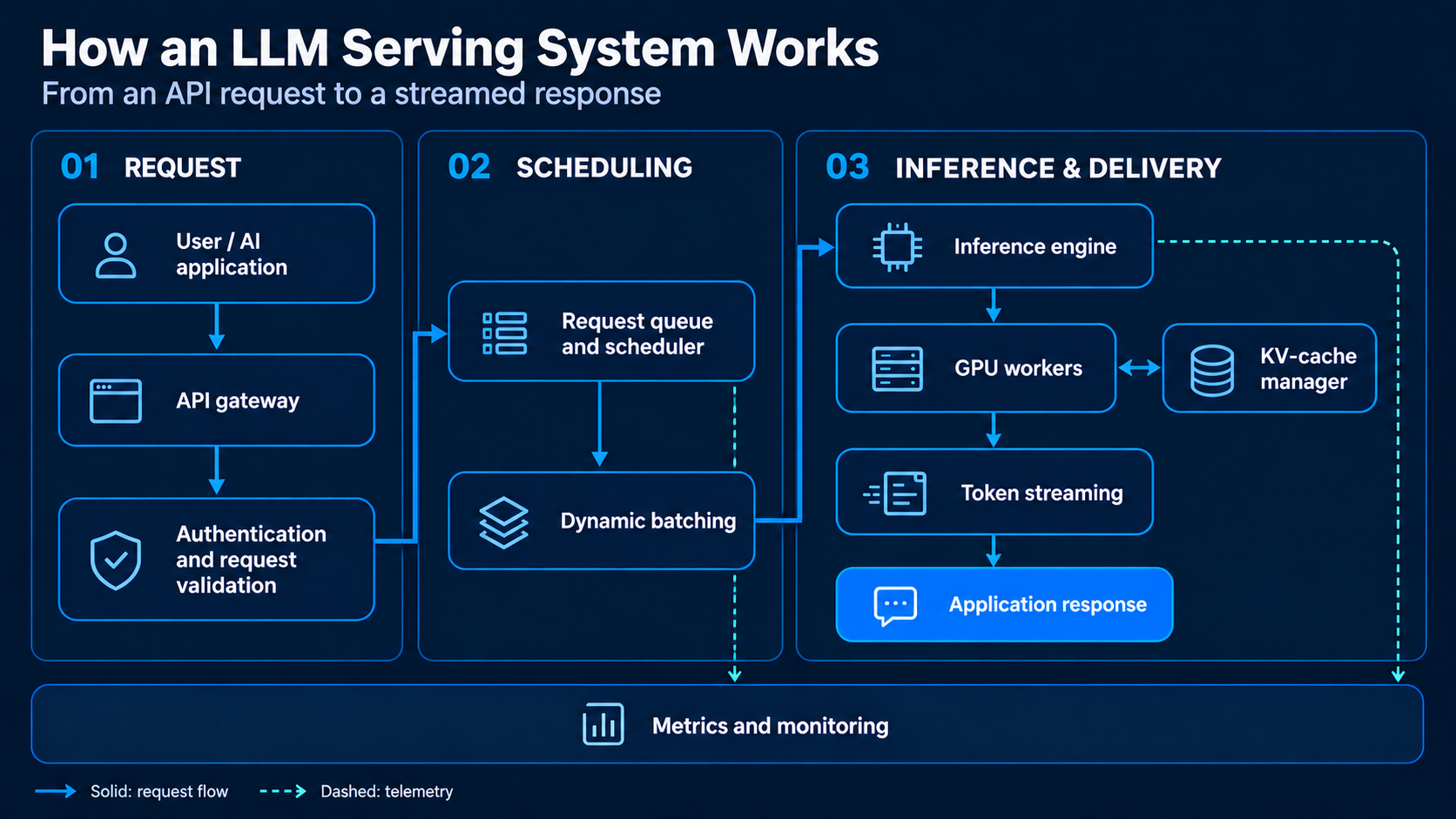
When a request arrives, the API layer validates it before passing it to the scheduler.
- The scheduler determines when the request can execute. The inference engine then manages batching, model execution, and KV-cache allocation.
- GPU workers perform the actual computations, while generated tokens are streamed to the application.
- A monitoring layer collects information about latency, memory usage, request volume, errors, and throughput.
For large-scale deployments, prefill and decode can also be separated across different GPU workers. This allows infrastructure to be tuned for the different requirements of each stage, although transferring KV-cache data introduces additional overhead.
Best Practices for Production Inference
Optimizing a model does not necessarily mean optimizing the entire application.
A few engineering practices make a significant difference:
- Benchmark the actual prompt lengths and traffic patterns expected in production.
- Measure TTFT and TPOT separately.
- Use KV-cache and prefix-cache optimizations for repeated contexts.
- Evaluate quantization against application-specific quality tests.
- Tune batching without ignoring tail latency.
For agentic applications, the same inference process may execute repeatedly during planning, retrieval, tool use, and verification. Reducing unnecessary model calls can sometimes save more time than optimizing an individual inference call.
Conclusion
LLM inference is the foundation of every generative AI application. It determines how quickly models respond, how efficiently hardware is used, and how much it costs to serve users.
Understanding prefill, decoding, KV caching, and GPU bottlenecks makes it easier to diagnose performance issues. Techniques such as quantization, FlashAttention, continuous batching, PagedAttention, and tensor parallelism help address different limitations.
The practical takeaway is simple: inference optimization is not about maximizing a single benchmark number. It is about delivering reliable model quality, low latency, and sustainable cost for a real application.
Read more: Top 10 LLMs and How to Access Them?
Frequently Asked Questions
Q1. What is the difference between training and inference?
A. During training, a model learns patterns by adjusting billions of parameters. During inference, those parameters remain fixed to generate outputs from new inputs.
Q2. Why does the model use a KV cache?
A. The KV cache stores previously computed attention keys and values, allowing the model to reuse them instead of recalculating representations for every new token generated.
Q3. What is the primary bottleneck during the decoding stage?
A. The decoding stage is primarily limited by memory bandwidth, as the system must repeatedly access model weights and KV-cache contents from GPU memory.
Q4. How does quantization improve inference performance?
A. Quantization represents model weights using lower numerical precision, which reduces memory usage and can decrease memory-bandwidth requirements, helping models fit into smaller hardware.
Q5. What does Time to First Token (TTFT) measure?
A. TTFT measures the duration a user waits before the first output token arrives, encompassing queuing time, the prefill stage, and the initial decoding step.
Hi, I am Janvi, a passionate data science enthusiast currently working at Analytics Vidhya. My journey into the world of data began with a deep curiosity about how we can extract meaningful insights from complex datasets.