
In today’s fast-paced business world, it’s very important to get quick and accurate data insights. It is still hard for many companies to get this information in a simple and fast manner. The majority of existing business intelligence solutions and tools require users to know how to use SQL, which means that businesses have to rely on data teams for simple queries, which slows things down at an organization. There are currently “text-to-SQL” tools that can help with this, but Snowflake Cortex Analyst is a huge step forward in this regard. It makes working with data a truly self-service and conversational experience. This article dives into how Snowflake Cortex Analyst makes it easy to get to and understand data insights in the Snowflake Data Cloud, going beyond just translating text to SQL.
Table of contents
The Current State of Data Insights
Getting data from databases used to be a pretty difficult and time-consuming process. For example, a simple business question like “What were our total profits for the new product line in the South region last quarter?” requires a data analyst to write a complex SQL query by joining multiple tables, applying appropriate filters, and summarizing the findings. This process often leads to delays, misunderstandings, and a significant reliance on a limited number of data experts in the organization.
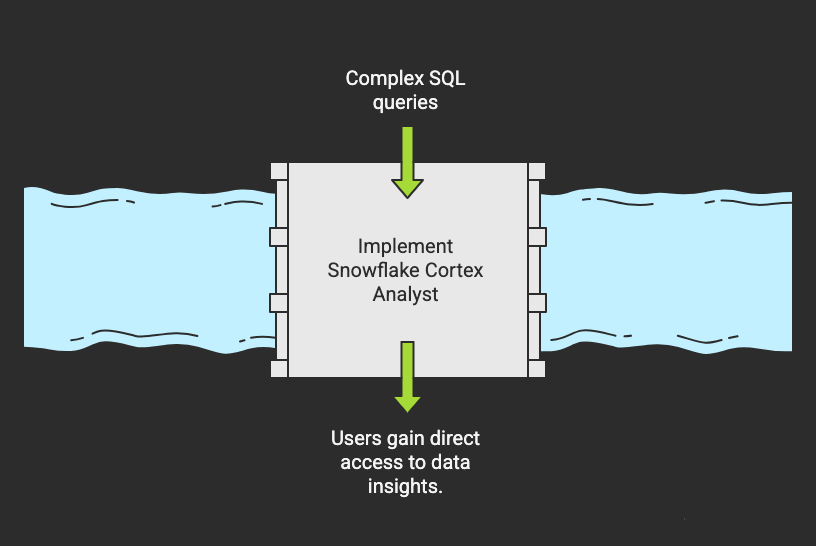
In the beginning, text-to-SQL tools seemed like a good solution. These tools converted natural language queries into SQL. However, users often had to check the generated SQL queries. They also had to fix the SQL because the accuracy was not great.
Recent advancements in AI have changed this. Snowflake recently introduced Snowflake Cortex Analyst. It solves the issues of traditional text-to-SQL tools. This AI-powered data analyst lets users ask questions in plain English. They don’t need SQL expertise. It understands the questions and returns accurate data and insights.
This is a big move. It enables more people to interact directly with data. They don’t need technical knowledge. This fosters a truly data-driven culture.
What is Snowflake Cortex Analyst?
Snowflake Cortex Analyst is an AI-powered analytics service, part of the Snowflake Cortex AI suite. This is designed to simplify data analytics by enabling users to query and extract insights from data using natural language queries. This lets users ask questions in plain English without requiring any technical expertise or SQL knowledge. Behind the scenes, Cortex Analyst converts these natural language queries to SQL queries and presents relevant information to the users.
Snowflake Cortex Analyst leverages Large Language Models (LLMs) to understand the user’s intent and context, thereby generating the appropriate SQL queries to retrieve and analyze information from the Snowflake data warehouse.
This analyst tool is really helpful for non-technical users to interact with data conversationally and to produce quick insights without depending on the internal data experts. It can handle simple data retrieval to complex data aggregations and data analysis. It is designed to work seamlessly in the Snowflake data warehouse and makes it easier for more users to do data analysis interactively.
Key Features of Snowflake Cortex Analyst
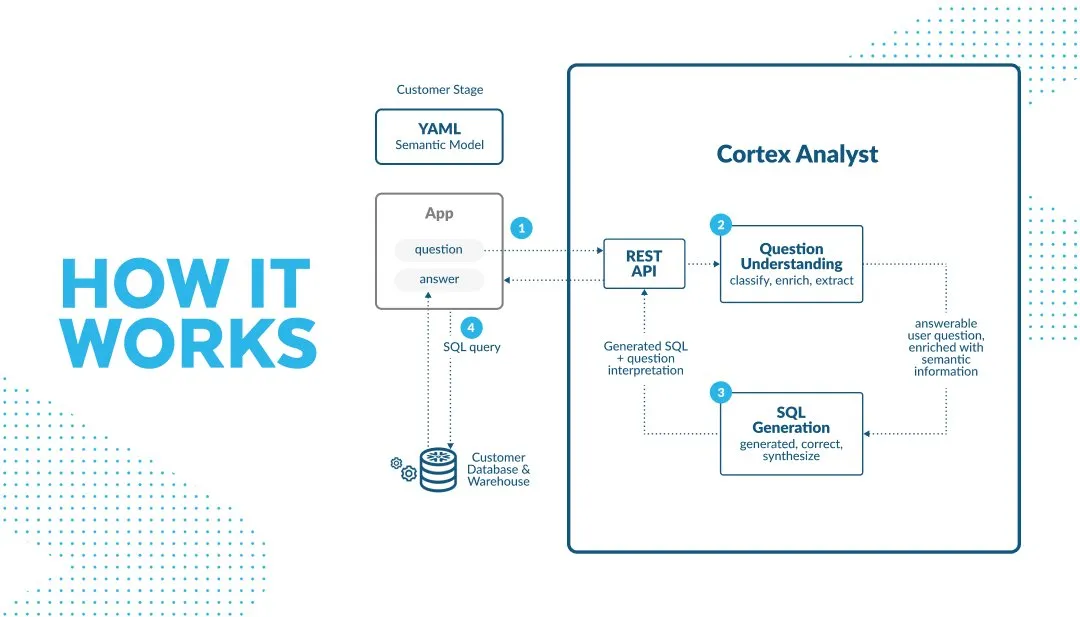
The strength of Cortex Analyst comes from several key features that go beyond its text-to-SQL capabilities:
True Natural Language Understanding
Cortex Analyst utilizes Large Language Models (LLMs) to understand natural language queries and the context and intent behind these queries. This means that Cortex Analyst will still be able to understand natural language questions even if these questions are asked casually and use synonyms. It can act like a true analytical assistant by letting users ask natural language questions and respond back with accurate results.
Semantic Model for Business Context
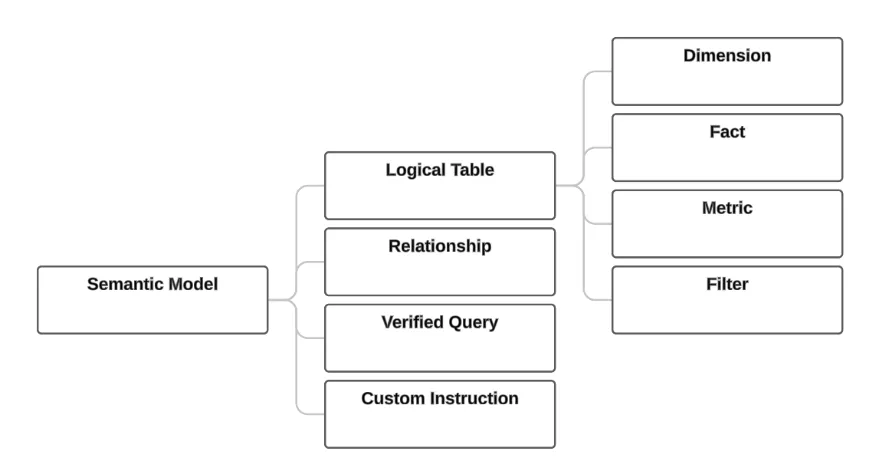
Cortex Analyst works with a semantic model, which is different from traditional tools that work with raw database schemas. This semantic model defines the relationships between tables, measures, dimensions, filters, metrics, business terms, and even synonyms within your company. For example, if your database has a column named “annual_recurring_revenue” and your sales team uses “ARR,” the semantic model makes sure Cortex Analyst sees this relationship, which gives you accurate and reliable results.
Prioritize Insight Over Query Generation
The main goal of Cortex Analyst is to answer business questions, not to simply write SQL. It can provide you with a summary of the results, find connections, explain strange things, and highlight key drivers. For instance, if you ask Cortex Analyst, “Why did customer churn go up last month?” it might not just give you a number; it might also highlight the underlying reasons that led to this increase in churn, like a recent service outage or a change in the pricing structure. This information will be very useful for business users to take any necessary action for any bad events that led to customer churn.
Outstanding Accuracy and Reliability
Cortex Analyst generates SQL that is very accurate and reliable by employing an “agentic AI system” that uses a variety of LLMs and internal validation processes. This advanced method results in a very low error rate and hallucinations that can happen with simple text-to-SQL methods. It often gets over 90% accuracy on real-world BI use cases. It has capabilities for handling complicated joins, figuring out hard literals (such as “India” vs. “IN”), and making sure that business logic is always used the same way.
Native Snowflake Integration
The analyst works completely inside your current Snowflake system because it is a fully managed service in Snowflake Cortex. This has so many benefits, such as:
- No Data Movement: All of the current role-based access controls (RBAC) and data protection rules are followed. This keeps your data safe inside Snowflake’s governance bounds.
- Easier Deployment: No need to worry about complicated infrastructure management or integrations.
- Scalability and Performance: Snowflake’s cloud architecture makes sure that response times are always faster with very low latency, even with larger datasets.
Getting Started with Snowflake Cortex Analyst
To get started with Snowflake Cortex Analyst, follow the steps outlined below:
- Prerequisites: Make sure you have a Snowflake account with appropriate privileges, and check if Cortex AI services are enabled in your region.
- User Access Configuration: Create necessary roles and permissions for users who will use Cortex Analyst.
- Access Cortex Analyst: Go to Cortex Analyst through Snowflake’s UI or integrate it into your application through its API.
- Data Connection and Semantic Model: Connect your data sources and create semantic models that define your data structure along with relationships, measures, dimensions, column meanings, business context, and verified queries.
- Start Asking Questions: Now, start by asking questions in plain English about your data to familiarize yourself, and slowly, advance to more complex analytical questions as you learn more about your data.
Empowering Each Department
The self-service capabilities of Snowflake Cortex Analyst make it easier for people in different business areas to get instant insights:
- Marketing: What are the most recent marketing campaigns that cost the most to get new customers in the South region?
- Sales: What are the key differences between our top five and bottom five accounts this quarter in terms of sales?
- Finance: Give me a breakdown of our operating costs by department, when compared to the same time last year?
- Product Development: Analyze the customer feedback to find out what new features people want the most in our mobile app.
Business stakeholders from different departments for each of the business questions above can get fast, accurate insights without having to understand the underlying complex data structures or write a single line of SQL.
The Future is Conversational
Snowflake Cortex Analyst changes the way people work with data in a significant manner. It eliminates the usual hurdles to accessing data and insights by focusing on natural language, using semantic understanding, and giving immediate access to key insights. This speeds up the time it takes for business users to get insights, which makes the organization more flexible and truly data-driven. The future of data analysis is conversational, and Cortex Analyst is leading in this direction.
Frequently Asked Questions
Q1. How is Cortex Analysts different from other tools for analyzing data?
A. Cortex Analyst does more than just turn natural language questions into SQL. It works like a real data analyst that speaks your company’s language and gives you useful data and insights
Q2. How trustworthy are the results for making business decisions?
A. It does advanced validation behind the scenes and keeps its accuracy above 90% in real-world situations. It’s very reliable, but like with any analytical tool, it’s always a good idea to check the results.
Q3. Is it safe to use Cortex Analyst with data?
A. Yes, for sure. In the current Snowflake environment, everything works with the current security settings. The data never leaves the secure Snowflake platform, and all the access controls that are already in place will stay in place.
Mohan Mannava is a data science & analytics leader, published author, and mentor with over 12 years of experience driving data-powered business transformations across Financial Services, Insurance, Media, and Technology sectors. He specializes in developing comprehensive data strategies, building scalable analytics frameworks, and creating data products that facilitate customer-centric decision making.






