Two short clips. One question: how alike do they look? Sounds trivial, it isn’t, and I learned that the slow way.
My setup: one reference clip, eight others to rank against it, all waterfalls (more on why in a second). I figured this was an afternoon job, grab a model, compute a number, move on. Instead I watched supposedly-smart methods rank near-identical clips in nonsense orders, and the one that looked best on paper was too slow to actually use.
So I benchmarked six methods, same clips, same rules, and judged them accuracy first. A wrong answer in a millisecond is still wrong, so speed only gets a say once a method proves it can rank correctly. Accuracy first, speed as the tiebreaker. Here’s what I found.
Table of contents
- Why this is harder than it sounds
- The six contenders
- Setting up a fair fight
- The techniques, and where each one broke
- Does sampling frames even help?
- Accuracy first, because a fast wrong answer is useless
- Then speed, the tiebreaker
- The surprising winner, and the catch
- The calibration trap nobody warns you about
- So which one should you actually use?
- What’s changed by 2026
- Wrapping up
- Frequently Asked Questions
Why this is harder than it sounds
My first instinct was to just compare pixels. That’s the trap: you’re actually comparing meaning, the subject, colors, light, whether the water crashes or trickles.
Chase meaning and you’re picking from three families, each costing you something. Embeddings sample frames through a model that knows what images mean, smart, but costs milliseconds or API credits. Fingerprints crush each frame to a tiny code, almost free and instant, almost blind to anything subtle. Full multimodal LLMs take the whole video and hand you an opinion, they see the most, they also break the most.
Speed, accuracy, cost. You get two. That’s the whole reason I benchmarked instead of arguing about it.
The six contenders
| Technique | The one-liner | Local? |
| GPT Vision | A vision LLM scores it and tells you why | No |
| Gemini Flash (full video) | A multimodal LLM watches both clips whole | No |
| CLIP embeddings | Neural frame vectors, compared by cosine | Yes |
| Perceptual hash | A 64-bit fingerprint per frame | Yes |
| CV multi-metric | Old-school OpenCV signals, blended | Yes |
| Gemini Embedding 2 | Native multimodal vectors, compared by cosine | No |
Three of these run free on my laptop. Three bill me per call. That split mattered more to me than the accuracy numbers.
Setting up a fair fight
Most benchmarks cheat by testing on an easy set, so I made mine mean on purpose. The reference is a tropical waterfall, sunbeams and wet greenery, and all eight test clips are waterfalls too. That forces every method to win on the fine detail, color cast, light direction, framing, motion, instead of just spotting “there’s water in this one.”
Same input for everyone: six frames per clip, evenly spaced, shrunk to 384×216. Sampling a few frames instead of all of them is normal and barely costs you quality.
The annoying part: no human labels, no budget to make any. So I faked a fair consensus, averaged the first five methods’ scores per clip. Two clips came out on top, including one I’ll call Sample 4 (shown in the 2nd video below) and the original video (the 1st video); everything else gets graded against. Imperfect, but defensible.
The techniques, and where each one broke
I’m skipping the neat pros-and-cons boxes. They didn’t break neatly.
GPT Vision
GPT Vision was the one I actually liked reading, hand it a few frames and it judges theme, color, and mood, writing back something like “differed significantly in visual theme, color palette, and overall mood.” But the numbers underneath were mush, everything scored 50 to 80, bunched together and wobbling between runs. Great at explaining itself, bad at ranking eight near-twins.
Here’s the actual call, trimmed down:
# Grab a few frames from each video, show them side by side to
# GPT-4o-mini, and just ask it to score how similar they look.

def score_with_gpt_vision(ref_frames, test_frames, api_key):
    client = OpenAI(api_key=api_key)

    ref_imgs = frames_to_jpeg_b64(ref_frames[:3])
    test_imgs = frames_to_jpeg_b64(test_frames[:3])

    response = client.chat.completions.create(
        model="gpt-4o-mini",
        messages=[
            {
                "role": "user",
                "content": [
                    {"type": "text", "text": "REFERENCE VIDEO:"},
                    *[image_message(img) for img in ref_imgs],
                    {"type": "text", "text": "TEST VIDEO:"},
                    *[image_message(img) for img in test_imgs],
                    {
                        "type": "text",
                        "text": "Score how closely these match, 0 to 100, JSON only.",
                    },
                ],
            }
        ],
    )

    data = json.loads(response.choices[0].message.content)

    return data["score"], data["feedback"]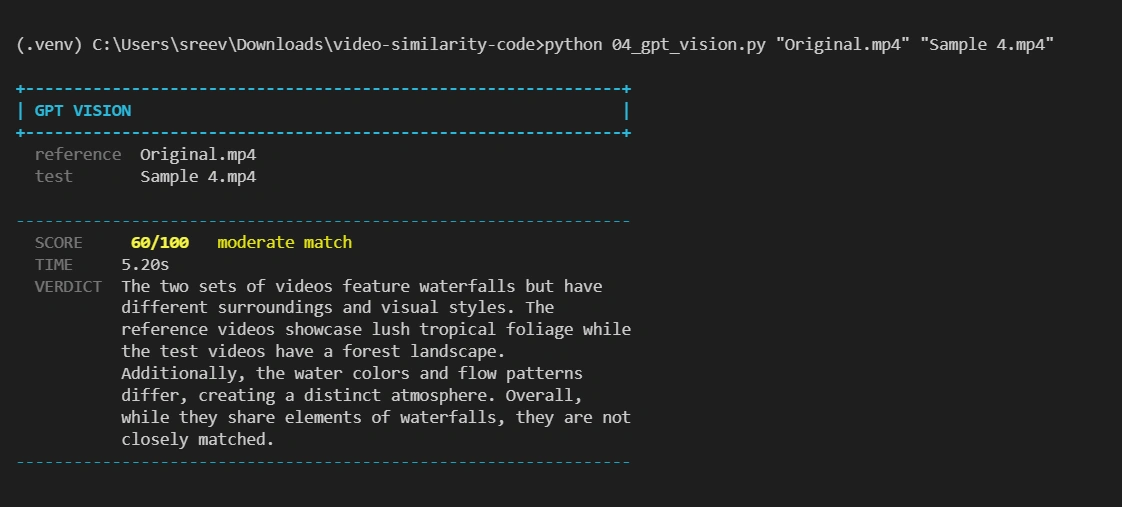
Gemini Flash
Gemini Flash on the full video is the only one that watches real motion, not stills, pacing and camera drift included, a big edge on paper. Then reality showed up: slowest by a mile, and mid-test one clip threw a 503, the fallback hit a 429, and that clip never got a score at all. Dealbreaker for anything live.
Here’s what makes this one different, code-wise:
# Upload both full videos and just ask Gemini to watch and compare.
# The only technique here that actually sees motion, not just stills.

def score_with_gemini_flash(ref_path, test_path, api_key):
    client = genai.Client(api_key=api_key)

    ref_video = client.files.upload(file=ref_path)
    test_video = client.files.upload(file=test_path)

    # Wait for both files to leave PROCESSING state before using them

    prompt = "Compare these two videos for visual similarity. Score 0-100, JSON only."

    response = client.models.generate_content(
        model="gemini-2.5-flash",
        contents=[prompt, ref_video, test_video],
        config={"response_mime_type": "application/json"},
    )

    data = json.loads(response.text)

    return data["score"], data["feedback"]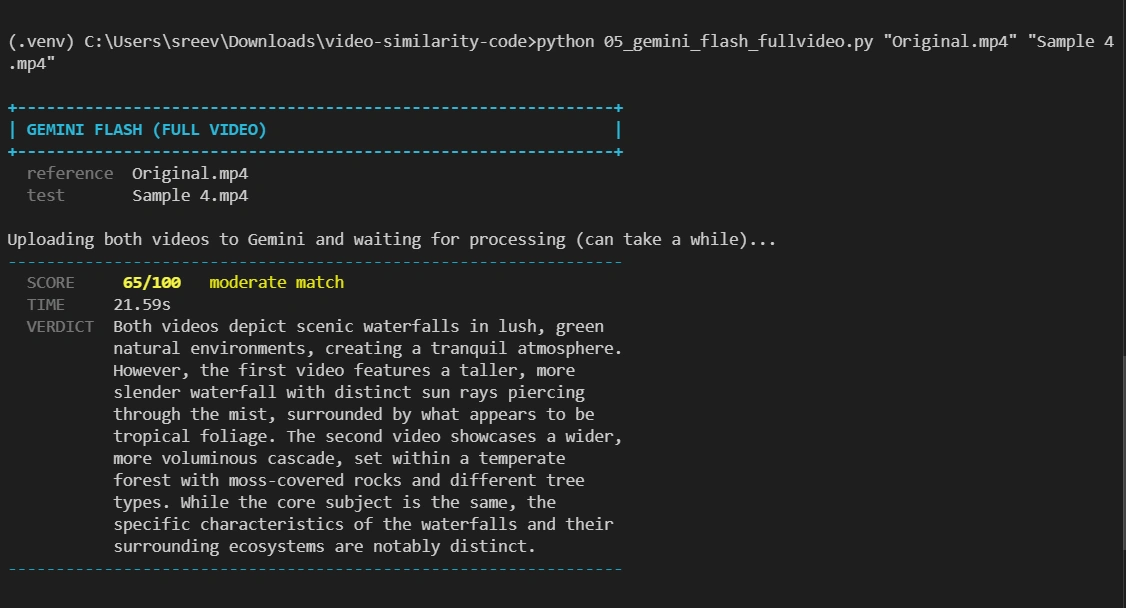
CLIP
CLIP was my bet going in: each frame becomes a vector, you average them, take the cosine. Runs locally in under a second and gave the steadiest scores in the test, though everything clusters in the high 80s and low 90s even for clips that aren’t close. Great for ranking, useless if you want “you scored 88%” to mean anything on its own.
Here’s the whole technique in code:
# Turn every frame into a CLIP vector, average them into one vector
# per video, then just take the cosine between the two.

def embed_video_with_clip(frames, model, preprocess):
    images = [preprocess(to_pil_image(f)) for f in frames]

    with torch.no_grad():
        vectors = model.encode_image(torch.stack(images))

    vectors = vectors / vectors.norm(dim=-1, keepdim=True)

    # One vector for the whole video
    return vectors.mean(dim=0).numpy()


ref_vec = embed_video_with_clip(ref_frames, model, preprocess)
test_vec = embed_video_with_clip(test_frames, model, preprocess)

similarity = cosine_similarity(ref_vec, test_vec)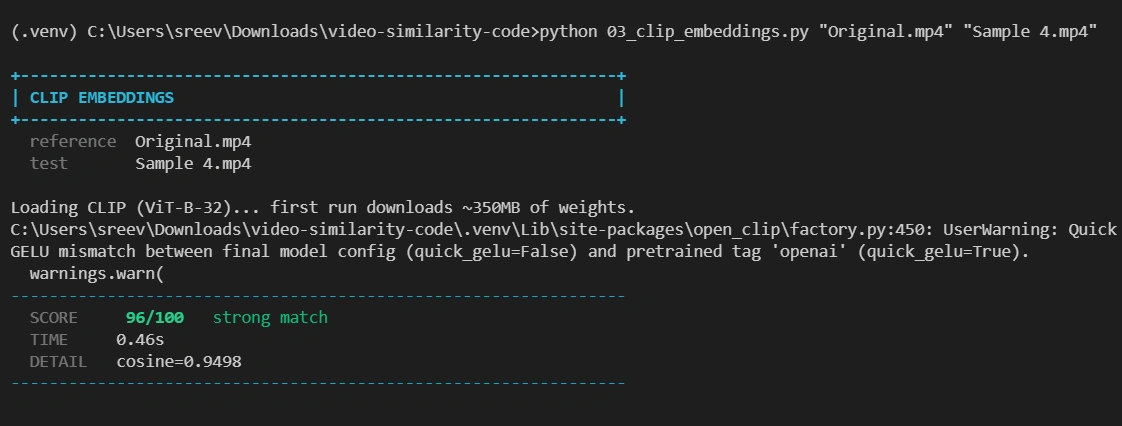
No API call in sight. Once the model’s downloaded, this all runs on your own machine.
Perceptual hash is fifty times faster than anything else, no model to even load. As a judge though, nearly useless here, it’s a bouncer, not a critic. (Exact number coming up, funnier than I expected.)
And here’s the entire thing, no model required:
# Hash every frame down to a tiny fingerprint, then measure
# how many bits differ. No model, no API, just bit-counting.

def phash_similarity(ref_frames, test_frames):
    ref_hashes = [imagehash.phash(to_pil_image(f)) for f in ref_frames]
    test_hashes = [imagehash.phash(to_pil_image(f)) for f in test_frames]

    similarities = []

    for rh in ref_hashes:
        # Smallest Hamming distance
        closest = min(rh - th for th in test_hashes)

        # 64-bit hash
        similarities.append(1.0 - closest / 64)

    return sum(similarities) / len(similarities)
That’s the whole bouncer. Fast because it isn’t actually looking at anything, just counting flipped bits.
CV multi-metric is what I’d build to see inside a score, four old-school signals weighted by hand:
composite = 0.30 * color  # HSV histogram

       + 0.35 * struct # SSIM

       + 0.20 * temporal   # temporal color profile

       + 0.15 * edge   # edge density
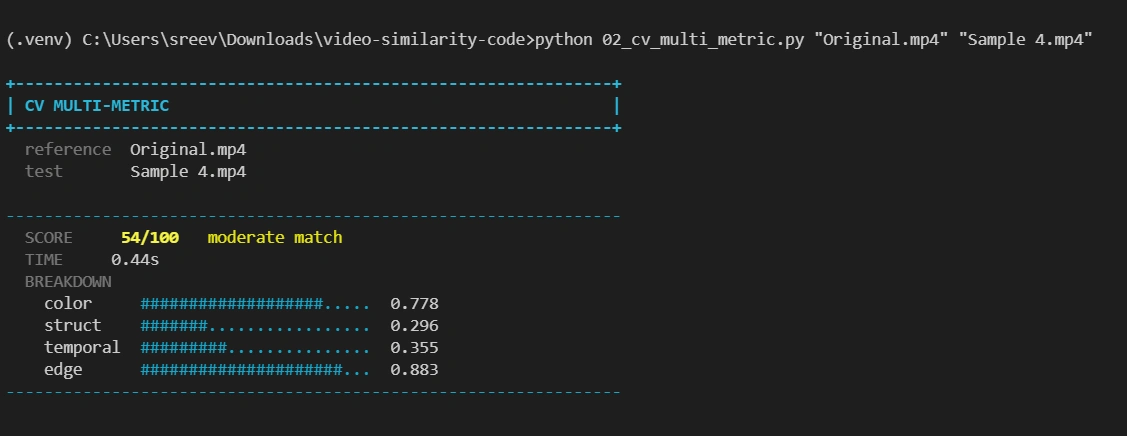
One quirk that showed up: different metrics can wildly disagree on the same clip. SSIM punishes any framing shift hard, while a temporal color-profile check barely notices it, so the same video can score a 99 on one signal and an 18 on another.
Gemini Embedding 2 is CLIP’s idea after it grew up. Same move, embed then pool then cosine, but the embedding comes from a model built to handle image, video and text in one 3072-dimensional space.
Here’s what that actually looks like in code, trimmed down to the part that matters:
# Just read the whole video file and hand it to Gemini as one blob.
# No frames, no pooling, one API call per video.

def embed_full_video(video_path, api_key):
    with open(video_path, "rb") as f:
        video_b64 = base64.b64encode(f.read()).decode()

    body = {
        "content": {
            "parts": [
                {
                    "inline_data": {
                        "mime_type": "video/mp4",
                        "data": video_b64,
                    }
                }
            ]
        }
    }

    resp = requests.post(f"{EMBED_URL}?key={api_key}", json=body)

    return np.array(resp.json()["embedding"]["values"])


# Embed both videos, then just compare the two vectors

ref_vec = embed_full_video("Original.mp4", api_key)
test_vec = embed_full_video("sample_1.mp4", api_key)

cos = cosine_similarity(ref_vec, test_vec)

# Stretched onto a friendly 0-100
score = cosine_to_score(cos)
Does sampling frames even help?
Quick side test: if sampling frames works for CLIP, does it work the same way for Gemini’s embedding model? I tested one video at 4, 8, 16, 32, and 64 frames against sending the whole video in one shot.
| Method | Cosine | Score | Time |
|---|---|---|---|
| 4 frames | 0.91283 | 65 | 5.26s |
| 8 frames | 0.91674 | 67 | 7.56s |
| 16 frames | 0.92196 | 69 | 8.78s |
| 32 frames | 0.92540 | 70 | 10.65s |
| 64 frames | 0.92476 | 70 | 14.6s |
| Full video | 0.93156 | 73 | 7.19s |
4 to 32 frames buys 5 extra score points (65 to 70) but doubles the time (5.26s to 10.65s). Push to 64 frames and only the time moves, up to 14.6s. Full video beats all of them on accuracy (73) while being faster than anything past 4 frames.
Here’s the actual function, kept as simple as I could make it:
# Grab a handful of frames from the video, embed each one,
# then average them into a single vector. Same idea as CLIP,
# just using Gemini's embedding model instead.

def embed_video_by_frames(video_path, frame_count, api_key):
    frames = grab_frames(video_path, frame_count)
    vectors = []

    for frame in frames:
        jpeg = frame_to_jpeg_b64(frame)
        vec = embed_one_frame(jpeg, api_key)
        vectors.append(vec)

    # Average all the frame vectors into one video vector
    return np.mean(vectors, axis=0)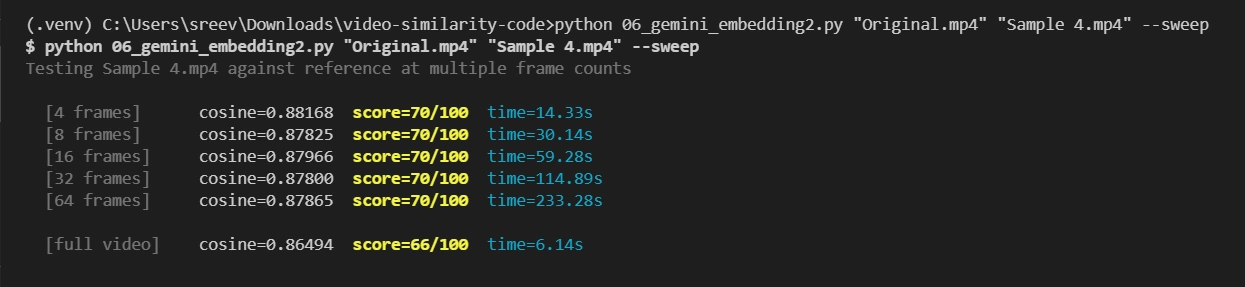
So that settles it: more frames doesn’t buy better accuracy past a point, just a longer wait. Full video wins both ways.
Costs money, costs a few seconds. I walked in rolling my eyes at the latency. I walked out having shipped it. The next section is why, and it’s all about accuracy.
Accuracy first, because a fast wrong answer is useless
This is the one that actually matters, so I looked at it before I looked at the clock.
Two questions. How many of the three consensus favorites did each method find? And how closely did its full ranking track the consensus overall?
| Technique | Accuracy vs. Consensus |
|---|---|
| GPT Vision | 77% — Good |
| CLIP embeddings | 74% — Good |
| CV multi-metric | 75% — Good |
| Gemini Embedding 2 | 93% — Excellent |
| Gemini Flash (full video) | 88% — Very good |
| Perceptual hash | -8% — Worse than a coin flip |
There’s the perceptual hash number I promised: -8%. Negative. Its ranking leans very slightly backwards from the consensus. A coin would have done about as well. That alone knocks it out as a judge, no matter how fast it is.
And then the one that made me sit up. Gemini Embedding 2 found only two of the three favorites, yet it posted the best accuracy of the lot, 93%.
How does the best-correlating method miss a top-3 pick? Because the miss was a fake tie.
Look at the raw numbers: the top few clips all landed within a hair of each other, while the next clip down had a real, clear gap below them.
So the model ranked two very close clips in a slightly different order than the consensus did, and that one swap is what the top-3 count punished it for. The rank correlation saw straight through that.
I honestly assumed CLIP would top this table. It didn’t. Not close.
So here’s where I stood after this table. Three of the local methods can rank correctly, and two of the API methods rank even better. Perceptual hash is out. Only now does speed get a say, and only among the ones still standing.
Then speed, the tiebreaker
Now that I knew which methods could actually rank the clips, speed got to decide between them. Not before. A method that can’t rank right doesn’t earn speed-credit, it just gets cut.
| Technique | Avg time / video |
|---|---|
| Perceptual hash | 0.015s |
| CV multi-metric | 0.080s |
| CLIP embeddings | 0.78s |
| GPT Vision | 2.9s |
| Gemini Embedding 2 | ~7.2s |
| Gemini Flash (full video) | 21.5s |
Fastest to slowest is roughly a 1,400x gap. Not a typo. Fourteen hundred times.
Stare at that and the full-video LLM writes its own rejection letter for anything with a person waiting. It ranked well (88%), but clever doesn’t help when clever takes 21 seconds and sometimes returns nothing at all.
So it came down to two. CLIP is basically free in under a second. Gemini Embedding 2 is the more accurate one but costs about seven seconds. That’s the real fight, and it’s the next section.
The surprising winner, and the catch
I shipped Gemini Embedding 2.
The case is 93%. Sit with what it means: the model agreed with a panel of five independent methods more tightly than those methods agreed with their own panel. One call, roughly the whole committee’s verdict.
And the latency I griped about? I buried it. If your interface already has the user busy for a few seconds with something else, the scoring runs underneath and nobody ever watches a spinner.
Now the catch, because this is where most write-ups go quiet and pretend there isn’t one. If you can’t hide the wait, the whole thing flips.
Picture a search box with someone tapping their foot. Seven seconds there is a disaster, and I’d ship local CLIP in a heartbeat and never feel bad about it.
Embedding 2 won my constraints. Yours get a vote. Don’t let a blog (this one included) make that call for you.
The calibration trap nobody warns you about
Skip everything else if you want. Don’t skip this. It’s the part that quietly ate an afternoon of mine.
A cosine of 0.88 means nothing particularly insightful. So you stretch it onto a 0 to 100 scale. Fine.
The trap: every model’s stretch is different. Copy one model’s settings onto another and your scores go haywire.
Different models park “totally unrelated” at different cosines. CLIP puts two unrelated images somewhere around 0.2 to 0.5, so its floor sits at 0.20. Gemini Embedding 2 crams everything higher and tighter. Even genuinely unrelated clips rarely dropped below 0.75, so its floor is 0.75.
| Model | Cosine -> 0 | Cosine -> 100 |
|---|---|---|
| CLIP | 0.20 | 0.98 |
| Gemini Embedding 2 | 0.75 | 1.00 |
Reuse CLIP’s 0.2 floor on Gemini and watch every clip score in the 90s. Then watch someone file a bug that says “the scores are broken, everyone’s getting 90%.”
The scores aren’t broken. The floor is. That complaint is almost never the model, it’s almost always this. Check your own model’s real cosine range first, then set the floor. Borrowed numbers lie.
So which one should you actually use?
There’s no “best.” Only best for your case. Here’s the cheat sheet I’d hand a teammate:
| If you’re… | Use | Because |
|---|---|---|
| Chasing accuracy and can hide the wait | Gemini Embedding 2 | 93% vs consensus, multimodal |
| Offline, privacy-bound, or broke | CLIP embeddings | Sub-second, free, steady ranking |
| Filtering a firehose before a real model | Perceptual hash | 15ms, kills obvious mismatches |
| On the hook to explain every score | CV multi-metric | You can read every sub-signal |
| Showing users words, not a number | GPT Vision | It writes the reason out loud |
| Studying real motion, time to burn | Gemini Flash (full video) | The only one that truly sees movement |
The move that beats picking one: stack them. Cheap filter up front (hash or CLIP), expensive judge only on the survivors. You get speed and quality both, and the bill drops hard. I didn’t build it that way the first time. I would now.
What’s changed by 2026
One honest caveat: I leaned on CLIP as the local baseline of all articles because the tooling’s everywhere, but it’s not the sharpest option anymore. DINOv3, trained on images alone with no captions, tends to beat it on fine-grained similarity now. SigLIP 2 and Meta’s Perception Encoder push retrieval further still.
And if motion matters to you, video-native encoders like V-JEPA 2 and VideoPrism now bake temporal structure right into the embedding, the one thing frame-by-frame CLIP can never do.
Real takeaway: don’t weld your pipeline to one model. Wrap it so you can swap encoders in an afternoon, because a better one lands every quarter now. Embedding 2 won this round. The shape (embed, pool, cosine, calibrate) is what lasts.
Wrapping up
So, after all that. Video similarity is a tug-of-war between speed, accuracy and cost, and nothing wins all three at once.
Hashing is instant and shallow. The CV blend is transparent but miscalibrated. The big LLMs are insightful but flaky. Frame embeddings sit in the sweet spot.
On my deliberately brutal all-waterfall set, Gemini Embedding 2 tracked a five-method consensus at 93% and stayed fast enough to hide. That’s why I shipped it.
Three things I’d actually tell you. Benchmark on your own footage, not someone’s blog table. Calibrate to the model you actually picked. And keep the whole thing loose enough to rip the model out when the next one lands. Which it will, probably right after you finish reading this.
Frequently Asked Questions
Q1. What’s the easiest way to compare two videos in code?
A. Pull a few frames from each, embed them with CLIP, average the vectors, take the cosine. Free, local, a handful of lines, solid ranking in under a second. Start there. Get fancy only if it forces you to.
Q2. Is plain pixel comparison ever fine?
A. For exact-duplicate detection of the same file, sure. For anything else, no.
Q3. Why cosine and not Euclidean distance?
A. Cosine cares about which way two vectors point, not how long they are, and direction is where the meaning lives. Two frames can at different magnitudes and still point the same way, and cosine catches that they’re alike where a raw distance might not. Honestly you can just use it and move on.
Q4. How many frames should I sample?
A. I used six in the benchmark and four in production, and four to eight is plenty for most short clips. If your video cuts fast or runs long, sample more, or sample by scene instead of by clock. No magic number, just don’t pay to process every frame when six tell the same story.
Q5. Do I have to pay for an API?
A. No. CLIP, perceptual hash and the OpenCV metrics all run on your own hardware for free. A hosted model buys better ranking, and you pay for it in latency and dollars. That’s a trade you choose, not a tax you owe.
Hi , I am Sree Vamsi a passionate Data Science enthusiast currently working at Analytics Vidhya. My journey into data science began with a curiosity for uncovering insights from complex data and has evolved into building end-to-end Generative AI applications, RAG pipelines, agentic AI workflows, and multi-agent systems that solve real-world business problems.