Git can feel like a puzzle until you learn the key moves. In this guide, you’ll find the top 20 Git commands, ordered by how often they are used. Each entry starts with a quick “What it does” summary, followed by an image displaying its functionality. No walls of text, no unexplained flags, no perusing through the documentation. Just practical, bite-size entries that you can use as a cheat sheet. Let’s make Git simple, fast, and fun.
Table of contents
- 1. git commit
- 2. git status
- 3. git add
- 4. git push
- 5. git pull
- 6. git clone
- 7. git branch
- 8. git checkout
- 9. git merge
- 10. git log
- 11. git diff
- 12. git stash
- 13. git init
- 14. git fetch
- 15. git reset
- 16. git revert
- 17. git rebase
- 18. git show
- 19. git cherry-pick
- 20. git bisect
- Best Practices
- Conclusion
- Frequently Asked Questions
1. git commit
Creates a new commit from staged changes, assigning a snapshot ID and message.
git commit -m []Example:

The command records “First commit” and displays its commit hash and summary.
*You can only commit if you’ve staged first
2. git status
Reports untracked, modified, and staged files to indicate the next steps.
git status []Example:
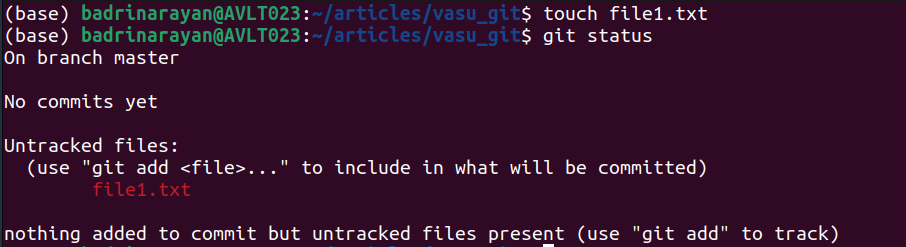
We can see that file1.txt is appearing red, which indicates that git has not started tracking this file.
3. git add
Stages specified file changes, moving them into the index for the next commit.
git add .Example:
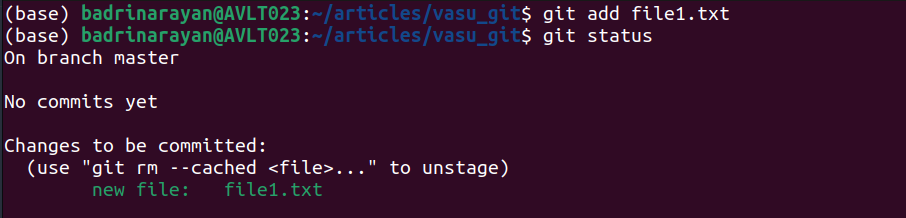
The output (using status command) confirms that file1.txt has been added to the staging area.
4. git push
Sends your local commits on a branch up to a remote repo.
git pushExample:
git push origin mainUploads your main branch commits to “origin”.
5. git pull
Fetches and merges changes from a remote branch into your current branch.
git pull [] []Example:
git pull origin devGets origin/dev and merges it into what you’ve checked out.
6. git clone
Creates a local copy of a remote repository.
git clone []Example:

The clone process fetches objects and deltas, creating an AV_Article_Codes folder.
7. git branch
Lists, creates, or deletes branches in your repo.
git branch [] []Example:

In the example, a new branch test is created alongside master.
8. git checkout
Switches to another branch or restores files from a specific commit.
git checkout <branch|commit> [--] []Example:

The output indicates a successful switch from master to the test branch.
9. git merge
Integrates another branch’s commits into your current branch.
git merge [--no-ff]Example:
git merge --no-ff feature/apiMerges feature/api and always creates a merge commit.
10. git log
Displays the project’s commit history in reverse chronological order.
git log []Example:

The log lists the commits – “First commit” along with its timestamps and authors.
11. git diff
Shows line-by-line differences between commits, branches, or index vs. working tree.
git diff [--staged] […]Example:

Using --staged displays the diff of a newly added file3.txt ready for commit.
12. git stash
Temporarily saves uncommitted changes, cleaning the working directory.
git stash [save ]Example:
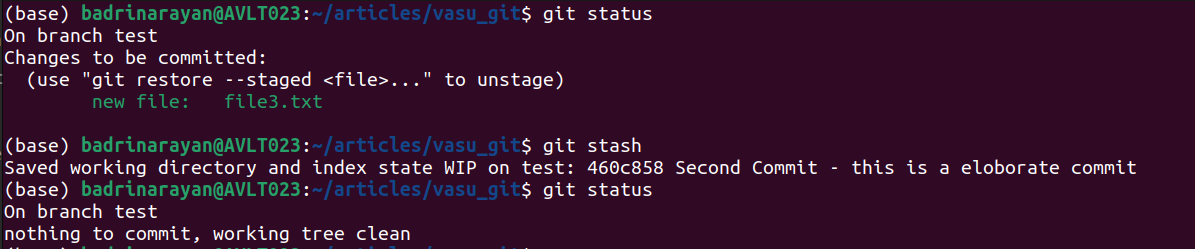
Stashing records the current state on branch test and returns a clean working tree.
13. git init
Initializes a new Git repository by creating a .git directory and displaying branch-naming hints.
git init []Example:
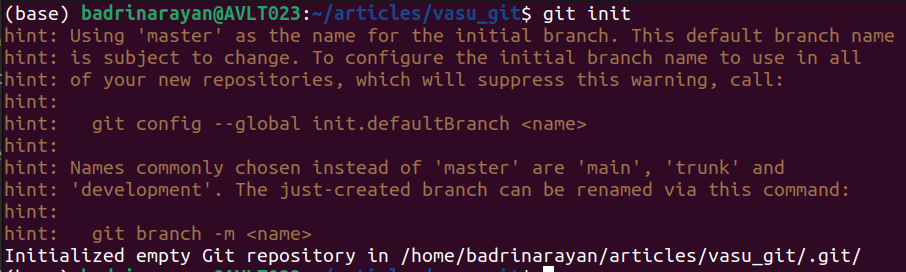
The example shows repository initialization with guidance on renaming the default branch.
14. git fetch
Downloads commits and refs from a remote without merging them.
git fetch [] []Example:
git fetch --allPulls updates from every configured remote.
15. git reset
Moves your HEAD and optionally updates the index or working tree.
git reset [] []Example:
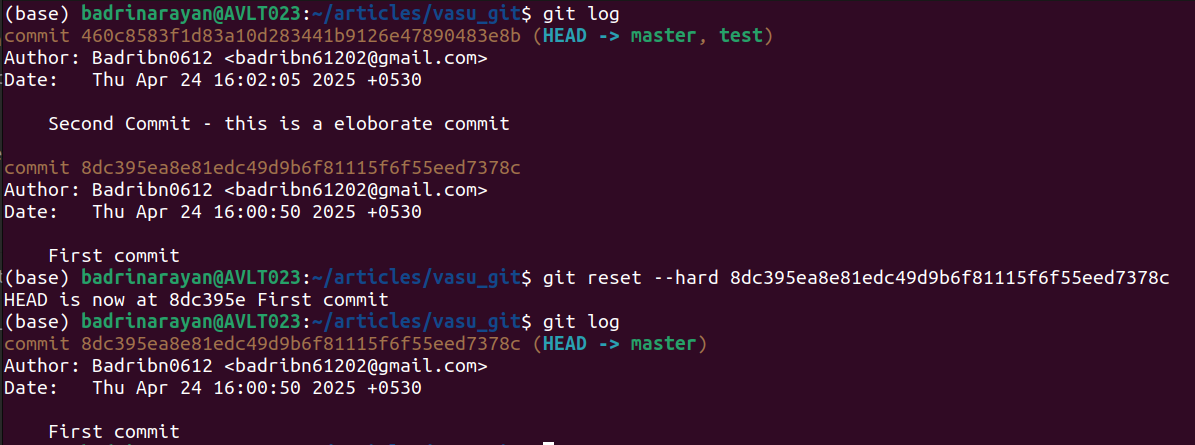
A hard reset to the first commit discards later changes and resets HEAD accordingly.
16. git revert
Creates a new commit that undoes changes from a past commit.
git revertExample:
git revert a1b2c3dAdds a commit that reverses a1b2c3d without rewriting history.
17. git rebase
Moves your commits onto a new base, keeping history linear.
git rebase [-i]Example:
git rebase -i mainLets you reorder, squash, or edit commits interactively.
18. git show
Displays metadata and patch details for a given commit or object.
git show []Example:
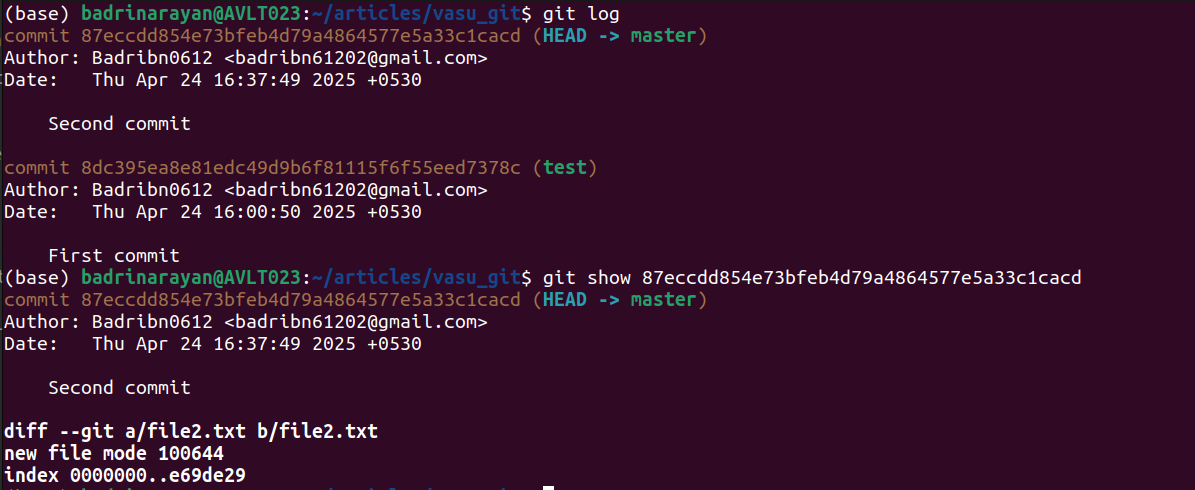
Showing a specific hash prints its author, date, commit message, and the diff of file2.txt.
19. git cherry-pick
Applies one specific commit from another branch onto your current HEAD.
git cherry-pickExample:
git cherry-pick f4e5d6cPulls that single change into your branch
20. git bisect
Automates a binary search to find which commit introduced a bug.
git bisect [good/bad/start]Example:
git bisect start; git bisect bad; git bisect good v1.0Narrow down the bad commit in a few steps.
Best Practices
Here are some of the go-tos when it comes to git commands:
- Keep commits small: Focus each commit on one change and write clear messages.
- Use branches: Do feature work on its own branch, then merge via pull requests.
- Stash before switching: Avoid half-done commits by stashing WIP changes first.
- Rebase locally: Clean up your branch history before sharing, but never rebase shared branches.
- Review with diff/log: Always glance at git diff and git log before pushing.
Conclusion
You now have the top 20 Git commands, each with a quick “what it does,” and a one-line example. Start by practicing the first five until they’re second nature, then add branching, merging, rebasing, and stashing to your muscle memory. Keep this list handy in Google Docs or your sticky notes. You can visit this guide if you are new to Git or GitHub to get a head start. With these commands under your belt, you’ll spend less time wrestling with version control and more time writing code. Go ahead, open your terminal and level up your Git game!
Frequently Asked Questions
How do I undo changes in a file before committing?
Use git checkout — <file> to discard unstaged edits and restore the last committed version.
What’s the easiest way to combine multiple commits into one?
Run git rebase -i <base> and squash the commits you want to merge into a single, tidy commit.
How can I pause my work and come back later without committing half-finished code?
Stash your changes with git stash and reapply them when you’re ready using git stash pop.
What’s the real difference between git fetch and git pull?
Git fetch downloads updates from the remote without touching your files, while git pull fetches and merges in one step. The two git commands might seem similar in their functionality, but their applications are vastly different.
How do I track down the commit that introduced a bug?
Use git bisect to do a binary search through your history and pinpoint the exact bad commit.
Studying, evaluating, and explaining AI systems for over 6 years.
“𝘖𝘯𝘤𝘦 𝘮𝘦𝘯 𝘵𝘶𝘳𝘯𝘦𝘥 𝘵𝘩𝘦𝘪𝘳 𝘵𝘩𝘪𝘯𝘬𝘪𝘯𝘨 𝘰𝘷𝘦𝘳 𝘵𝘰 𝘮𝘢𝘤𝘩𝘪𝘯𝘦𝘴 𝘪𝘯 𝘵𝘩𝘦 𝘩𝘰𝘱𝘦 𝘵𝘩𝘢𝘵 𝘵𝘩𝘪𝘴 𝘸𝘰𝘶𝘭𝘥 𝘴𝘦𝘵 𝘵𝘩𝘦𝘮 𝘧𝘳𝘦𝘦. 𝘉𝘶𝘵 𝘵𝘩𝘢𝘵 𝘰𝘯𝘭𝘺 𝘱𝘦𝘳𝘮𝘪𝘵𝘵𝘦𝘥 𝘰𝘵𝘩𝘦𝘳 𝘮𝘦𝘯 𝘸𝘪𝘵𝘩 𝘮𝘢𝘤𝘩𝘪𝘯𝘦𝘴 𝘵𝘰 𝘦𝘯𝘴𝘭𝘢𝘷𝘦 𝘵𝘩𝘦𝘮.” — 𝖥𝗋𝖺𝗇𝗄 𝖧𝖾𝗋𝖻𝖾𝗋𝗍, 𝖣𝗎𝗇𝖾