
AI and machine learning have pushed the demand for high-performance hardware, making the GPU-versus-TPU discussion more relevant than ever. GPUs, originally built for graphics, have grown into flexible processors for data analysis, scientific computing, and modern AI workloads. TPUs, built by Google as specialized ASICs for deep learning, focus on high-throughput tensor operations and have even powered training runs like Gemini 3 Pro. Sorting between the two comes down to architecture, performance, scalability, energy efficiency, and cost for your specific workload. In this article, we break down those differences so you can choose the right hardware for your AI needs.
Table of contents
What is a GPU?
A graphics processing unit (GPU) is a computer processor that is optimized for running many tasks simultaneously. Because most GPUs contain thousands of processing cores that can all work at the same time, they are designed to be used in parallel to render graphics in games. However, GPUs are also very well-suited to performing calculations that can be executed in parallel with other calculations. As a result, GPUs from AMD and NVIDIA are used by many scientific researchers, video editors, and those using machine learning (ML) and deep learning (DL) models. For example, deep learning frameworks like TensorFlow and PyTorch take advantage of the GPU’s ability to process many computations simultaneously in order to train a neural network using a massive amount of data.
Architecture Overview
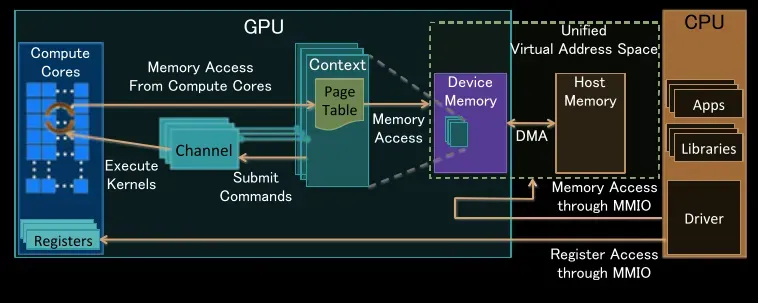
GPUs take advantage of many processing cores (compute units) to achieve parallel processing. For example, high-end NVIDIA GPUs contain thousands of thousands of CUDA cores grouped into Streaming Multiprocessors (SMs). These cores can run similar operations such as multiply-add in parallel with each other. A large number of high-bandwidth memory (GDDR or HBM) enables these cores to receive data for computation. This architecture allows GPUs to work with multiple pieces of information at the same time – this is important for processes that can be divided into smaller pieces and executed in parallel.
- NVIDIA, for example, has introduced Tensor Cores (in several architectures) designed to speed up Matrix Multiply for deep learning applications.
- Modern NVIDIA GPUs support mixed precision; by utilizing both half-precision (FP16) and full precision (INT8) for computations, they increase throughput while maintaining accuracy.
- Combining many parallel processing cores and fast memory gives NVIDIA GPUs the ability to execute an incredible number of computational operations per second; for example, the NVIDIA A100 currently operates at approximately 312 teraflops (TFLOPS) in mixed-precision mode.
In practice, this means that GPU processors are well-suited to perform tasks that can be vectorized or parallelized efficiently. For example, they excel at performing Matrix and Vector operations; therefore, they excel at performing neural networks. However, modern GPUs can perform many types of parallelized algorithms/workflows that they are designed for graphics rendering not just AI.
Applications of GPUs
While gaming is certainly one key use of GPU’s, it is far from the only use. Other examples of how GPUs can be applied include:
- Real Time Graphics: Rendering 3D models and images at high frame rates (high quality) in 2D and 3D games / VR environments; Scientific Visualization.
- Video Editing & Production: Speeding up video encoding/decoding (when creating videos or DVDs), applying effects, and performing editing tasks.
- AI/ML Acceleration: Speeding up the process of training (or running) ML models. Most modern ML models are trained on very large matrices (the matrix size is equal to the number of pixels in the image) and involve a process called convolution at training time.
- Deep Learning Training: Because of the thousands of cores that are available in a modern GPU and their ability to work in parallel (to do many things simultaneously), modern GPUs are best suited for training Convolutional Neural Networks (CNN) on large datasets.
- High Performance Computing (HPC): Running the most intense scientific simulations or large-scale data analytics using parallel processing.
- Cryptocurrency Mining: Performing a very large number of hash calculations in parallel (using parallel processing) that are required for Proof of Work cryptocurrencies.
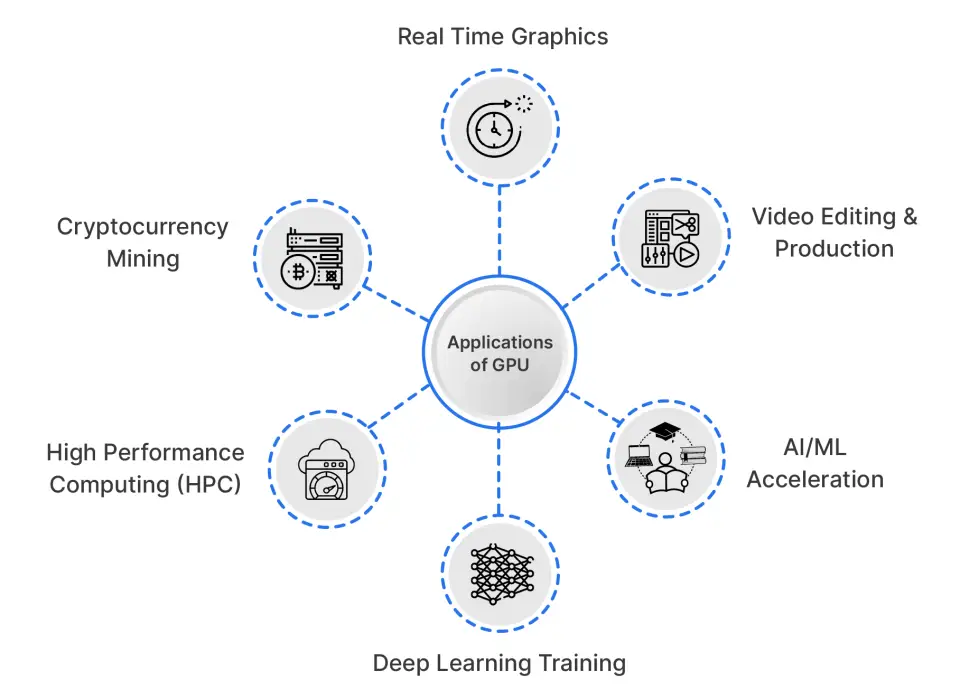
All these applications rely on the parallel architecture that defines modern GPUs. A single GPU can render a complex 3D scene in real time and also train a CNN by processing many images at once.
Tired of reading? You can watch the following short to understand this content easily: YouTube
What is a TPU?
In 2016 Google introduced a proprietary chip specifically designed for Machine Learning (ML) are known as Tensor Processing Units (TPUs). TPUs focus on the tensor operations that form the foundation of Neural Networks to provide superior performance. The Ironwood (7th) generation TPU, to launch in 2025, will optimize speed related to Inference Tasks (4x faster than previous generations).
TPUs will primarily be made available through Google Cloud, and they are compatible with TensorFlow and JAX. TPUs were built with a strong focus on energy efficiency, allowing large-scale deployments where thousands of chips run massive AI workloads. Google describes them as engineered specifically for AI computation, which explains why they’re better suited for deep learning than CPUs or GPUs.
Architecture Overview
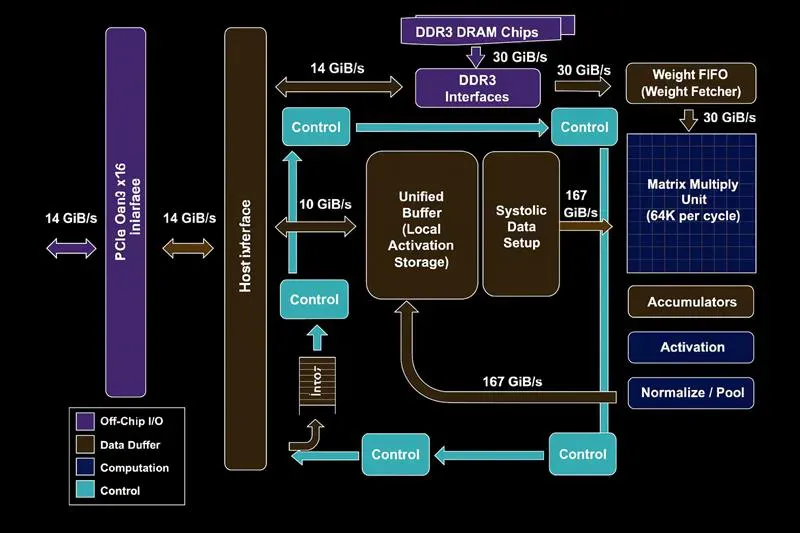
The TPU architecture provides efficient communication for matrix multiplication by employing a systolic array configuration to minimize memory latency for tensor computations. The TPU architecture was designed with deep learning in mind, and as such, TPUs provide the following benefits over other architectures:
- Systolic Array: Each TPU chip contains several large matrix-multiplication units that work together to perform an enormous number of multiplications and additions rapidly and simultaneously. For example, TPU v5 can execute approximately 550+ billion floating-point operations per second, using bfloat16 precision on each chip.
- High Bandwidth Memory (HBM) and On-chip Scratchpad: Each TPU has a vast amount of very high-speed memory located close to the compute units, thus minimizing the time required to access the weight and data for tensor operations. Data is frequently moved from the TPU’s scratchpad (VMEM) into the matrix-multiplication units for optimal and continuous processing.
- Low Precision Optimization: TPUs utilize lower-precision numeric formats such as bfloat16 or INT8 to create more throughput while minimally affecting accuracy compared with higher-precision numeric formats. In addition, TPUs perform more operations per watt of power than other architectures.
TPUs can outperform GPUs in many situations where workloads take advantage of TPUs’ high-density linear algebra capabilities while processing large tensors with minimal overhead.
Applications of TPUs
TPUs are utilized to handle the majority of AI workloads focusing on inference and take advantage of mass production in such tasks as Google Search, Recommendations, and Developers who can fit multiple workloads onto a single TPU (a cost effective way to scale in a cloud environment).
- Large TensorFlow Training: TPUs are built to train huge TensorFlow models, which is how Google handles most of its own workloads.
- Training Google-Scale Models: They power massive systems like Gemini and PaLM that need enormous compute capacity.
- Faster Batch Jobs: For big datasets and fixed model designs, TPUs can process batch jobs much faster than general-purpose hardware.
- High-Performance Batch Training: They shine when training large batches of images or text, reaching their highest throughput at big batch sizes.
- Efficient Large-Scale Inference: TPUs handle repeated tensor operations efficiently, making them ideal for serving very large models in production.
- TPU Pods for Massive Models: Academia and industry use TPU Pods to spread training across many units, cutting down the time needed for enormous research models.
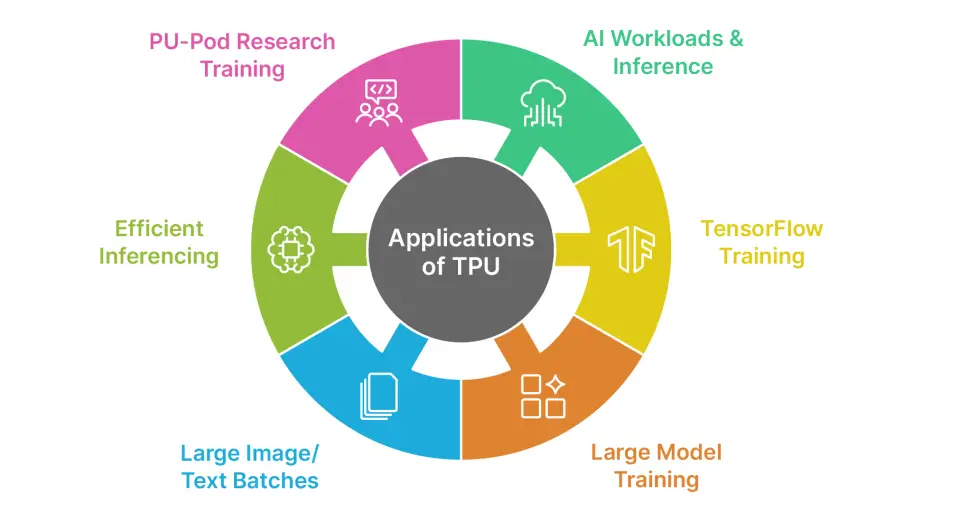
Overall, TPUs excel at AI workloads, especially when training or deploying large deep learning models across many servers. They aren’t suited for tasks like 3D graphics rendering or traditional HPC, and instead focus on high-throughput deep neural network workloads.
GPU vs TPU: Head-to-Head Comparison
Deciding between GPUs and TPUs for AI/ML infrastructure will have trade-offs. GPUs can serve a wide range of applications, whereas TPUs are designed specifically for running deep learning workloads with high efficiency.
In 2025, this difference in capabilities will become apparent through benchmarks that establish important characteristics of GPUs and TPUs.
1. Performance Comparison
Key differences of GPU vs TPU majorly reflect in the performance category. For example:
- GPUs perform extremely well with large-scale training of many models, but when implementing deep learning inference.
- TPU systems have significantly faster speeds and deliver higher throughput on tensor-based workloads.
According to the 2025 MLPerf benchmarks, there is a major difference between GPUs and TPUs for different types of workloads.
2. Pricing & Cost-Efficiency
Deployment locations and scale provide additional criteria for determining initial cost and ongoing operational expense of each platform. At small team sizes, GPU-based deployments have a lower initial cost than TPU units.
However, on the large enterprise levels, TPU units quickly become more cost-effective than GPU solutions. Cloud-based deployments reflect this difference.
3. Flexibility & Ecosystem
One of the key aspects of GPUs is that they have great flexibility. GPUs stand out for their flexibility, working smoothly with major deep learning libraries like PyTorch and TensorFlow, and giving developers the option to use CUDA for custom experimentation. TPUs, in contrast, are tightly integrated with Google’s ecosystem and perform best with TensorFlow, but they often require extra programming effort to work with other frameworks.
4. Scalability
The ability to quickly build very massive AI systems and continue to maintain them effectively is key to the success of single- and multi-node AI networks using both GPUs and TPUs.
- GPUs scale easily with NVLink, allowing hundreds of systems to combine into one GPU-based infrastructure that can expand further as needed.
- TPUs also scale to extremely large systems, linking thousands of TPU chips together in a single location. The Ironwood system provides customers the ability to seamlessly deploy their exascale inferences or extremely large, trillion-parameter models.
| Feature | GPU | TPU |
| Designed For | Graphics rendering and general-purpose parallel compute | High-throughput tensor operations for deep learning |
| Compute Units / Architecture | Thousands of SIMD cores for diverse workloads | Large systolic arrays optimized for matrix multiplication |
| Best Tasks | Graphics, video, HPC, and broad ML workloads | Large-scale neural network training and inference |
| Framework Support | TensorFlow, PyTorch, JAX, MXNet, and more | TensorFlow, JAX; PyTorch via XLA |
| Availability | AWS, Azure, GCP, OCI, on-prem, workstations | Google Cloud and Colab only |
| Energy Efficiency | Lower performance-per-watt | 2–4× higher performance-per-watt |
| Scalability | Multi-GPU clusters, NVLink, DGX systems | TPU Pods with thousands of connected chips |
| Ecosystem & Tools | CUDA, cuDNN, Nsight, strong community | XLA compiler, TensorBoard, TPU profiler |
| When to Use | Flexible frameworks, mixed workloads, on-prem setups, experimentation | Very large models, TensorFlow/JAX pipelines, high-throughput GCP workloads |
| Pros & Cons |
Pros: Very flexible, widely supported, strong tooling and community. Cons: Less energy-efficient, slower for massive TensorFlow workloads, higher power usage. |
Pros: Excellent for large neural networks, top performance-per-watt, scales efficiently in Pods. Cons: Limited flexibility, cloud-only, higher cost at small scale. |
Conclusion
The GPUs and TPUs will give you power as AI systems, however, the application and usage of each of these types of hardware are substantially different. The flexibility of GPU’s allows for the greatest performance in many different applications including simulations via graphics, high-performance computing (HPC), research, etc. TPUs, on the other hand, are designed for a specific type of artificial intelligence, majorly deep learning. They provide high speed and efficiency in support of Google’s TensorFlow deep learning framework.
Read more: CPU vs GPU
Frequently Asked Questions
Q1. What’s the main difference between GPUs and TPUs?
A. GPUs are flexible, general-purpose parallel processors, while TPUs are specialized hardware built specifically to accelerate deep learning tensor operations.
Q2. When should someone choose a TPU over a GPU?
A. When training very large neural networks, using TensorFlow or JAX, or needing high-throughput inference at scale on Google Cloud.
Q3. Why are TPUs often more cost-efficient at scale?
A. Their energy efficiency and high throughput reduce operational costs in large enterprise deployments compared with GPU-based systems.
Hello! I'm Vipin, a passionate data science and machine learning enthusiast with a strong foundation in data analysis, machine learning algorithms, and programming. I have hands-on experience in building models, managing messy data, and solving real-world problems. My goal is to apply data-driven insights to create practical solutions that drive results. I'm eager to contribute my skills in a collaborative environment while continuing to learn and grow in the fields of Data Science, Machine Learning, and NLP.






