The iOS development world has undergone a radical change. Only a few years back, implementing AI functionalities required costly cloud APIs or, at best, on-device processing with limited capabilities. The introduction of Apple’s Foundation Models framework heralds the availability of a 3 billion parameter language model for developers who prefer on-device processing, and it is no longer a dream but reality.
Thus, it is possible to create GPT-type functionalities with total privacy, no API charges, and offline usage. Text generation, summarization, entity extraction, sentiment analysis, and tool calling will all be part of the iOS app we develop through this guide.
Table of contents
- What is the Foundation Models Framework?
- Key Capabilities of Foundation Models Framework
- Getting Started with Foundational Model Framework
- Building the Demo App using Foundational Model Framework:
- Setup of XCode For the Demonstration
- Foundation Models vs Core ML 3 Natural Language
- Real-World Use Cases
- Conclusion
- Frequently Asked Questions
For developers who mastered CoreML, this is the next frontier. Build on your foundation by first reviewing: How to build your first Machine Learning model on iPhone (Intro to Apple’s CoreML).
What is the Foundation Models Framework?
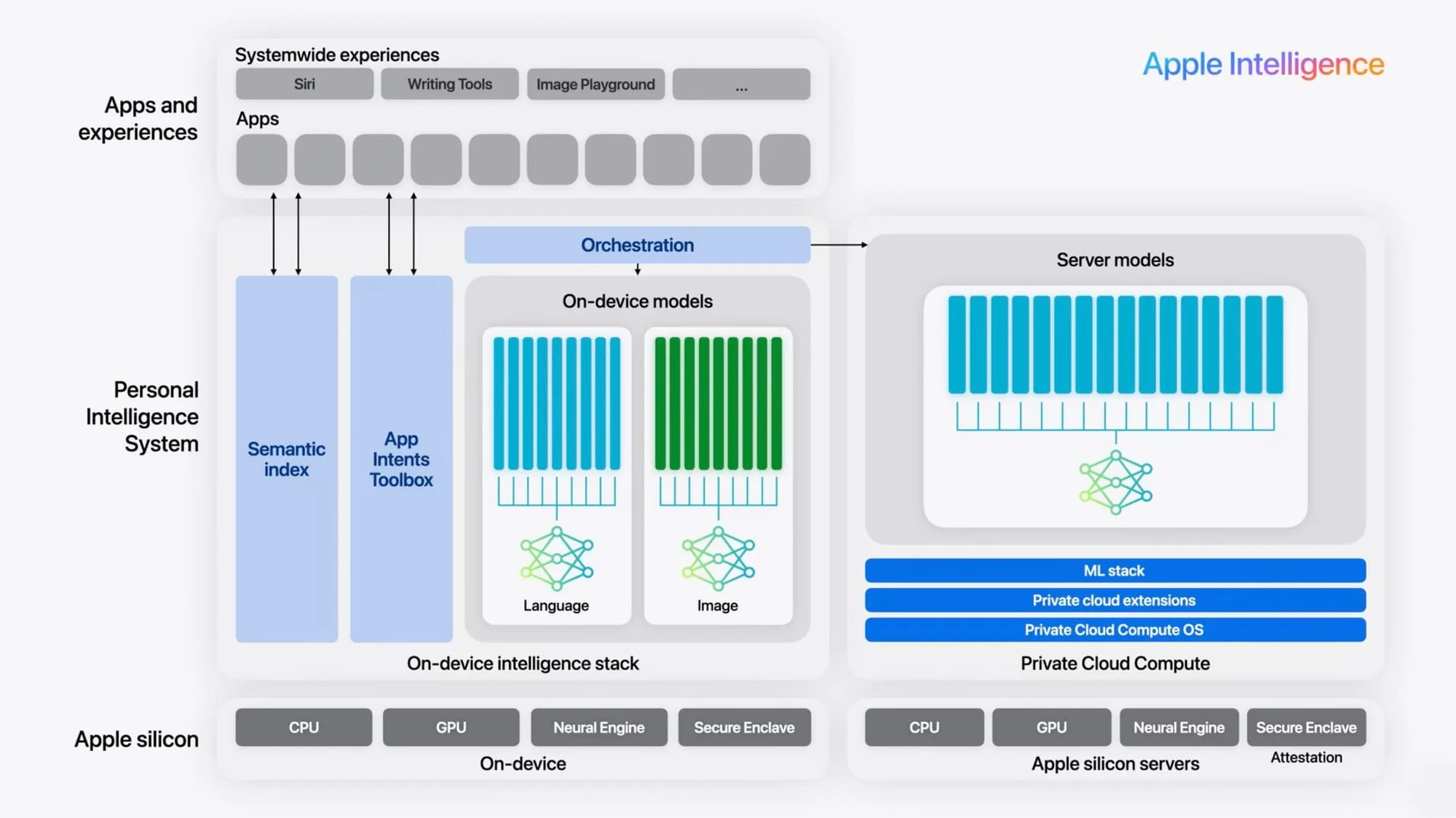
The Foundation Models framework enables users to use an LLM that is on device for Apple Intelligence directly. The model, which is a transformer with 3 billion parameters, operates completely on the user’s device, thus providing:
- Total Privacy: Every piece of information is kept on the device, and it is not sent to the cloud.
- No cost: There is no limitation to the use of AI inference and there are no fees for using the API.
- Capability to work offline: It functions without the internet connection.
- Low Latency: Response times are fast and are optimized for Apple Silicon.
- Integration that is Type-Safe: There is native Swift support with compile-time guarantees.
Key Capabilities of Foundation Models Framework
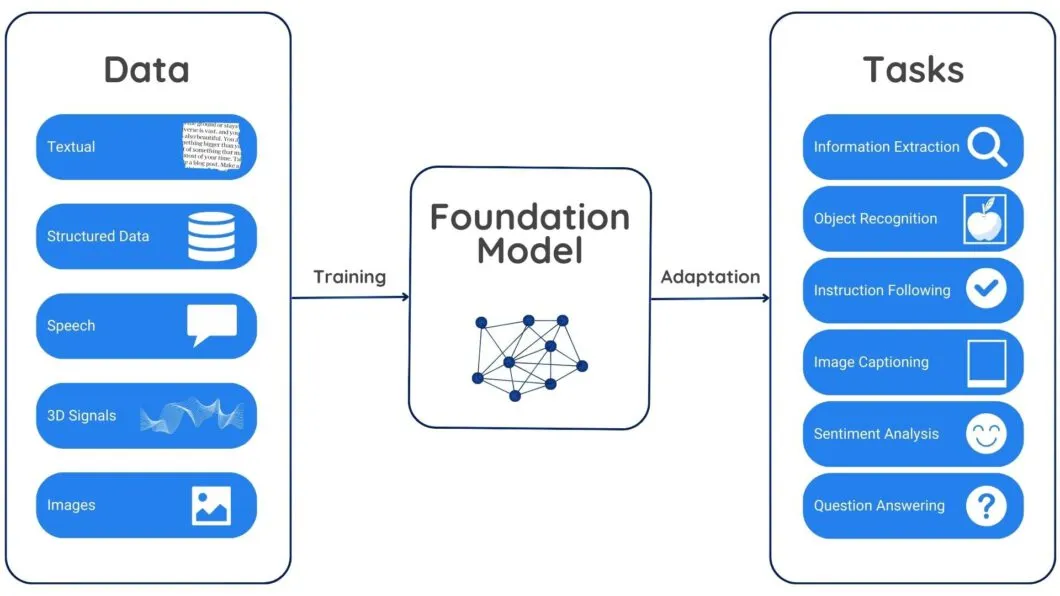
The key features of foundation Models Framework are:
- Text Generation: It helps in creating unique content, complete your thoughts, write creative stories, and even help in generating those formal emails with context aware continuations.
- Summarization: This feature helps in providing condense summaries of articles and documents while preserving the necessary or key information.
- Entity Extraction: Here, it basically makes use of unstructured data to extract and identify locations, people, organization, dates and many more custom entity types.
- Sentiment Analysis: It helps in understanding the tone and emotions behind the context.
- Tool Calling: This framework offers various in-build tools, which helps in autonomously executing swift functions, extract parameters and then incorporate those results.
- Guided Generation: By making use of enums and Swift structs, we can get structured outputs, in a way that we want instead of unreliable text outputs.
Getting Started with Foundational Model Framework
There are certain requirements that we need to consider before we get started on the demo app:
Requirements:
- Xcode with a version of 16 or higher
- Swift 6.0+
- Apple intelligence enabled
- Iphone 15 pro or later
- Mac running macOS Sequoia 15+
Building the Demo App using Foundational Model Framework:
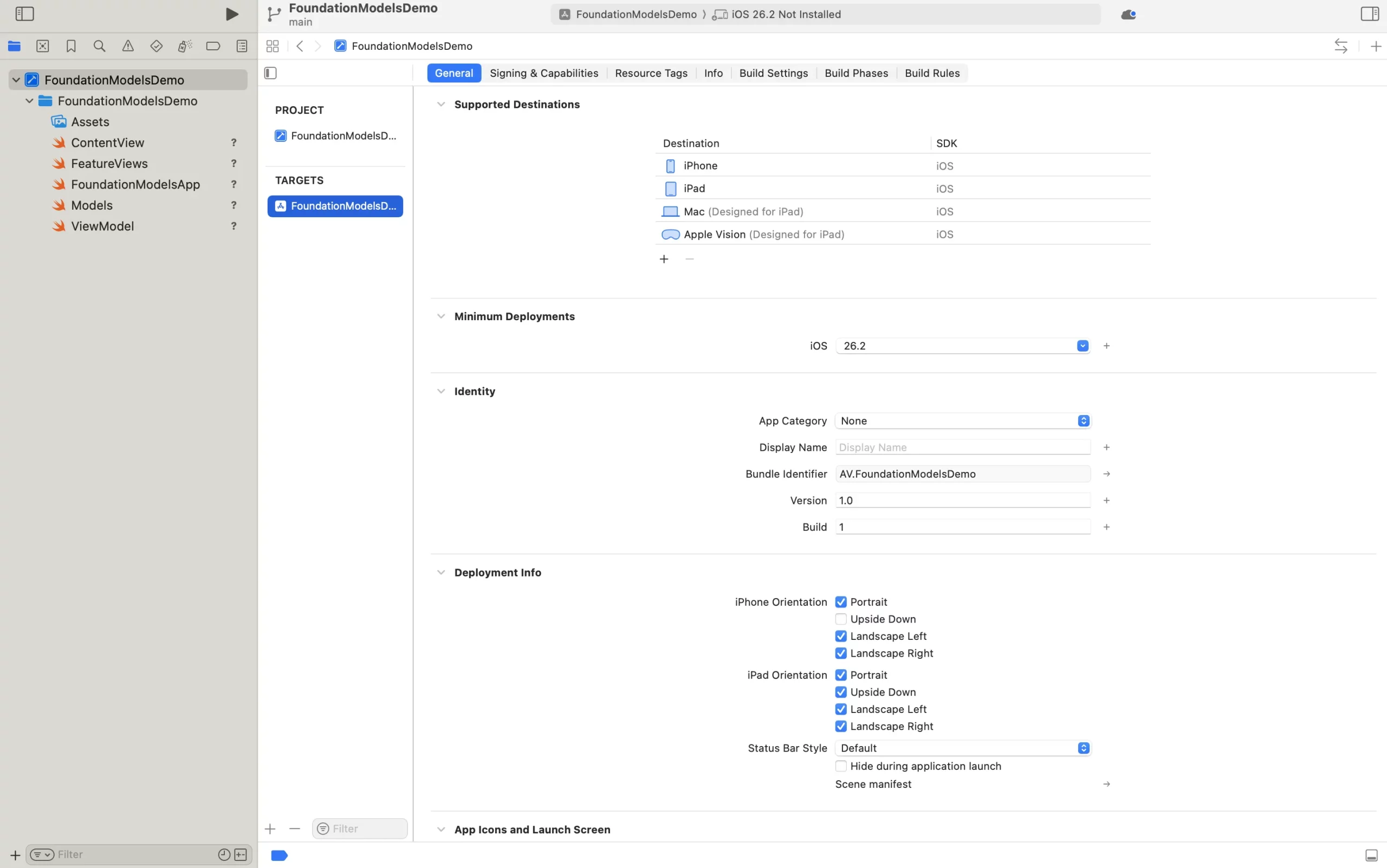
We’ll create a new iOS App in Xcode with SwiftUI interface and iOS 18 minimum deployment. The framework is built-in, requiring only SwiftUI and FoundationModel.
App Structure
import SwiftUI
import FoundationModels

@main
struct FoundationModelsApp: App {
var body: some Scene {
        WindowGroup {
            ContentView()
    }
}
}

enum DemoFeature: String, CaseIterable {
case textGeneration = "Text Generation"
case summarization = "Summarization"
case entityExtraction = "Entity Extraction"
case sentiment = "Sentiment Analysis"
case toolCalling = "Tool Calling"

var icon: String {
    switch self {
    case .textGeneration: return "text.bubble"
    case .summarization: return "doc.text"
    case .entityExtraction: return "person.crop.circle.badge.checkmark"
    case .sentiment: return "face.smiling"
    case .toolCalling: return "wrench.and.screwdriver"
    }
}
}
Define Type-Safe Structures
@Generable
struct Summary {
var mainPoints: [String]
var keyTakeaway: String
}

@Generable
struct ExtractedEntities {
var people: [String]
var organizations: [String]
var locations: [String]
}

@Generable
enum SentimentResult: String {
case positive, negative, neutral
}
Feature 1: Text Generation with Streaming
@MainActor
class FoundationModelsViewModel: ObservableObject {
@Published var inputText = ""
@Published var outputText = ""
@Published var isLoading = false
private var session: FoundationModels.Session?

    init() {
    session = try? FoundationModels.Session()
}

    func generateText() async {
    guard let session = session else { return }

    let prompt = "Generate a creative continuation: \(inputText)"
        isLoading = true

    do {
        let stream = try session.generate(prompt: prompt)
        for try await chunk in stream {
                outputText += chunk
        }
    } catch {
            outputText = "Error: \(error.localizedDescription)"
    }

        isLoading = false
}
}
Streaming provides real-time feedback, creating an engaging experience as users see text appear progressively.
Feature 1: Text Generation
Hands-On: Let’s try some prompts on our demo app and see the results:
1: Write a poem about coding.
2: Tell me a joke.
3: Draft an email for the team to schedule a meeting.
Feature 2: Summarization
func summarizeText() async {
guard let session = session else { return }

let prompt = """
Summarize into 3-5 main points with a key takeaway:
\(inputText)
"""

    isLoading = true

do {
    let summary: Summary = try await session.generate(prompt: prompt)

    var result = "Key Takeaway:\n\(summary.keyTakeaway)\n\nMain Points:\n"
    for (i, point) in summary.mainPoints.enumerated() {
        result += "\(i + 1). \(point)\n"
    }
        outputText = result
    } catch {
        outputText = "Error: \(error.localizedDescription)"
}

    isLoading = false
}
The summary object is fully type-safe with no JSON parsing, no malformed data handling.
Hands-on: Let’s try some prompts on our demo app and see the results:
Prompt: Apple Intelligence is a new personal intelligence system for iPhone, iPad, and Mac that combines the power of generative models with personal context to deliver intelligence that’s incredibly useful and relevant.
Feature 3: Entity Extraction
func extractEntities() async {
guard let session = session else { return }

let prompt = "Extract all people, organizations, and locations from: \(inputText)"
    isLoading = true

do {
    let entities: ExtractedEntities = try await session.generate(prompt: prompt)

    var result = ""
    if !entities.people.isEmpty {
        result += "👤 People:\n" + entities.people.map { "  • \($0)" }.joined(separator: "\n") + "\n\n"
    }
    if !entities.organizations.isEmpty {
        result += "🏢 Organizations:\n" + entities.organizations.map { "  • \($0)" }.joined(separator: "\n") + "\n\n"
    }
    if !entities.locations.isEmpty {
        result += "📍 Locations:\n" + entities.locations.map { "  • \($0)" }.joined(separator: "\n")
    }

        outputText = result.isEmpty ? "No entities found" : result
} catch {
        outputText = "Error: \(error.localizedDescription)"
}

    isLoading = false
}
Hands-On: Let’s try some prompts on our demo app and see the results:
Prompt: Elon Musk is the CEO of Tesla and SpaceX.
Feature 4: Sentiment Analysis
func analyzeSentiment() async {
guard let session = session else { return }

let prompt = "Analyze sentiment: \(inputText)"
    isLoading = true

do {
    let sentiment: SentimentResult = try await session.generate(prompt: prompt)

    let emoji = switch sentiment {
        case .positive: "😊"
        case .negative: "😔"
        case .neutral: "😐"
    }

        outputText = "Sentiment: \(sentiment.rawValue.capitalized) \(emoji)"
} catch {
        outputText = "Error: \(error.localizedDescription)"
}

    isLoading = false
}
Hands-On: Let’s try some prompts on our demo app and see the results:
- Prompt 1: Type I love this new app, it is great!
- Prompt 2: Type This is terrible and I am sad.
- Prompt 3: Type The sky is blue. -> 😐 Neutral
Feature 5: Tool Calling
func demonstrateToolCalling() async {
guard let session = session else { return }

let weatherTool = FoundationModels.Tool(
    name: "getWeather",
    description: "Get current weather for a location",
    parameters: ["location": .string]
    ) { args in
    let location = args["location"] as? String ?? "Unknown"
    return "Weather in \(location): Sunny, 72°F"
}

let calculatorTool = FoundationModels.Tool(
    name: "calculate",
    description: "Perform calculations",
    parameters: ["expression": .string]
) { args in
    return "Result: 42"
}

    isLoading = true

do {
    let response = try await session.generate(
        prompt: "User query: \(inputText)",
        tools: [weatherTool, calculatorTool]
    )
        outputText = response
} catch {
        outputText = "Error: \(error.localizedDescription)"
}

    isLoading = false
}
The model automatically detects which tool to call, extracts parameters, and incorporates results naturally.
Hands-On: Let’s try some prompts on our demo app and see the results:
Prompt 1: What is the weather in San Franchisco?
Prompt 2: Calculate 20+22
Setup of XCode For the Demonstration
We have created all the required files and now in this section, we’ll explain how to set up the Foundation Models demo app using XCode and run it on your device.
Step 1: Create a new project in the XCode Software
- Download Xcode via https://xcodereleases.com/
- Open Xcode 16 on your Mac once downloaded.
- Choose Create a new Xcode project.
- Select iOS and then App from the templates provided.
- Click Next to continue.
- Enter the project information as follows:
- Product Name: FoundationModelsDemoApp
- Interface: SwiftUI
- Language: Swift
- Storage: None
Click Next, choose where you want to save the project, and create it.
Step 2: Add the source files created
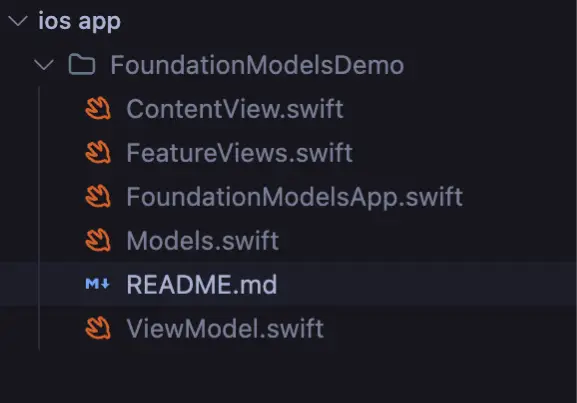
The project will not run until the required source files are added. You can add them in either of the ways below.
Option 1: Copy files manually
- Open the project folder in Finder.
- Go to the source folder created by Xcode.
- Copy the files listed below into this folder.
- If you are asked to replace existing files, allow it.
Option 2: Drag and drop into Xcode
- Open Xcode and look at the Project Navigator on the left side.
- Drag the source files from Finder into the navigator.
- When the dialog appears, check Copy items if needed and confirm the FoundationModelsDemo target is selected.
- Click Finish.
Step 3: Review project settings
- In Xcode, select the project from the Project Navigator.
- Choose the FoundationModelsDemo target.
- Open the General tab.
Under Deployment Info, set the iOS deployment target to iOS 18.0 or later.
- Open the Signing and Capabilities tab next.
- Under Signing, select your development team.
If your team does not show up, add your Apple ID in Xcode preferences and return to this screen.
Step 4: Run the app on a device
The Foundation Models framework does not work in the iOS Simulator, so a physical device is required.
- Connect an iPhone 15 Pro or another supported device to your Mac using a USB cable.
- Unlock the device and trust the computer if prompted.
- In Xcode, select the connected device from the device selector near the Run button.
- Click Run
If this is the first time the app is installed on the device, you may need to create the developer certificate.
- Open Device Settings.
- Go to General.
- Open VPN and Device Management.
- Select your developer account and tap Trust.
How has iOS system matured for GenAI?
- Early days (iOS 7-12): In this period, it only assisted with the use of spell-checking and recognizing language. Possessing no on-device ML capabilities at all.
- Core ML Era (iOS 11-17): The Natural Language ML and Core ML opened the on-device ML era. Sentiments’ classification and recognition of entities were among the enabled tasks but still no generative abilities were there.
- GenAI Revolution (iOS 18+): The Foundation Models framework implements the full LLM capabilities on device. The developers’ proved ChatGPT-like features with the complete privacy of users’ data are now possible.
Developers’ Major Changes
- Classification to Characterization: The prior situation allowed you just to classify (“Is there on a positive matter?”). The current situation is, however, one where you can directly characterize (“Write a positive response”).
- Cloud to User Prime: No longer is the data being transmitted to the external APIs. The whole process is run on-device thus guaranteeing the user’s privacy.
- Parsing to Type-Safety: Instead of dealing with the unreliable JSON parsing, you get compile-time guaranteed Swift types.
- Expensive to Free: No API costs, no rate limits, unlimited usage, all that is and will be included with iOS.
Competitive Edge
iOS now takes the lead in AI development that respects privacy. When talking about the privacy of users, iOS is the most mature, developer-friendly ecosystem for GenAI applications that do not require infrastructure costs or privacy concerns as the platform is already cloud-free and paid at the same time with the rest of the mobile and web applications.
Foundation Models vs Core ML 3 Natural Language
| Feature | Foundation Models | Core ML 3 NL |
| Model Type | 3B parameter LLM | Pre-trained classifiers |
| Text Generation | Full support | Not available |
| Structured Output | Type-safe | Manual parsing |
| Tool Calling | Native | Not available |
| Streaming | Real-time | Batch only |
| Use Case | General purpose AI | Specific NLP tasks |
| iOS Version | iOS 18+ | iOS 13+ |
Foundation Models are to be chosen when: You need capabilities in generation, structured outputs or conversation features with privacy assurance.
Core ML 3 NL is the option when: You have a requirement only for classification tasks, the operating system is iOS 17 or earlier, or you are needing support for many languages, specifically 50 or more.
Real-World Use Cases
The real-world cases that can use Foundation Model Framework are:
- Smart Journaling App: Create individual daily suggestions from earlier notes and observe the changes of moods over a period, all in a secure manner using the device.
- Fitness Coach: Make personalized workout plans according to the equipment that is available and the fitness goals and then give positive encouragement summaries after the workouts.
- Study Assistant: Automatically create quizzes from the textbooks, use comparisons to make difficult ideas easier to understand, and design study guides according to personal preferences.
- Travel Planner: Prepare an elaborate itinerary for each day according to the travellers’ tastes and money and give a list of the best places to visit.
- Writing Tool: Make any writing better by offering grammar tips, adjusting the tone, and giving style variations.
- Support Chatbot: Engage in a natural talk and utilize the tool to check orders, update on deliveries, and browse knowledge bases.
Conclusion
The introduction of the Foundation Models framework brings a radical change to iOS app development. Nowadays, developers can use the potent generative AI that comes with full privacy, no cost, and offline features all through the device. This is a breakthrough in iOS development.
- Cloud dependency is no longer an issue when building smart features.
- User privacy is guaranteed as processing is done on-device.
- API costs are wiped out completely.
- Type-safe guided generation can be utilized.
- Offline experiences can be created.
The GenAI era on iOS has just started. The framework is ready for production; the platform is mature; the tools are available. The only question that remains is, what do you want to create?
Frequently Asked Questions
Q1. What is the Foundation Models framework?
A. It provides a 3B parameter on-device language model for iOS apps with privacy, offline usage, and no API costs. pasted
Q2. What devices are required to use it?
A. You need Xcode 16+, Swift 6+, Apple Intelligence enabled, and an iPhone 15 Pro or later. pasted
Q3. What can developers build with it?
A. Apps with text generation, summarization, sentiment analysis, entity extraction, and tool calling, all running fully on-device.
Data Science Trainee at Analytics Vidhya
I am currently working as a Data Science Trainee at Analytics Vidhya, where I focus on building data-driven solutions and applying AI/ML techniques to solve real-world business problems. My work allows me to explore advanced analytics, machine learning, and AI applications that empower organizations to make smarter, evidence-based decisions.
With a strong foundation in computer science, software development, and data analytics, I am passionate about leveraging AI to create impactful, scalable solutions that bridge the gap between technology and business.
📩 You can also reach out to me at [email protected]