
You’ve probably heard about Qwen3 Coder, Alibaba’s new AI model that developers are raving about. Now they have released a lighter and faster verion of the same model – Qwen3 Coder Flash. What makes it special? It packs 30.5B parameters but only uses 3.3B at a time through Mixture-of-Experts, making it incredibly efficient. This directly addresses what coders need most: a high-performance tool that won’t overwhelm local setups. With 256K context (expandable to 1M) and strengths in prototyping and API work, it’s built for speed. As open-source software compatible with platforms like Qwen Code, Flash is perfectly timed for today’s fast-moving AI coding landscape, giving developers the edge to innovate quicker. Let’s break down what this means for practical use.
Table of contents
Before going ahead, I suggest you read my previous article on Qwen3 Coder.
What is Qwen3-Coder-Flash?
Qwen3-Coder-Flash is a specialized language model built for writing code. It uses a smart design called Mixture-of-Experts, or MoE. The model has 30.5 billion parameters, but it only uses about 3.3 billion for any single task. This makes the model very fast and efficient.
The name “Flash” highlights its speed. The model’s architecture is optimized for fast and accurate code generation. It can handle a large amount of information at once. The model supports a context of 262,000 tokens. This can be extended up to 1 million tokens for very large projects. This makes it a powerful and accessible open-source coding model for developers.
Qwen3-Coder-Flash vs Qwen3-Coder: What’s the Difference?
The Qwen team released two distinct coding models. It is important to understand their differences.
- Qwen3-Coder-Flash (released as Qwen3-Coder-30B-A3B-Instruct): This model is the agile and fast option. It is smaller and designed to run well on standard computers with a good graphics card. It is ideal for real-time coding help.
- Qwen3-Coder (480B): This is the larger, more powerful version. It is built for maximum performance on the most demanding agentic coding tasks. This model requires high-end server hardware to operate.
While the larger model scores higher on some tests, Qwen3-Coder-Flash performs exceptionally well. It often matches the scores of much larger models. This makes it a practical choice for most developers.
Also Read: Top 6 LLMs for Coding
How to Access Qwen3-Coder-Flash?
Getting started with Qwen3-Coder-Flash is a simple process. The model is available through several channels, making it accessible for quick tests, local development, and integration into larger applications. Below are the primary ways to access this powerful open-source coding model.
1. Official Qwen Chat Interface
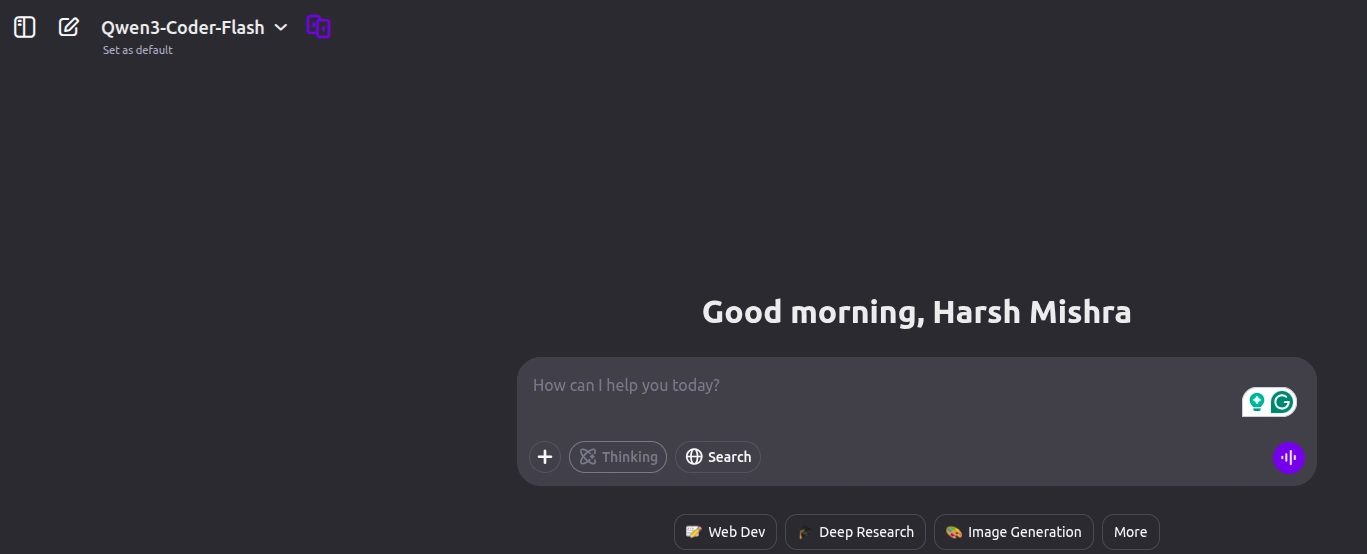
The quickest way to test the model’s capabilities without any installation is through the official web interface. This provides a simple chat environment where you can directly interact with the Qwen models
Link: chat.qwen.ai
2. Local Installation with Ollama (Recommended for Developers)
For developers and learners who want to run the model on their own machine, Ollama is the easiest method. It allows you to download and interact with Qwen3-Coder-Flash directly from your terminal, ensuring privacy and offline access.
How to Install Qwen3-Coder-Flash Locally?
You can get this model running on your local machine easily. The tool Ollama simplifies the process.
Step 1: Install Ollama
Ollama helps you run large language models on your own computer. Open a terminal and use the command for your operating system. For Linux, the command is:
curl -fsSL https://ollama.com/install.sh | shInstallers for macOS and Windows are available on the Ollama website.
Step 2: Check Your GPU VRAM
This model needs sufficient video memory (VRAM). You can check your available VRAM with this command:
nvidia-smi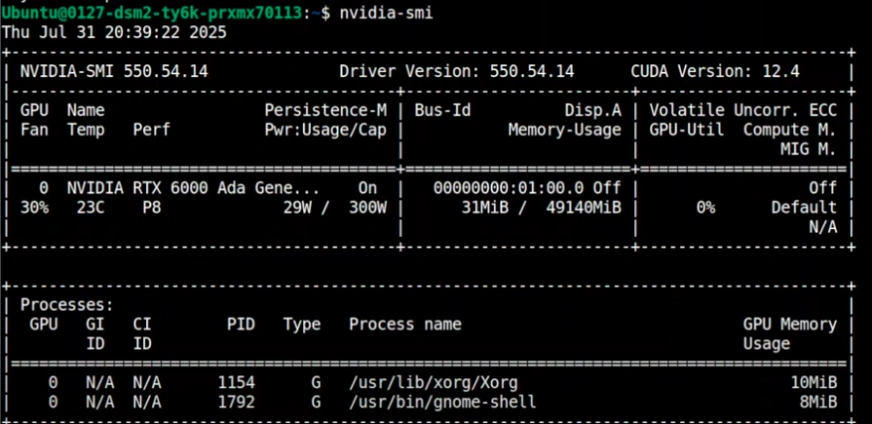
You will need about 17-19 GB of VRAM for the recommended version. If you have less, you can use a version that is more compressed.
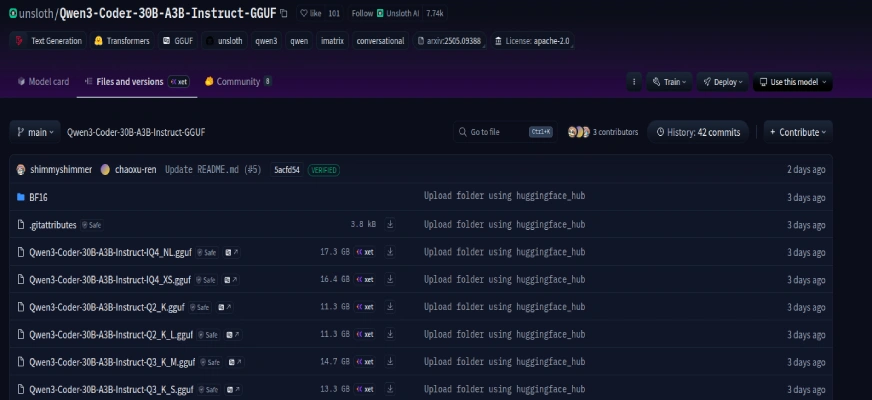
Step 3: Find the Quantized Model
Quantized versions are smaller and more efficient. Quantization reduces the model’s size with very little loss in performance. The Unsloth repository on Hugging Face provides an excellent quantized version of Qwen3-Coder-Flash.
You can find more versions here.
Step 4: Run the Model
With Ollama installed, a single command downloads and starts the model. This command pulls the correct files from Hugging Face.
ollama run hf.co/unsloth/Qwen3-Coder-30B-A3B-Instruct-GGUF:UD-Q4_K_XL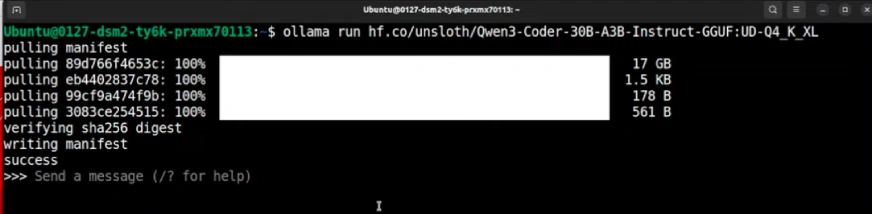
The first run will download the 17 GB model. After that, it will launch instantly. This completes the steps to install Qwen3-Coder-Flash.
Putting Qwen3-Coder-Flash to the Test
Let’s see how the model handles difficult tasks. The following examples show its impressive abilities
Task 1: Create an Interactive p5.js Animation
A good test is to request a creative and visual project. The model was asked to build a firework show with a rocket.
Prompt: “Create a self-contained HTML file using p5.js that features a colorful, animated rocket zooming dynamically across the screen in random directions. The rocket should leave behind a trail of sparkling fireworks that burst into vibrant, radiating particles. The rocket should move smoothly, rotate to face its direction, and occasionally trigger firework explosions. Make the experience visually engaging.”
Output:
Result:
The model quickly generated a single HTML file. The animation was smooth, visually appealing, and interactive. It perfectly captured the request for a dynamic space-themed firework show.
Task 2: Optimize a Complex SQL Query
This task tested the model’s database knowledge. It was given a poorly written SQL query for a large time-series database.
Prompt: “You are given a large time-series database ‘sensor_readings’ containing billions of rows from IoT devices. The table schema is as follows: device_id, metric_name, reading_value, reading_timestamp, location_id, status. Your Task:
1. Rewrite and optimize the provided slow query for performance on this large-scale dataset (assume 50B+ rows).
2. Suggest new indexes, materialized views, or partitioning strategies.
3. Consider using window functions, CTEs, or approximate algorithms.
4. Assume the system is PostgreSQL 16 with TimescaleDB allowed.
5. Minimize I/O and reduce nested subquery overhead.
Deliverables: Optimized SQL query, Index suggestions, and a summary of recommendations”.
/* The Slow and Inefficient Query */

SELECT

    location_id,

    PERCENTILE_CONT(0.5) WITHIN GROUP (ORDER BY reading_value) AS median_temp,

    PERCENTILE_CONT(0.95) WITHIN GROUP (ORDER BY reading_value) AS p95_temp

FROM sensor_readings sr1

WHERE

    metric_name = 'temperature'

    AND reading_timestamp >= NOW() - INTERVAL '30 days'

    AND device_id IN (

        SELECT device_id

        FROM sensor_readings sr2

        WHERE

            reading_timestamp >= NOW() - INTERVAL '30 days'

            AND metric_name = 'temperature'

        GROUP BY device_id

        HAVING AVG(CASE WHEN status = 'active' THEN 1.0 ELSE 0.0 END) >= 0.95

    )

GROUP BY location_id;
Output:
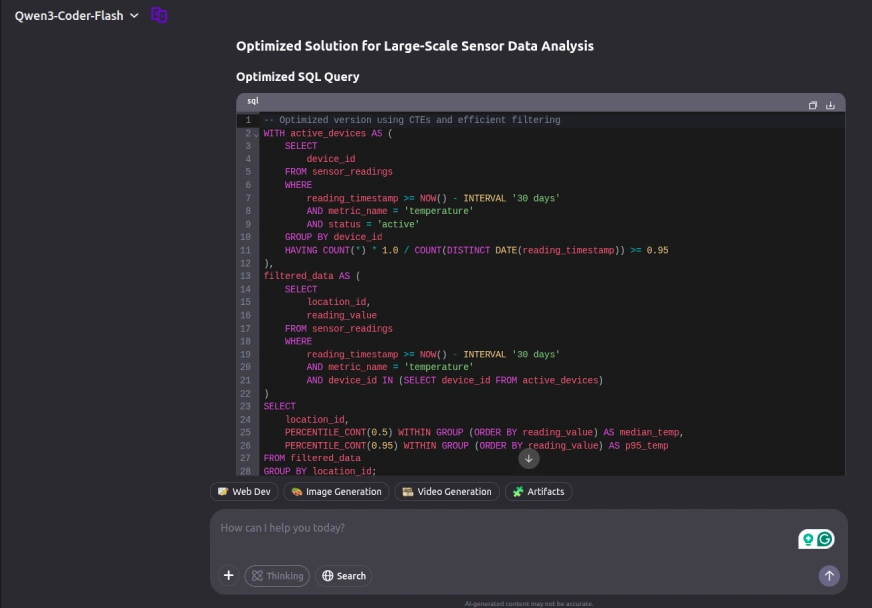
Result:
Qwen3-Coder-Flash provided a comprehensive and professional solution, demonstrating deep expertise in database optimization. The response featured a clear query restructuring using Common Table Expressions (CTEs) for improved readability, along with strategic recommendations for composite indexes to enhance filtering performance. Notably, it also included expert advice on implementing time-based partitioning, a critical optimization technique for handling large-scale time-series data efficiently. The solution showcased a strong understanding of advanced database performance tuning methodologies.
Task 3: Build a LEGO Builder Game
This final task involved creating a complete, interactive game from a detailed prompt.
Prompt: “Create a self-contained HTML file using p5.js that simulates a playful, interactive LEGO building game in a 2D environment. The game should feature a virtual workbench where users can spawn, drag, rotate, and snap together LEGO bricks of various shapes, sizes, and colors. The core mechanics should include different brick types, mouse interaction to move bricks, a magnetic snapping system, and stackable bricks.”
Output:
Result:
The model produced a functional LEGO sandbox game. It created different brick types and implemented controls for selecting, moving, and rotating them. The magnetic snapping system worked as described, allowing bricks to connect when close. The result was a fun and interactive building game, created from a single prompt.
Performance Insights and Benchmarks
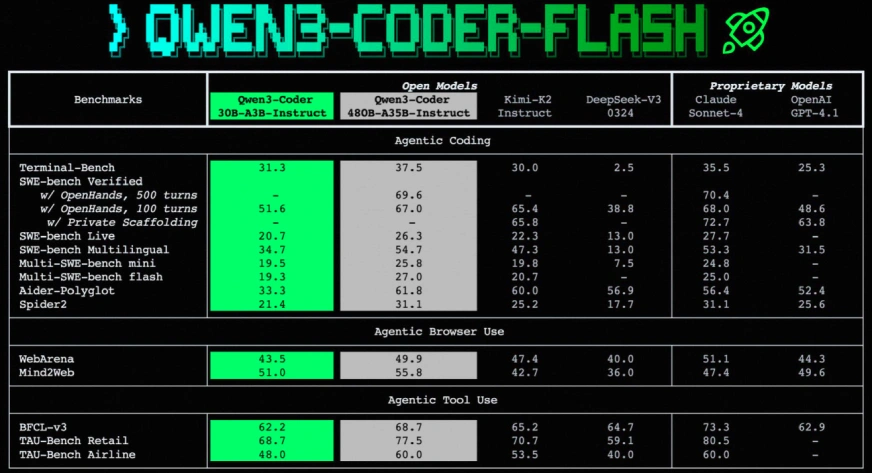
The benchmark results for Qwen3-Coder-Flash are very strong. It holds its own against many larger open-source coding model options and even some top proprietary ones.
In tests for agentic coding tasks, it achieves scores that are competitive with models like Claude Sonnet-4 and GPT-4.1. This is impressive for a model of its size. It also performs well in benchmarks that test its ability to use a web browser and other tools. This makes it a great foundation for building smart AI agents. The Qwen3-Coder vs Flash comparison clearly shows that efficiency does not mean a large drop in quality.
Conclusion
Qwen3-Coder-Flash is a remarkable achievement. It provides a powerful and efficient tool for developers. Its balance of speed and performance makes it one of the best choices for local AI development today. Because it is an open-source coding model, it empowers the community to build amazing things without high costs. The simple process to install Qwen3-Coder-Flash means anyone can start exploring advanced AI coding today.
Frequently Asked Questions
Q1. What hardware do I need to run Qwen3-Coder-Flash?
A. You need a computer with a modern GPU. For the best experience, aim for a graphics card with at least 16-20GB of VRAM.
Q2. Is Qwen3-Coder-Flash free?
A. Yes, it is released under the Apache 2.0 license. This makes it free for both personal and commercial projects.
Q3. How is this different from GitHub Copilot?
A. Copilot is great for suggesting lines of code. Qwen3-Coder-Flash can handle entire projects and complex, multi-step tasks like a true AI agent.
Q4. Can it do more than just code?
A. Yes, while it is best at coding, it is also a capable language model. It can help with writing, summarizing, and other text-based tasks.
Q5. What does a “quantized” model mean?
A quantized model is a compressed version of the original. This process makes the model smaller and faster to run on regular hardware with very little impact on its performance.
Harsh Mishra is an AI/ML Engineer who spends more time talking to Large Language Models than actual humans. Passionate about GenAI, NLP, and making machines smarter (so they don’t replace him just yet). When not optimizing models, he’s probably optimizing his coffee intake. 🚀☕






