
As we have seen recently, all the major AI firms like OpenAI, Gemini, and Qwen are slowly putting out their command-line interfaces. Anthropic is also among the frontrunners, with its Claude Code, which offers its latest models in the command line. Claude Code is powered by the Claude 4 Sonnet model and is designed to act as a hands-on collaborator within your terminal.
Now developers can describe a new feature or bug, and Claude Code will analyze the task, plan the steps, and generate working code. According to Anthropic, it can also search codebases, edit files, run tests, and commit to GitHub, essentially functioning as an intelligent junior developer that works alongside you. In this article, we put the command-line utility to the test on three tasks. This would give you a good overview of the capabilities of the models.
Table of contents
What is Claude Code?
Claude Code is an AI coding assistant created by Anthropic and first launched on February 24, 2025. It is a prime example of the term “supervised coding agent.” For those unaware, these are tools that can complete fairly sophisticated tasks in a software development workflow. In some cases, they do so autonomously.
Claude Code is the best-known supervised coding agent currently available today. It is widely adopted and easily integrated into IDE-based workflows. These include Cursor, Cline, Windsurf, and GitHub Copilot currently has agentic workflows in preview. Claude Code differs fundamentally from these as it’s a terminal-based interface. The beauty of working through a terminal in Claude Code is that it facilitates the integration of agents within a larger ecosystem compared to being fixed to a specific IDE.
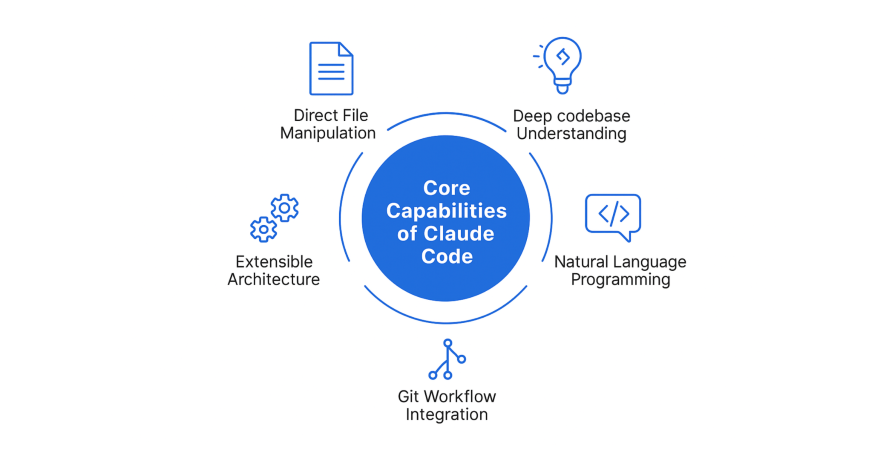
Core Capabilities of Claude Code
- Direct File Manipulation: Claude Code can manipulate files, including new file creation, and can manage the project structure with no manual intervention.
- Deep Codebase Understanding: It can understand the dependencies, patterns, and coding conventions throughout your codebase. This contextual information allows for more relevant and accurate suggestions.
- Natural Language Programming: Provide a description of what you would like to see in plain English, and Claude Code can develop implementation plans, write the code, and confirm everything works.
- Git Workflow Integration: Relax and let Claude Code handle complex git operations, fix merge conflicts for you, write meaningful commit messages, and manage pull requests with simple conversational commands.
- Extensible Architecture: Claude Code modern architecture allows it to connect to external tools, databases, and APIs, via the Model Context Protocol (MCP), allowing for flexibility among development environments.
- Supervised Coding Agent: Claude Code is an AI tool that helps you write, manage, and debug your code. But it works under your guidance, instead of acting fully on its own. It takes instructions from you, like fixing a bug or adding a feature, and then plans and executes the steps needed to do it. Think of it like a junior developer who can read your codebase, make edits, run tests, and even push commits, but always follows your lead.
Recent Update in Claude Code CLI 2.0.70
Claude Code is continually evolving its developer experience through updates that enable quicker execution, improved handling of larger coding contexts, and enhanced collaborative opportunities. These updates reduce friction on a daily basis, making a prompt-driven workflow even more productive for extended periods in real-world development.
Key highlights and commands:
- Instant Prompt Execution: To quickly accept and submit prompt suggestions, you can now press Enter to immediately accept and submit your suggested prompt. You will still have the option to use Tab for in-line editing. This allows you to iterate more quickly.
- Large Context Handling Efficiency: Large context handling can be three times more efficient due to Claude Code’s reduced memory usage (up to 3 times less) when using long conversations. These memory savings are especially helpful for developers who are working on large refactor projects and/or large multi-file coding projects.
- Context Window Awareness: Managers will find that as the workspace size increases for their projects, they will find it more difficult to efficiently manage their prompt size and using the current_usage indicator on the Status Line will help them manage their prompt size effectively.
- Controlled Execution by the Agent: You can now require that your plans be approved before any changes are made to plans made by teammates by defining the plan_mode_required spawn parameter in Claude Code, prior to generating your team member’s plan.
- Easier Permissions to MCP: You now can easily apply wildcard rules, e.g. mcp__server__*, to AllTools or NoTools from a specified MCP Server.
- Clearer Team Workflow Sharing: You can now produce high-res stats screenshots with better clarity for documentation and reviews by using Ctrl+S to copy your high-res stats, while generating more professional-looking images at the same time.
Source: https://github.com/anthropics/claude-code/blob/main/CHANGELOG.md#2070
Claude Code Installation
Before you start building with Claude Code, you need to be certain that your environment is perfectly set up for its proper use. So, you should have certain hardware and software prerequisites. This section outlines the required system requirements and provides step-by-step instructions on installing Claude’s AI coding assistant on your macOS, Linux, or Windows systems.
Systems Requirements
Here is the minimum system setup we need to run Claude Code smoothly:
| Category | Requirements |
|---|---|
| Operating Systems | – macOS 10.15+ – Ubuntu 20.04+ / Debian 10+ – Windows 10+ (with WSL 1, WSL 2, or Git for Windows) |
| Hardware | Minimum 4GB RAM |
| Software | Node.js 18+ and npm |
| Network | Internet connection required for authentication and AI processing |
| Shell | Works best in Bash, Zsh, or Fish terminals |
Steps to Install
To get Claude Code up and running on your local machine, follow these relatively simple steps with a few commands required.
npm install -g @anthropic-ai/claude-codeImportant: Do not use sudo npm install -g as this could create permission problems or security issues. If you run into permission issues, consider using a Node.js version manager like nvm instead.
Once installed, you can navigate to your project directory and run Claude Code:
cd your-project-directory
claude
Authentication Setup
Claude Code has multiple authentication options depending on your preference and need:
- Anthropic Console Auth: This is the default option if you have active billing at console.anthropic.com. You can complete the OAuth process by running claude login. If you have already done this, your session is still active until you use the Claude logout.
- Claude App Subscription: If you subscribe to the Claude Pro or Max plan, you have automatic access to Claude Code in addition to the web interface.
- Enterprise Platforms: You can also configure Code to leverage either Amazon Bedrock or Google Vertex AI credentials in your enterprise applications if you already have cloud-enabled.
Running Claude Code
In this part, we will learn how to start and interact with Claude Code inside a project. After installing it, go to your project directory in a terminal window and enter the following command:
claude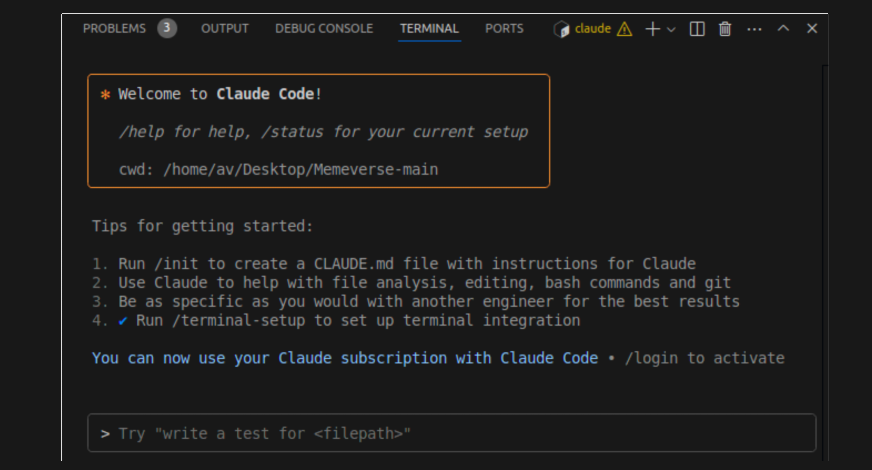
Claude will understand what you’re asking for and will write the code for you. You can also ask it to explain files for you, add tests, and fix bugs. It works with all programming languages and frameworks as well.
The essential built-in commands include:
/help – displaying available commands and features
/exit – closing the Claude Code session
/clear – clear the context and the previously generated conversation
/config – shows the configuration settings
/doctor – health status of your installation and diagnosis of any potential issues
Building “Bat Dash”: A Fun Pixel-Style Game
In this section, we will demonstrate the use of Claude Code to create a fun game. Here is the prompt that I passed to Claude.
Prompt: “Create an engaging Halloween-themed side-scrolling game called “Bat Dash”. The player controls a bat that can move up and down using the arrow keys or W/S keys, flying across the screen while avoiding ghosts and collecting pumpkins. Ghosts spawn from the right side of the screen and move left; if the bat touches a ghost, the game ends. Pumpkins also move from right to left, and collecting them increases the player’s score. Every 10 seconds, the game’s difficulty increases by speeding up the ghosts and adding more obstacles and pumpkins. Include a dynamic day-night cycle where the background switches from a dusk sky with clouds to a dark night with glowing stars every 20–30 seconds. The score should be displayed on screen, and when the game ends, show a “Game Over” screen with a restart button.”
Error Debugging
In this section, we will demonstrate how Claude Code assists you in locating and interpreting errors in your code. I have a code that helps to make a slideshow of the pictures placed inside a directory. Whenever a new image is added to the directory, it should also include that. But the initial issue is that it is only showing the first image continuously in a sequence. So I asked Claude’s code to resolve this, and here is its response and the final result.
Explaining the Codebase
In this section, we will demonstrate how Claude’s AI coding assistant helps you comprehend your project.
You can check the full documentation here.
Claude Code: Overall Analysis
Claude Code is a great creative aide for building interactive projects. In the “Bat Dash” game project, it turned a long prompt into a functioning side-scroller. It rendered the animation, increasing difficulty, and background changes easily using basic web technologies, and demonstrated great flexibility of game logic and the function of the user interface.
When debugging errors, Claude easily identified logic and errors in the script. It clearly identified the part of the repetitive rendering of images and offered a clean and workable solution. This clearly illustrated Claude’s strong knowledge of control flow and its ability to handle real-time dynamic data in a development workflow.
Claude also seems competent in identifying and explaining code, an important skill as a code aide. It provides good potential as a documentation aide or as training for others to onboard new employees or to provide an overview for self-paced learning. Especially if the user was learning and working in a large codebase or an older legacy system.
Claude Code is an excellent aide for game development, debugging, and documentation, proving its might as a fantastic AI coding assistant. It is especially strong at creative and interpretive tasks.
Bonus Round: Real Coding, Real Impact
Outside of core functions, Claude Code was also useful in developer-oriented, real-world development situations. I explored its use for environment setup, data analysis, and version control – all roles designers play as users.
- Virtual Environment Setup: Out of the box, Claude helped set up a clean Python environment and set up the dependencies.
- Exploratory Data Analysis(EDA): Claude provided guidance for getting insights, visualizations, and summaries from local CSV files.
- Git Repository Workflow: In my experience with Claude, I was able to clone a repo, edit, and commit to the repo in real time.
Conclusion
Claude Code makes your terminal a full-fledged AI-powered development environment! No more context switching while coding, and now, through the power of natural language, you can streamline all of your complex coding tasks. It understands your full codebase and executes commands on your behalf in your terminal. It is an intelligent coding partner that adapts to any environment seamlessly. The AI coding assistant thus becomes a part of your coding workflow, while still allowing developers full control.
Whether you are trying to debug an exceptionally complicated issue, implement new functionality, or deal with a codebase you are not familiar with, Claude Code is the future of developer tooling – bringing sophisticated development tasks to you through simple conversational commands!
Frequently Asked Questions
Does Claude Code support native Windows installation?
No, it requires the Windows Subsystem for Linux (WSL2) with an Ubuntu distribution, and cannot run directly in Windows.
Is it possible to use it without an internet connection?
No, all model calls are made in the cloud, so you need to have a stable internet connection for authentication and processing by the AI model.
Can I use Docker installation instead of Node.js to install Claude Code?
You can use the official Docker wrapper to run Claude Code without the use of any dependencies, although the npm installation method is the easiest.
What if I have trouble authenticating?
You can run Claude Doctor to see if your installation and authentication are working properly. You must have the correct permissions (claude_code_user, developer, owner, or admin role) in your Anthropic organization.
How does it differ from other AI coding tools?
Claude Code runs directly in your terminal with a better awareness of the context of your entire project. It executes commands and edits files directly in the terminal, and it can provide deeper integration into development workflows through natural language commands.
How do I update it to the latest version?
You can run the command claude update or reinstall using npm: npm install -g @anthropic-ai/claude-code.
Hello! I'm Vipin, a passionate data science and machine learning enthusiast with a strong foundation in data analysis, machine learning algorithms, and programming. I have hands-on experience in building models, managing messy data, and solving real-world problems. My goal is to apply data-driven insights to create practical solutions that drive results. I'm eager to contribute my skills in a collaborative environment while continuing to learn and grow in the fields of Data Science, Machine Learning, and NLP.





