
AI and ML developers often work with local datasets while preprocessing data. Engineering features, and building prototypes make this easy without the overhead of a full server. The most common comparison is between SQLite, a serverless database released in 2000 and widely used for lightweight transactions, and DuckDB, introduced in 2019 as the SQLite of analytics, focused on fast in-process analytical queries. While both are embedded, their goals differ. In this article, we’ll compare DuckDB and SQLite to help you choose the right tool for each stage of your AI workflow.
Table of contents
What is SQLite?
SQLite is a self-contained database engine that is serverless. It creates a button directly out of a disk file. It is zero-configured and has a low footprint. The database is all stored in one file that is.sqlite and the tables and indexes are all contained in that file. The engine itself is a C library that is embedded in your application.
SQLite is an ACID-compliant database, even though it is simple. This makes it dependable in the transactions and data integrity.
Key features include:
- Row-oriented storage: The data is stored row by row. This renders updating or retrieving an individual row to be quite efficient.
- Single-file database: The entire database is in a single file. This enables it to be copied or transferred easily.
- No server process: Direct reading and writing to the database file are made to your application. No separate server is needed.
- Broad SQL support: It is based on most SQL-2 and supports such things as joins, window functions, and indexes.
SQLite is frequently selected in mobile applications and Internet of Things, as well as small web applications. It is luminous where you require a straightforward solution to store structured data locally, and when you will require numerous short read and write operations.
What is DuckDB?
DuckDB is a data analytics in-process database. It takes the strength of the SQL database to embedded applications. It will execute complicated analytical queries effectively without a server. This analytical focus is frequently the basis of comparison between DuckDB and SQLite.
The important features of DuckDB are:
- Columnar storage format: DuckDB stores data columns. In this format, it is able to scan and merge huge datasets at a much greater rate. It reads only the columns that it requires.
- Vectorized query execution: DuckDB is designed to perform calculations in chunks, or vectors, rather than in a single row. This method involves the application of current CPU capabilities to compute at a greater rate.
- Direct file querying: DuckDB can query Parquet, CSV and Arrow files directly. There is no need to put them into the database.
- Deep data science integration: It is compatible with Pandas, NumPy and R. DataFrame can be asked questions like database tables.
DuckDB can be used to quickly process interactive data analysis in Jupyter notebooks and speed up Pandas workflows. It takes data warehouse capabilities in a small and local package.
Key Differences
First, here is a summary table comparing SQLite and DuckDB on important aspects.
| Aspect | SQLite (since 2000) | DuckDB (since 2019) |
| Primary Purpose | Embedded OLTP database (transactions) | Embedded OLAP database (analytics) |
| Storage Model | Row-based (stores entire rows together) | Columnar (stores columns together) |
| Query Execution | Iterative row-at-a-time processing | Vectorized batch processing |
| Performance | Excellent for small, frequent transactions | Excellent for analytical queries on large data |
| Data Size | Optimized for small-to-medium datasets | Handles large and out-of-memory datasets |
| Concurrency | Multi-reader, single-writer (via locks) | Multi-reader, single-writer; parallel query execution |
| Memory Use | Minimal memory footprint by default | Leverages memory for speed; can use more RAM |
| SQL Features | Robust basic SQL with some limits | Broad SQL support for advanced analytics |
| Indexes | B-tree indexes are often needed | Relies on column scans; indexing is less common |
| Integration | Supported in nearly every language | Native integration with Pandas, Arrow, NumPy |
| File Formats | Proprietary file; can import/export CSVs | Can directly query Parquet, CSV, JSON, Arrow |
| Transactions | Fully ACID-compliant | ACID within a single process |
| Parallelism | Single-threaded query execution | Multi-threaded execution for a single query |
| Typical Use Cases | Mobile apps, IoT devices, local app storage | Data science notebooks, local ML experiments |
| License | Public domain | MIT License (open source) |
This table reveals that SQLite focuses on reliability and operations of transactions. DuckDB is optimized to support quick analytic queries on big data. Now we are going to discuss each one of them.
Hands-On in Python: From Theory to Practice
We will see how to utilize both databases in Python. It is an open-source AI development environment.
Using SQLite
This is an easy representation of SQLite Python. We shall develop a table, enter data, and execute a query.
import sqlite3

# Connect to a SQLite database file
conn = sqlite3.connect("example.db")
cur = conn.cursor()

# Create a table
cur.execute(
    """
    CREATE TABLE users (
        id INTEGER PRIMARY KEY,
        name TEXT,
        age INTEGER
    );
    """
)

# Insert records into the table
cur.execute(
    "INSERT INTO users (name, age) VALUES (?, ?);",
    ("Alice", 30)
)
cur.execute(
    "INSERT INTO users (name, age) VALUES (?, ?);",
    ("Bob", 35)
)

conn.commit()

# Query the table
for row in cur.execute(
    "SELECT name, age FROM users WHERE age > 30;"
):
    print(row)

# Expected output: ('Bob', 35)

conn.close()
Output:

The database in this case is kept in the example.db file. We have made a table, added two rows to it, and executed a simple query. SQLite makes you load data into the tables and then query. In case you have a CSV file, you must import the information first.
Using DuckDB
Still, it is time to repeat this option with DuckDB. We shall also bring your attention to its data science conveniences.
import duckdb
import pandas as pd

# Connect to an in-memory DuckDB database
conn = duckdb.connect()

# Create a table and insert data
conn.execute(
    """
    CREATE TABLE users (
        id INTEGER,
        name VARCHAR,
        age INTEGER
    );
    """
)

conn.execute(
    "INSERT INTO users VALUES (1, 'Alice', 30), (2, 'Bob', 35);"
)

# Run a query on the table
result = conn.execute(
    "SELECT name, age FROM users WHERE age > 30;"
).fetchall()

print(result)  # Expected output: [('Bob', 35)]
Output:

The simple use resembles the basic usage. Nevertheless, external data can also be queried by DuckDB.
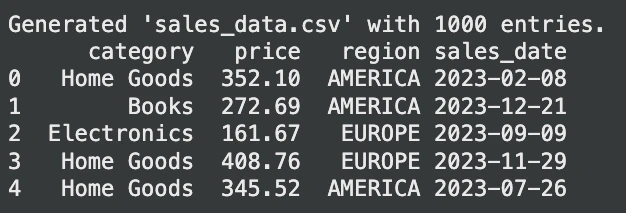
Let’s generate a random dataset for querying:
import pandas as pd
import numpy as np

# Generate random sales data
np.random.seed(42)
num_entries = 1000

data = {
    "category": np.random.choice(
        ["Electronics", "Clothing", "Home Goods", "Books"],
        num_entries
    ),
    "price": np.round(
        np.random.uniform(10, 500, num_entries),
        2
    ),
    "region": np.random.choice(
        ["EUROPE", "AMERICA", "ASIA"],
        num_entries
    ),
    "sales_date": (
        pd.to_datetime("2023-01-01")
        + pd.to_timedelta(
            np.random.randint(0, 365, num_entries),
            unit="D"
        )
    )
}

sales_df = pd.DataFrame(data)

# Save to sales_data.csv
sales_df.to_csv("sales_data.csv", index=False)

print("Generated 'sales_data.csv' with 1000 entries.")
print(sales_df.head())
Output:
Now, let’s query this table:
# Assume 'sales_data.csv' exists

# Example 1: Querying a CSV file directly
avg_prices = conn.execute(
    """
    SELECT
        category,
        AVG(price) AS avg_price
    FROM 'sales_data.csv'
    WHERE region = 'EUROPE'
    GROUP BY category;
    """
).fetchdf()  # Returns a Pandas DataFrame

print(avg_prices.head())

# Example 2: Querying a Pandas DataFrame directly
df = pd.DataFrame({
    "id": range(1000),
    "value": range(1000)
})

result = conn.execute(
    "SELECT COUNT(*) FROM df WHERE value % 2 = 0;"
).fetchone()

print(result)  # Expected output: (500,)
Output:
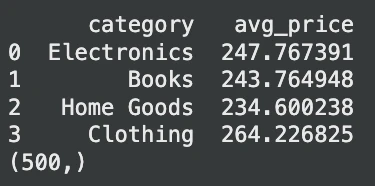
In this case, DuckDB reads the CSV file on the fly. No important step is required. It is also able to query a Pandas DataFrame. This flexibility removes much of the data loading code and simplifies AI pipelines.
Architecture: Why They Perform So Differently
The differences in the performance of SQLite and DuckDB have to do with their storage and query engines.
- Storage Model: SQLite is row based. It groups all data of one row in it. This is very good for updating a single record. Nonetheless, it is not fast with analytics. Assuming that you just require a single column, then SQLite will still have to read all the data of each row. DuckDB is column oriented. It puts all the values of one column in a single column. This is ideal for analytics. A query such as
SELECT AVG(age)only reads the age column which is much faster. - Query Execution: SQLite one query per row. This is memory efficient when it comes to small queries. DuckDB is based on a vectorized execution. It works with data on large batches. This technique uses current CPUs to do significant speedups on large scans and joins. It is also capable of executing numerous threads to execute a single query at a time.
- Memory and On-Disk Behavior: SQLite is designed to use minimal memory. It reads from disk as needed. DuckDB makes use of memory to enhance speed. It can execute data bigger than available RAM in out-of-core execution. This implies that DuckDB can consume additional RAM, but it is much faster on an analytical task. It has been demonstrated that in DuckDB, aggregation queries are 10-100 times faster than in SQLite.
The Verdict: When to Use DuckDB vs. SQLite
This is a good guideline to follow in your AI and machine learning projects.
| Aspect | Use SQLite when | Use DuckDB when |
|---|---|---|
| Primary purpose | You need a lightweight transactional database | You need fast local analytics |
| Data size | Low data volume, up to a few hundred MBs | Medium to large datasets |
| Workload type | Inserts, updates, and simple lookups | Aggregations, joins, and large table scans |
| Transaction needs | Frequent small updates with transactional integrity | Read-heavy analytical queries |
| File handling | Data stored inside the database | Query CSV or Parquet files directly |
| Performance focus | Minimal footprint and simplicity | High-speed analytical performance |
| Integration | Mobile apps, embedded systems, IoT | Accelerating Pandas-based analysis |
| Parallel execution | Not a priority | Uses multiple CPU cores |
| Typical use case | Application state and lightweight storage | Local data exploration and analytics |
Conclusion
Both SQLite and DuckDB are strong embedded databases. SQLite is a very good lightweight data storage and easy-going transaction tool. However, DuckDB can significantly accelerate the processing of data and prototyping of AI developers operating with big data. This is because when you are aware of their differences, you will know the right tool to use in different tasks. In case of contemporary data analysis and machine learning processes, DuckDB can save you a lot of time with a considerable performance benefit.
Frequently Asked Questions
Q1. Can DuckDB completely replace SQLite?
A. No, they are of other uses. DuckDB is used to access fast analytics (OLAP), whereas SQLite is used to enter into reliable transactions. Select according to your workload.
Q2. Which is better for a web application backend?
A. SQLite is typically more suited to web applications that have a large number of small, communicating reads and writes because it has a sound transactional model and WAL mode.
Q3. Is DuckDB faster than Pandas for data manipulation?
A. Yes, with most large-scale jobs, such as group-bys and joins, DuckDB can be a lot faster than Pandas due to its parallel, vectorized engine.
Harsh Mishra is an AI/ML Engineer who spends more time talking to Large Language Models than actual humans. Passionate about GenAI, NLP, and making machines smarter (so they don’t replace him just yet). When not optimizing models, he’s probably optimizing his coffee intake. 🚀☕






