Alibaba’s Qwen has been on a roll lately, launching model after model for various use cases. For instance, it recently introduced the Qwen3-Coder-Next as an AI coding assistant for developers. This time, the AI giant is in the news yet again for its latest release – the Qwen-2.0-Image. As the name suggests, this one comes as an upgrade to its Qwen Image AI model that helps bring visuals to life with the power of AI. The AI image generator has already been quite popular with users across the world, thanks to its lauded capability of generating super high-quality images accurately. Now, the Qwen-2.0-Image promises even more.
Just what all, we shall explore in this blog. We will have a look at its new features, benchmark performance, and even try it out in a hands-on test. So without any further ado, let’s dive into the all-new Qwen-2.0-Image.
Table of contents
- What is Qwen-2.0-Image?
- Qwen-2.0-Image: What’s new?
- Qwen-2.0-Image: New Features
- 1) Professional typography rendering (finally, the “infographic test”)
- 2) Extreme photorealism at native 2K (not “enhanced later”)
- 3) Improved text rendering via a unified “understand + generate” approach
- 4) Unified Omni model: generation + editing in one model
- 5) Lighter model architecture for faster inference
- Qwen-2.0-Image: Benchmark Performance
- Qwen-2.0-Image: Hands-on
- Conclusion
What is Qwen-2.0-Image?
First things first, what exactly is Qwen-2.0-Image? For those unaware, Qwen is a family of open-weight large language models (LLMs), or basically AI models, which have been developed by Alibaba Cloud. Qwen-Image-2.0 is the latest addition to this family. It enters the race as an AI image generator, meaning simply put in your prompt or describe the image you wish to create, and the AI model will create it for you in seconds.
Now, the thing to note here is that the Qwen-2.0-Image is being positioned as an AI image model built for “professional infographics” and high-detail realism. This obviously extends far beyond pretty pictures and display pictures people usually use AI to create, and is a huge jump from the capabilities of any regular AI image generator, at least in claims.
In its official release, the Qwen team highlights stronger semantic adherence and native 2K resolution, explicitly calling out finely detailed, realistic scenes, including people, nature, and architecture. It even promises a lighter, faster architecture for quicker iterations.
Qwen-2.0-Image: What’s new?
If you have ever used an AI image generator (check out the top ones here), you know that they (almost every time) tend to fall apart when it comes to infographics. More often than not, you get messy, confused visual hierarchy, and anything “designed” starts looking like it was assembled by a sleep-deprived intern with unlimited gradients.
The framing of Qwen-2.0-Image as a more nuanced AI model capable of infographics is quite a claim to make.. If it is genuinely optimised for that “structured visual” lane. And, on top of that, if it still pushes realism at 2K, Qwen-2.0-Image is definitely a model worth taking seriously. Especially for creators who need outputs that are actually usable, it may come as just the model everyone was waiting for.
So if the promises are huge, let’s check out the features that it brings to the table to match those claims.
Qwen-2.0-Image: New Features
So, beyond the hype, why should anyone really even care about the new Qwen model? The Qwen team answers this with a list of features that are enough to catch attention in the first glance. Have a look:
1) Professional typography rendering (finally, the “infographic test”)
The official blog leads with a feature most image models still struggle with: near-professional typography. Qwen-2.0-Image supports up to 1k-token instructions, specifically so you can directly generate “professional infographics.” This means a whole new level of professionalism with PPTs, posters, comics, and other such creative requirements, all in a single prompt.
This is a big deal because infographics are not “one pretty scene” problems. They’re layout + hierarchy + spacing + consistency problems. And if a model can follow long, structured instructions, it’s basically saying: stop describing one image, and start describing a designed page.
2) Extreme photorealism at native 2K (not “enhanced later”)
Next, Qwen-2.0-Image claims native 2K resolution (2048×2048) output and calls out “microscopic detail.” This means a whole new level of realism in elements like skin pores, fabric weave, and architectural textures. This also means strong performance in realistic scenes that include people, nature, architecture, and more.
The keyword here is native. Which means it is not positioned as “generate something and upscale it into respectability.” Instead, the base output itself is high fidelity.
3) Improved text rendering via a unified “understand + generate” approach
Now here’s where it gets interesting: the blog mentions integrated understanding and generation capabilities. The Qwen team explicitly frames it as a way of unifying image generation and image editing in a single mode.
In simple words, the model isn’t just trying to draw better text. It is trying to handle text as one of the most important aspects inside the image workflow.
4) Unified Omni model: generation + editing in one model
The release also describes a Unified Omni Model, i.e., generation + editing in one model. We have seen this with Nano Banana Pro, which first positioned itself as a unified AI model. Following suit, Qwen-2.0-Image now positions itself as a “full-stack multimodal understanding and generation,” all integrated in one.
This means “less tool-hopping” while using Qwen-2.0-Image. You can generate, tweak, and iterate without switching modes every time you want a modification.
5) Lighter model architecture for faster inference
This aspect is becoming increasingly important as the use of AI image generation models gains momentum. Qwen-2.0-Image is positioned as a lighter model, i.e., a smaller model size with faster inference speed.
I still don’t understand why this feature is underrated, even with other AI models. Think of it this way – if a model is built for posters/PPT-like outputs, you’ll likely use it for a lot of edits. And speed directly decides whether you keep experimenting or give up and open Canva.
Hats off to the marketing (or whichever) team of Qwen for demonstrating these features firsthand. In its announcement, the team has included images that the AI model produced, and interestingly enough, depict all its features. Check out the fidelity and the level of detail that the final output brings with it.
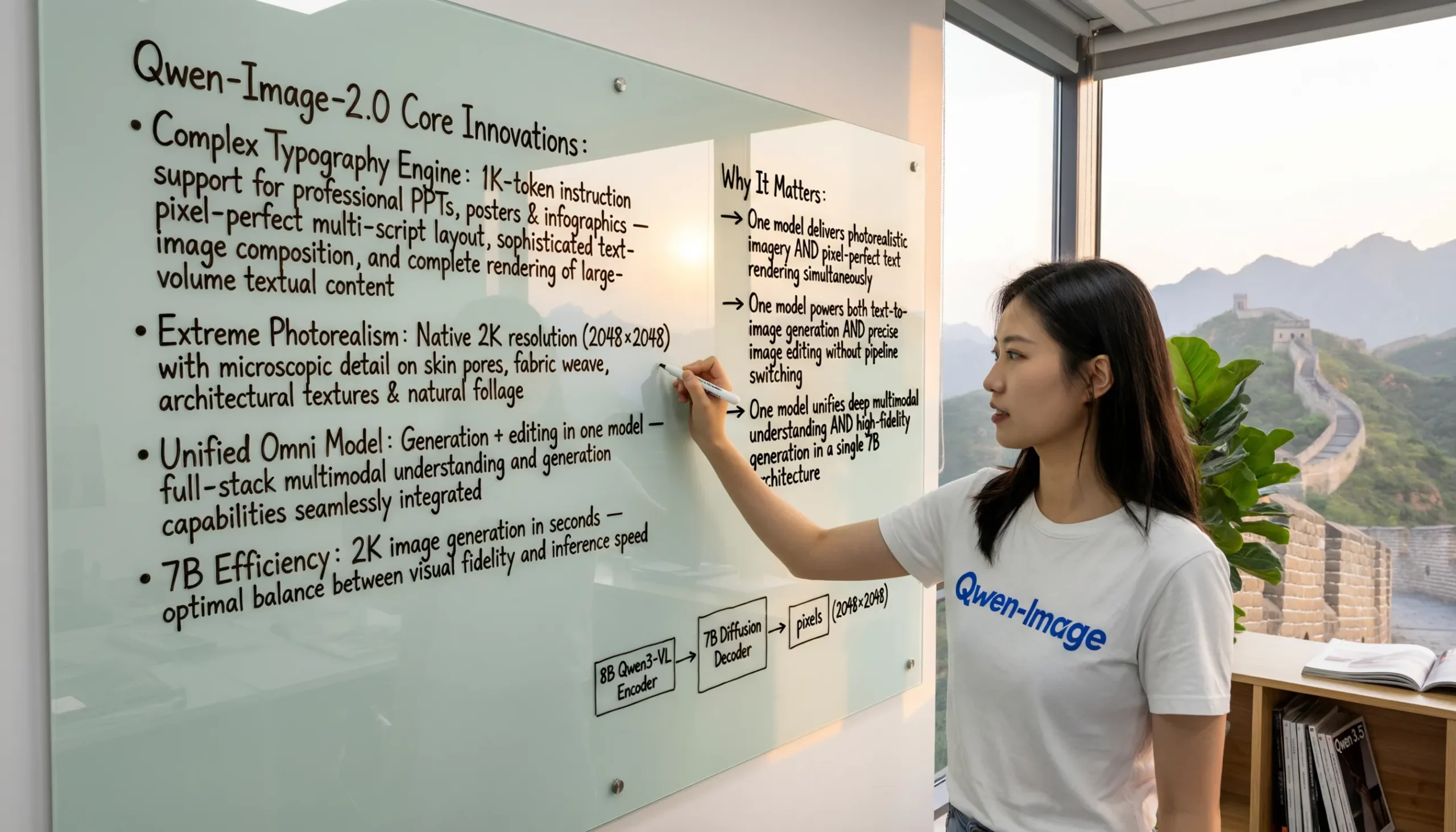
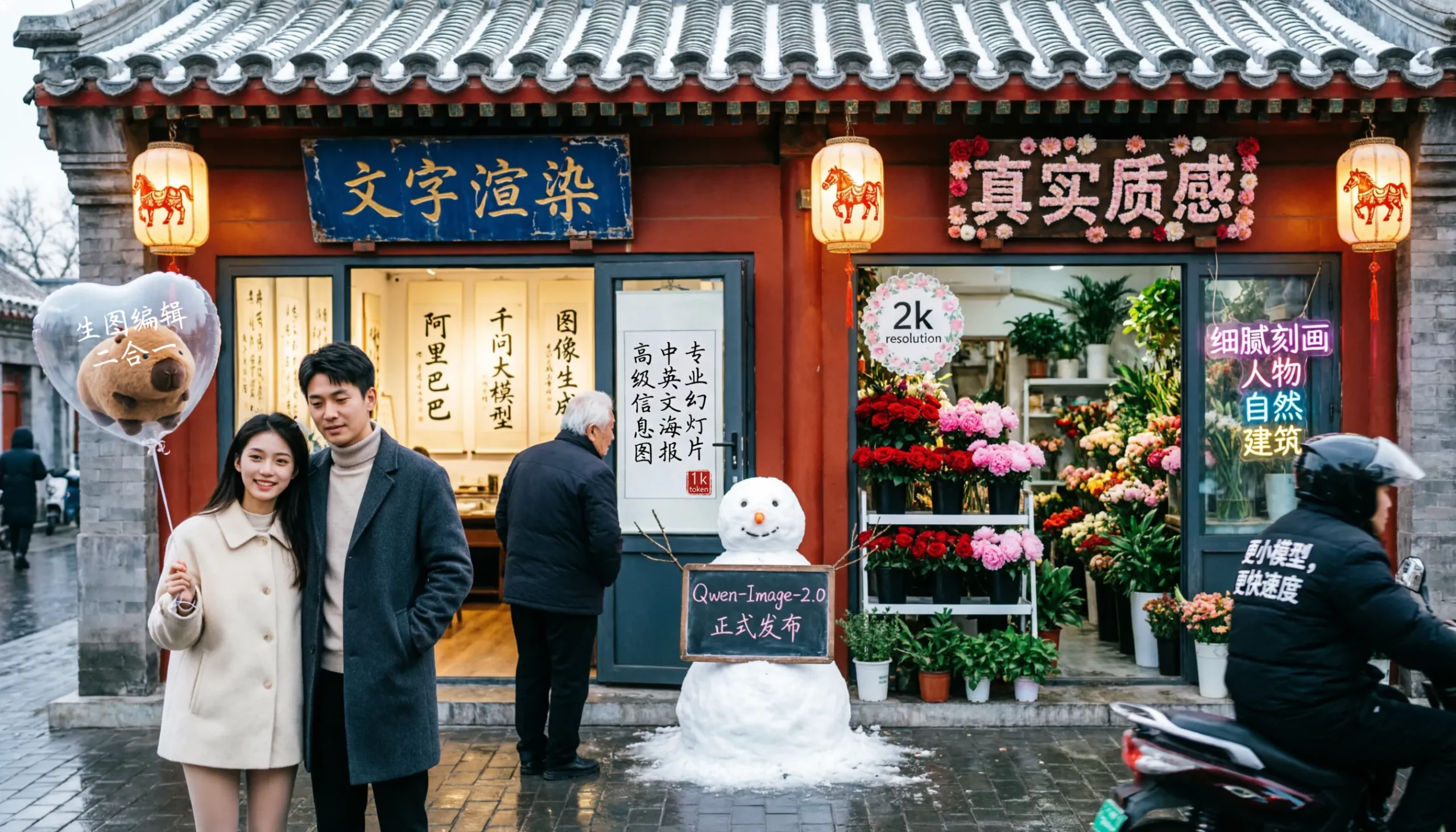
In case that is not enough of a proof, check out the benchmark performance of Qwen-2.0-Image to know of its capabilities.
Qwen-2.0-Image: Benchmark Performance
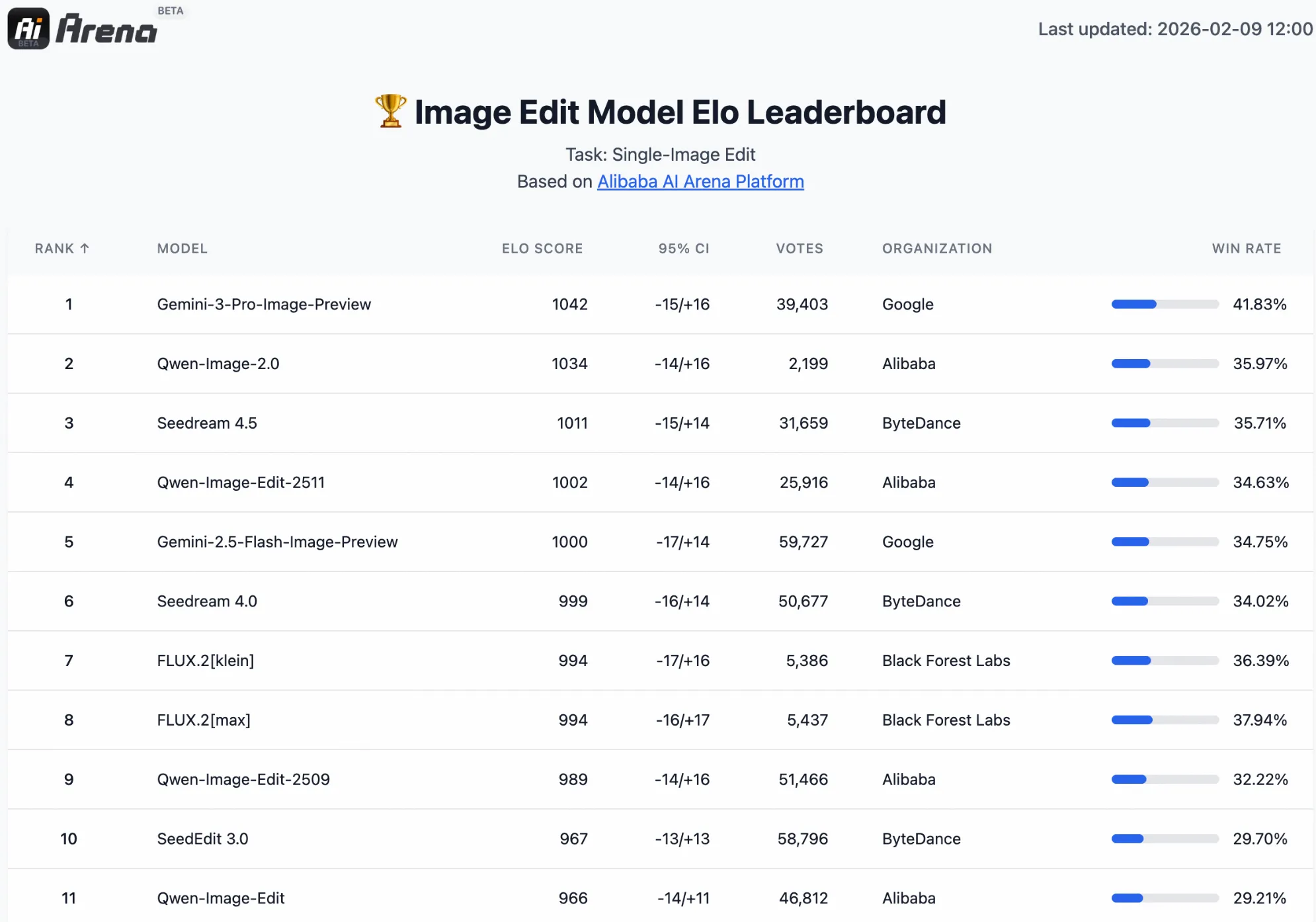
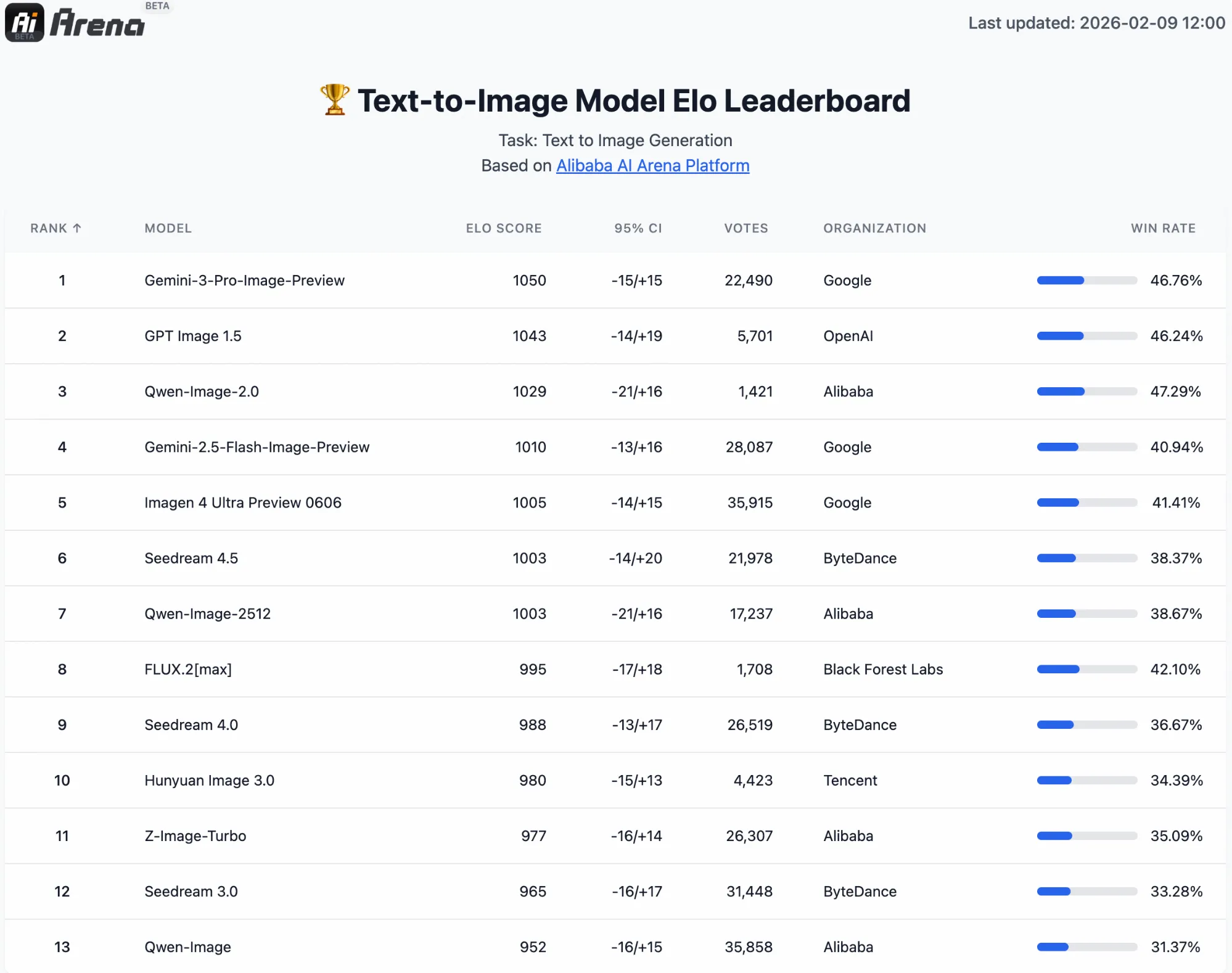
To support its claims, the Qwen team reports results from Alibaba AI Arena, of a blind human evaluation platform that ranks image models using an ELO rating system. In this setup, images are compared head-to-head, judges don’t know which model produced which output, and scores are updated based on human preference.
As shown in the official blog, Qwen-2.0-Image ranks at the top of the ELO leaderboard for text-to-image generation. Yet another leaderboard for image editing shows it competing head-to-head with some of the top AI image editors. You can check out the results in the leaderboard ranking shared by the Qwen team here.
Qwen-2.0-Image: Hands-on
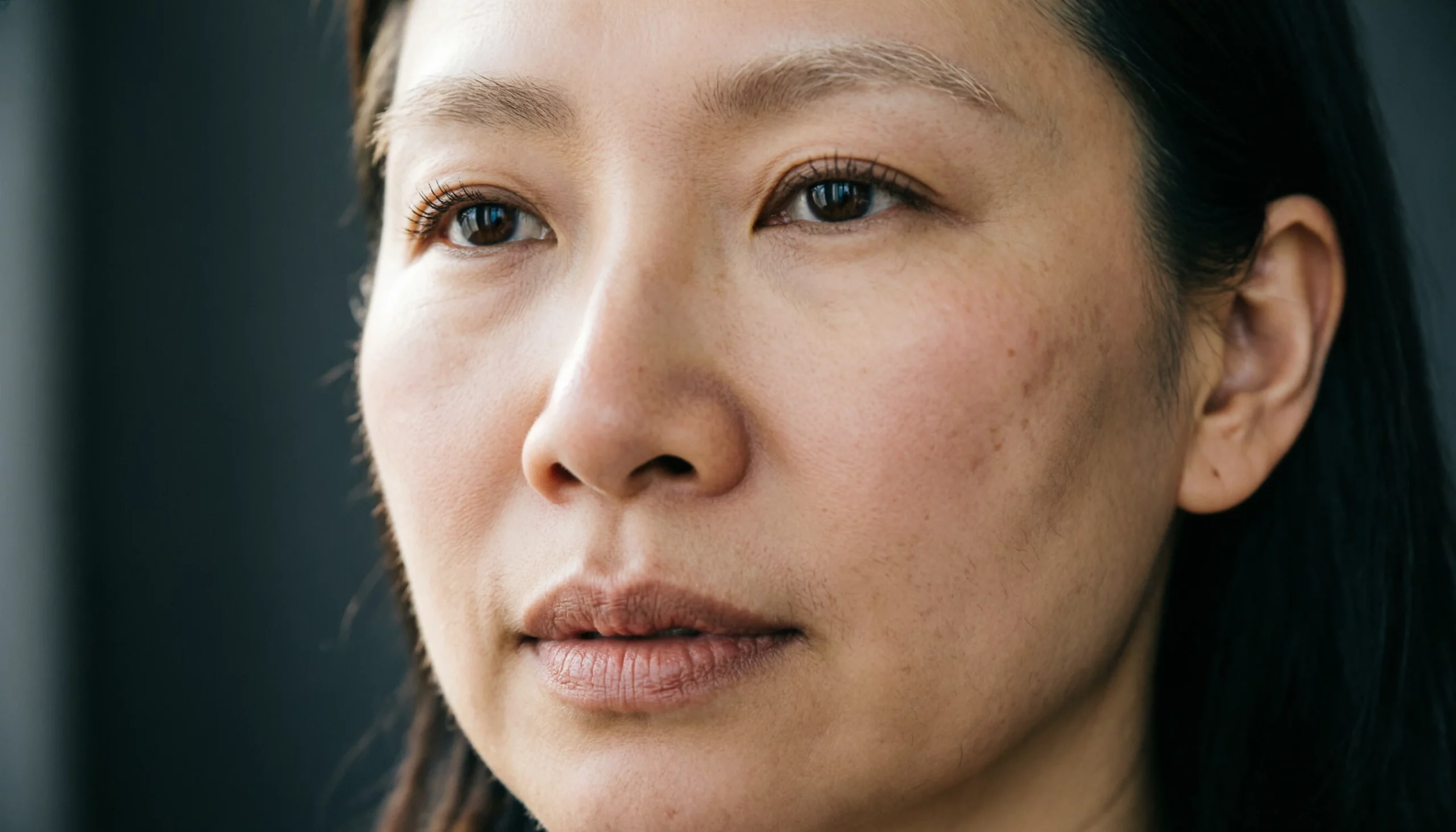
Now that we are aware of all that the Qwen-2.0-Image promises on paper, it was time to put its tall claims to the test. For that, we tried 3 different prompts. Check out these prompts and the results by the new Qwen model here –
Prompt 1:
Create a professional infographic-style poster about the ongoing Cricket World Cup in India, highlighting the top contenders for the title.
Overall Style
Clean sports infographic design
White or light background with subtle tricolour (saffron, white, green) accents
Balanced layout, clear sections, modern but not flashy
Title (Top, Centered)
Bold title: “Cricket World Cup 2023: Top Title Contenders”
Subtitle below: “Why these teams are favourites in India”
Main Layout
Divide the poster into four equal sections, one for each team:India
Australia
England
New Zealand
For Each Team Section, Include:
Team Name (bold heading)
Key Stats (bullet points, readable text):
Recent World Cup performance
Batting or bowling strength (one clear stat-style line)
Suitability to Indian conditions
Star Player Highlight:
Player name (bold)
One-line reason why this player is crucial
A stylised illustration of the star player (not photoreal, clean sports illustration)
Footer Section
Small text: “Stats and insights based on recent performances”
Simple cricket icons (bat, ball, trophy)
Text & Layout Rules
All text must be clearly readable
No overlapping text
Consistent font style across teams
Infographic should look ready for a sports website or presentation slide
Overall Goal
The final image should look like a polished cricket analytics infographic, combining visual appeal + factual clarity.
Output:
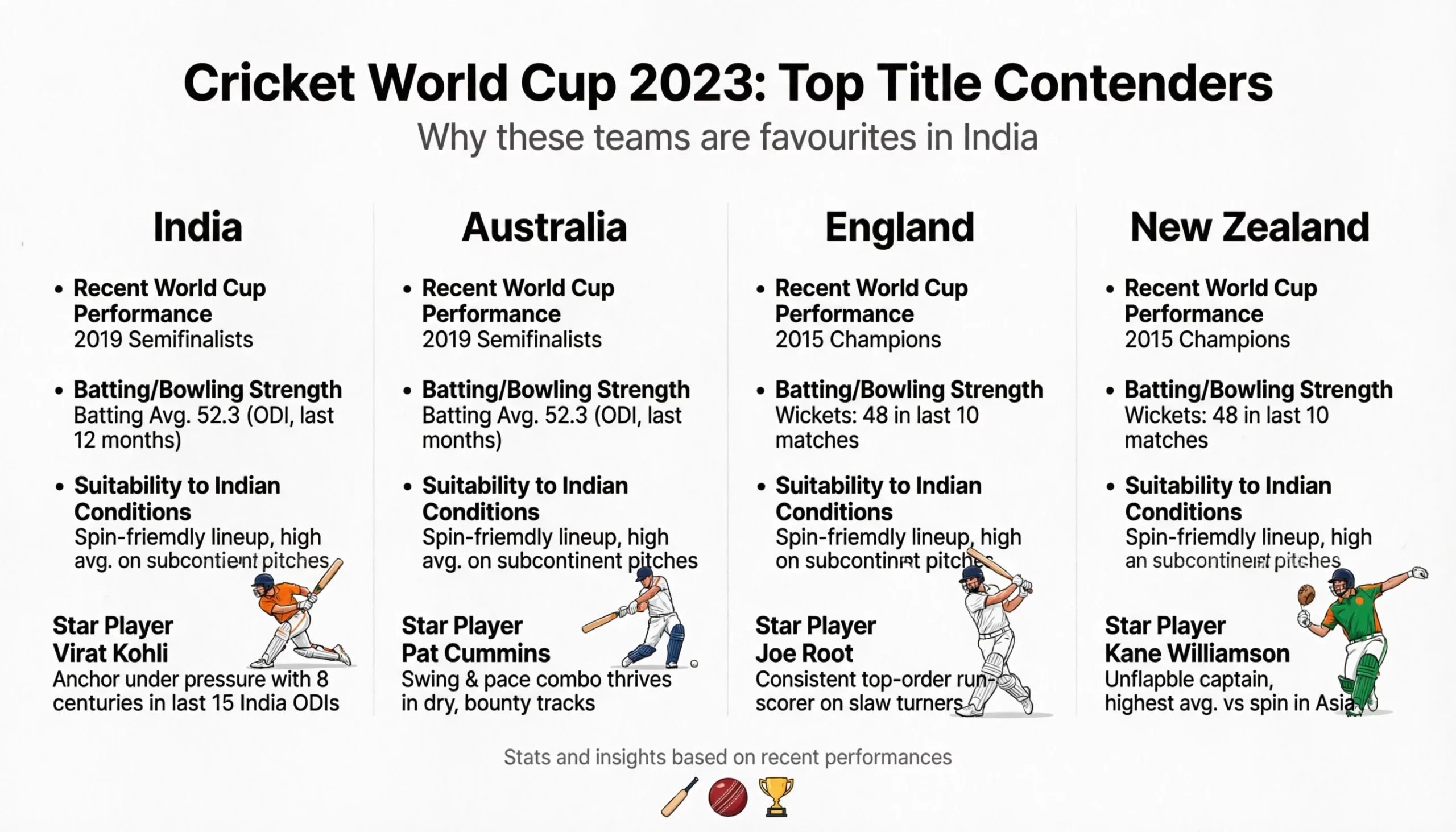
Prompt 2:
Visual Focus
Sharp focus on skin texture, pores, fine facial hair, and natural imperfections
Clearly visible eyelashes, eyebrow strands, and subtle skin translucency
Natural lip texture with fine lines, not glossy or over-smoothed
Lighting & Mood
Soft, diffused side lighting
Gentle shadows that enhance depth and realism
Neutral, cinematic colour tones (no oversaturation)
Style Rules
Photorealistic, DSLR-style macro photography
No beauty retouching, no artificial smoothing
No makeup-heavy look; natural skin finish
Background
Completely blurred (shallow depth of field)
Dark or neutral tone to isolate the subject
Overall Goal
The image should look like a professional macro photography shot, revealing realistic human skin detail at very close range.
Output:
Prompt 3:
Create a stunning natural landscape rendered as a classic oil painting.
Scene
A wide valley with snow-capped mountains in the distance
A winding river reflecting the sky
Lush green meadows with scattered wildflowers in the foreground
Tall pine trees framing the scene on both sides
Art Style
Traditional oil painting style
Visible brush strokes and textured paint layers
Soft blending in the sky, thicker impasto strokes in the foreground
Lighting & Mood
Golden-hour light with warm highlights
Dramatic clouds catching sunlight
Calm, majestic, slightly dreamy atmosphere
Colour Palette
Rich blues and soft purples in the mountains
Warm golds and greens in the valley
Natural, painterly tones (not hyper-saturated)
Overall Goal
The final image should feel like a museum-quality oil landscape painting, evoking scale, serenity, and natural beauty.
Output:

Conclusion
One look at the produced outputs, and it is safe to say that these are some of the best images I have ever seen an AI model produce. For the first prompt, Qwen-2.0-Image was able to create a simple, yet professional-looking infographic, complete with the information as asked. And even though the information written within is wrong (and the last player is playing with a tennis racket instead of a cricket bat) I won’t judge it the model on such trivial inaccuracies in an overall very well-rounded result. Of course, you can make edits to fix these in the follow-up prompts too. Here, I wished to stick to the original output for maximum transparency.
The second image is a bang-on-target output. It follows every instruction and looks so realistic that I highly doubt anyone can tell it to be an AI-generated image. Similar comments for the third image.
Overall, within this article, we have explored what’s new with Qwen-2.0-Image, what it promises on paper, and how it delivers in the real world. To sum up the entire experience, I would definitely recommend Qwen-2.0-Image as a must-try AI image generator and editor. And for anyone looking for professional, text-included, graphics, Qwen-2.0-Image is sure to be your new favourite.







